


Job-management software systems are essential tools that help tradies stay organized, productive, and profitable in 2026 and beyond.
But why do you need them?
In essence, they’re tools that bring together scheduling, quoting, invoicing, and team management in a single easy-to-use platform, eliminating paperwork and streamlining communication between the office and the field.
Since they’re so versatile, you can use job-management software tools for different purposes, such as tracking job progress, managing client relationships, processing payments, and monitoring business performance in real time.
Here are 11 of the best software systems and applications for job management:
ServiceTitan
Jobber
Tradify
ServiceM8
Housecall Pro
Connecteam
SimPRO
Workiz
Buildbite
Service Fusion
FieldAware
Each of these options brings unique features to the table, so let’s take a closer look at what makes them the best.
1. ServiceTitan


Source: ServiceTitan
ServiceTitan is one of the best job management solutions available on this list.
Its main purpose is to streamline every aspect of your operations, including scheduling, dispatching, invoicing, and reporting. For tradies, ServiceTitan acts as a complete business hub that connects the office to the field, helping teams organize jobs better, automate workflows, and eliminate paperwork.
From a single, easy-to-use platform, you can send invoices, generate quotes, monitor technician performance, and track leads. Because the platform also provides you with real-time insights into profitability, you can make smarter business decisions and scale confidently.
Best for:
Plumbing and electrical companies that need to manage multiple crews.
HVAC and home maintenance businesses looking for an all-in-one tool to manage customer communications and invoices.
Growing trade service teams that want to scale efficiently with advanced reporting.
Pros:
Users on G2 report positive things about ServiceTitan:
The software is very easy to use and navigate.
The customer support team is highly responsive, which is helpful with such a robust platform.
The insights ServiceTitan offers are very helpful in improving your operations.
Cons:
Similarly, they also reported a few negative things:
The most challenging thing is learning the platform’s quirks, especially if you’re a beginner.
There are a few bugs in the system, such as the price matrix not always applying.
Top features:
Smart scheduling and dispatching
Integrated invoicing and payments
Real-time reporting and analytics
The #1 newsletter for the trades.
Job booking and intake
This feature allows customer service reps to record customer information, job details, and work orders right from the first customer interaction.


ServiceTitan’s call-booking workflow ensures no details are missed and every request is processed and logged in the system.
Scheduling and dispatching
Once you create the job, ServiceTitan’s intelligent scheduling board makes it easy to assign the right technician with the right set of skills. With drag-and-drop functionality, dispatchers can view technician availability, skill set, and locations in real time.
These tools aim to optimize routes, reduce travel time, and help maximize productivity for every crew member. Pair that with job notifications, and you make sure both customers and crews stay informed throughout the project.
Field execution and technician mobile app
Another useful tool is ServiceTitan’s Field Mobile app, which gives technicians everything they need to perform their jobs effectively, such as pricebooks, digital forms, and the ability to capture photos and videos.

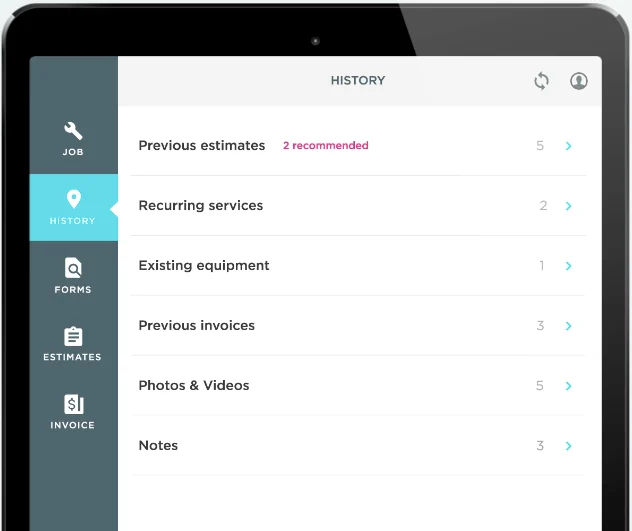
In short, your techs can update job statuses, collect signatures, and even process payments directly from their device. Plus, since the Field Mobile app supports offline mode, it ensures productivity doesn’t drop when your internet connection does.
Job costing and close-out
When a technician completes a job, ServiceTitan also helps close it efficiently and accurately.
The system automatically tracks labor, materials, and overhead costs, giving tradies full visibility into job profitability.


Technicians can review final details, complete checklists, and issue invoices instantly from the field. With integrated payment options, the close-out process is faster, seamless, and error-free, which helps to boost customer satisfaction.
2. Jobber


Source: Jobber
Jobber is a home and commercial service software solution that aims to simplify your day-to-day operations. For tradesmen juggling multiple clients and projects, Jobber helps schedule jobs, dispatch teams, and send invoices.
It integrates with popular tools like QuickBooks and Zapier, which ensures a smooth connection between your admin tasks and your field ops.
Best for:
Small to midsize businesses that need a simple way to manage daily operations.
Contractors who want professional-looking invoices.
Mobile teams who want to keep everyone connected from anywhere.
Pros:
Ability to manage jobs, quotes, and invoices from one place.
Clean, intuitive interface that’s easy for both office staff and field to learn.
Smooth invoicing and payment workflows with built-in credit card processing.
Cons:
The platform lacks more advanced capabilities, such as customizable reporting.
The app doesn’t work without a reliable internet connection.
Some users experience bugs and glitches with the mobile app that affect usability.
Top features:
Scheduling and dispatching
Quoting and invoicing
Client communication tools
3. Tradify


Source: Tradify
Tradify is a tool built for tradies who want an all-in-one solution that’s simple but powerful. The platform lets users manage every stage of the job, from first call to final payment, and features real-time scheduling, quote creation, and progress tracking.
Best for:
Independent contractors or small trade businesses that want an easy-to-learn tool.
Tradies who need fast quoting and invoicing tools to reduce paperwork.
Teams that want to track jobs and communicate effortlessly.
Pros:
Simple and intuitive interface that makes it easy for you to use.
Connects with popular accounting software, avoiding double entry.
The mobile app is great for on-the-go management.
Cons:
The pricing model might be expensive for startups or small businesses.
No offline access, which is an issue for remote areas.
New users might need time to learn the many functionalities.
Top features:
Job tracking
Quoting and invoicing
Time tracking and reporting
4. ServiceM8


Source: ServiceM8
ServiceM8 is a cloud-based job management app created to communicate with clients, manage jobs, and complete paperwork digitally faster.
Tradies can use this tool to schedule and dispatch jobs, track work progress, and invoice customers directly from the app. With automation features like reminders and follow-ups, no job will fall through the cracks.
Best for:
Solo tradies or small teams who want an easy-to-use solution.
Service businesses that want to automate client communication, reminders, and follow-ups.
Tradespeople who want fast invoicing and payment collection.
Pros:
Praised for its user-friendly interface.
It offers real-time visibility into staff location, scheduling, and job progress.
It’s a cost-effective solution.
Cons:
Basic reporting and analytics compared to other tools.
The full version of the tool is only available on iOS.
Some integrations require additional setup or third-party tools.
Top features:
Job scheduling and dispatching
On-site quoting and invoicing
Client communication tools
5. Housecall Pro


Source: Housecall Pro
Housecall Pro is a popular solution for managing basic tasks like invoicing, dispatching, and scheduling. With it, tradies can communicate with clients seamlessly, access job details, update statuses, and capture photos on the spot.
Best for:
Small to midsize service businesses seeking a mobile-first tool.
Contractors who want to automate customer communications.
Teams that require on-the-go quoting, invoicing, and payment collection.
Pros:
Very user-friendly and easy to implement.
You don’t need an IT expert to integrate it with other tools.
The scheduling and dispatch features are simple to understand and use.
Cons:
Reporting and analytics are less detailed than on other platforms.
Some features require higher-tier subscriptions and add-ons.
Limited advanced customization options for large-scale operations.
Top features:
Scheduling and dispatching
Mobile job management
Invoicing and payment processing
6. Connecteam


Source: Connecteam
For tradies, Connecteam is a valid alternative because it simplifies everyday work by helping them manage jobs, schedules, and team communications from a single platform.
Its mobile-first design ensures technicians can access job details, capture photos, and submit timesheets from anywhere. It also supports checklists, forms, and training modules while reducing paperwork.
Best for:
Small to midsize businesses that need workforce management.
Teams that want to centralize communication and task-tracking in one place.
Contractors who need a mobile-first tool for field technicians to log jobs in real time.
Pros:
Easy-to-use and intuitive interface with mobile-first design.
Scheduling and time tracking tools are especially useful for tracking employees’ work.
Excellent communication capabilities.
Cons:
No offline mode.
Occasional performance issues, such as slow loading and crashes.
Setting up and customizing might be challenging for those with limited technical familiarity.
Top features:
Job scheduling and assignment
Mobile app for field staff
Checklists and forms
7. SimPRO


Source: SimPRO
SimPRO is an AI-based platform built for tradies who want better control of their job, team, and profits. It provides tools for job scheduling, quoting, invoicing, and inventory management.
The mobile app ensures field teams can access job details, complete checklists, and submit timesheets in real time.
Best for:
Midsize to large businesses that need robust job management.
Companies that require inventory management alongside field management.
Teams looking for detailed reporting and analytics.
Pros:
Has strong capabilities for managing inventory and tracking assets.
Handles the entire job workflow from quoting to invoicing.
Has a helpful customer success team, enhancing user experience.
Cons:
Steeper learning curve due to a wide range of features.
Initial training and setup costs can be rather high for small businesses.
Customizing reports can be difficult.
Top features:
Estimating and quoting
Field mobile app
Scheduling and dispatching
8. Workiz


Source: Workiz
Workiz is a leading field-service management software program designed to help trade businesses streamline operations (from scheduling to dispatching to invoicing) from a single centralized location.
With real AI and smart automation, Workiz allows you to manage jobs, track performance, and communicate with customers from anywhere.
Best for:
Small to midsize companies looking for an easy-to-use job management solution.
Contractors seeking automated customer communication via chatbot.
Field teams that need mobile tools to manage jobs and collect payments on-site.
Pros:
Users praise Workiz’s customer service, claiming quick issue resolution.
The platform is user-friendly and easy to set up.
Includes built-in VoIP phone system that tracks customer calls.
Cons:
Setting up advanced features presents a challenge for new users.
Some users find it more expensive compared to alternatives, and some report hidden fees.
The reporting dashboard could offer more customization options.
Top features:
Invoicing and payment management
Scheduling and dispatching
Automations
9. Buildbite


Source: Buildbite
Mostly designed for trade businesses and construction teams, Buildbite is a job-management software solution that provides tools for managing and scheduling jobs. In short, it streamlines workflows and keeps projects on track.
From client inquiries to completed work, Buildbite ensures tradies can do their jobs successfully, without errors and duplicate entries.
Best for:
Small to midsize construction businesses that need simple job management tools.
Teams that want mobile access to timesheets and job details.
Contractors looking for simple reporting.
Pros:
Be aware that Buildbite doesn’t have enough online reviews yet to paint an accurate picture of its pros and cons.
User-friendly interface that is easy to learn and navigate.
Simplified quoting, invoicing, and payment tracking.
Great mobile app for communication on the go.
Cons:
May not have the deep customization and integration of other tools.
Aimed at small to midsize companies, so it’s not ideal for large projects.
Top features:
Real-time communication
Time tracking
Job documentation
10. Service Fusion


Source: Service Fusion
Service Fusion is a popular field service management solution for residential and commercial businesses. It helps tradies streamline operations and boost efficiency in the office and field by offering scheduling, dispatching, and invoicing capabilities in a single platform.
Best for:
Small to midsize trade companies seeking an affordable job management solution.
Contractors who want to automate scheduling and customer communications.
Teams that require mobile functionality for field technicians.
Pros:
People find it easy to use, especially for scheduling, dispatching, and invoicing.
Includes a robust set of features at an affordable price.
Can be good for businesses with a large number of techs.
Cons:
People complained about its poor customer service and difficult implementation process.
Limited advanced functionality, such as customer web portals or e-signing.
Lackluster inventory and data management.
Top features:
GPS tracking
Customer management
Invoicing and payments
11. FieldAware


Source: FieldAware
FieldAware is a commercial-focused tool designed to aid trade businesses with scheduling, dispatching, and work-order management. This makes it easier for teams to manage jobs, communicate with customers, and improve productivity.
Best for:
Small to midsize companies that want robust field management.
Contractors seeking automated workflows and real-time tracking.
Teams that need improved communication between office and field techs.
Pros:
Makes data capture easier for both office and field staff.
Generally considered easy to use.
Easy dispatching and tracking of field techs.
Cons:
Inconsistent customer support (slow response times and unresolved issues).
Many users experienced bugs and performance issues, causing disruptions.
Some feel that it lacks customization options.
Top features:
Customer portal
Alerts and notifications
Scheduling and dispatch
What Are the Best Job-Management Software Tools for Small Trades Businesses?
Here are three tools that are perfect for small trades businesses:
ServiceTitan: This all-in-one platform is built for trades, including HVAC, electrical, and plumbing. It offers real-time job scheduling, a field app, and invoicing, helping tradies scale their business, improve productivity, and gain visibility across all operations.
Jobber: Designed for small to midsize businesses, Jobber provides scheduling, quoting, and payment workflows in an easy-to-use tool.
Housecall Pro: This mobile-first field service platform supports one-tech operations, offering online booking, dispatching, and payment features at an affordable tier.
What Is the Best Job Management Software for Trades Franchises?
Running a trade franchise requires strong brand standards, consistency across all locations, and centralized visibility.
ServiceTitan offers branded templates, standardized workflows, and customizable dashboards that let you monitor key performance across all locations.
Additionally, Jobber has a dedicated franchise board and the ability to retrieve performance data from multiple locations. It also provides consistent customer-communication templates.
A tool that we didn’t discuss earlier but which can specifically help you monitor franchisee activity and manage recurring jobs across multiple locations is GeoOp, designed as a job management tool for trade or home service franchises.
Features to Look for in Job-Management Software Systems
The right job management software does more than just the basics. It should support every step of your business with a wide array of features, such as:
Scheduling and dispatching: Effective software allows you to not only set job dates, but also dynamically assign technicians based on availability, location, and skill. ServiceTitan is one such tool. It offers an intelligent scheduling board with capacity planning and automated job assignments, as well as dispatch software to help you avoid traffic delays and other last-minute scheduling curveballs.
Mobile app for field technicians: Your crews should be able to operate offline, view job history, update status, capture photos and videos, and collect signatures—all from their mobile devices. ServiceTitan’s mobile app delivers exactly that, enabling you to access customer data, payment tools, and pricebooks in the field.
Job costing and invoicing: If you want to maintain profitability, you need visibility into labor, materials, and profit margins per job. This is where ServiceTitan comes in handy, supporting detailed job costing, materials tracking, and seamless invoicing. Which means technicians can generate invoices and accept payments on the spot.
Customer communication and notification: Look for features like automated SMS or email reminders, ETAs, and confirmation workflows to ensure you keep customers updated at all times. This reduces frustration regarding no-shows and builds trust. ServiceTitan integrates dispatch notifications and alerts into its system, ensuring your customers stay informed about potential delays.
Reporting and analytics: You need insights, not guesswork. ServiceTitan offers real-time dashboards, customizable reports, and data analytics across jobs, technicians, and sales performance to help you make smarter decisions regarding your business.
Next, let’s discuss tips on how to choose the right job management tools.
How to Choose the Best Job Management Software for Tradesmen
You want a tool that does more than just scheduling and dispatching. You want a tool that fits your team, your workflow, and your growth ambitions.
Here are the key factors to guide you:
Ease of use and onboarding: The idea is for the tool to be adopted quickly by your technicians and office staff. ServiceTitan, for example, is packed with features, but also emphasizes usability, providing intuitive interfaces that everyone can easily understand.
Integration with existing tools: Look for tools that connect with your existing systems, such as accounting, CRM, or others. ServiceTitan supports integrations with QuickBooks and other major tools, which makes data flow smoother.
Scalability for business growth: Maybe you don’t need a complex tool now. But you might sometime in the future as your business grows and changes (e.g., more crews, multiple locations). So choose a system that scales with your company without additional costs and complications.
Customer support and training: Even the best software is only as good as its support, so ensure the vendor offers training, onboarding assistance, and responsive help when you encounter problems.
Pricing and value for money: Don’t just check for upfront subscription prices and call it a day. Look for fees for extra users, add-ons, and support, and ensure the features you get outweigh what you’ll pay.
Mobile accessibility and offline capability: Technicians work in the field, so they need a solution that offers a strong mobile app and offline usage. ServiceTitan has mobile features that allow field crews to continue working even without full cell service.
Over to You
You’re now armed with all the knowledge you need to make an informed decision regarding your job management software. The right system not only saves time but also helps you deliver a more professional and reliable experience to your customers.
ServiceTitan is a field service management platform built to help tradies and home service businesses streamline operations, grow revenue, and improve customer satisfaction from a single place. With it, you can manage every aspect of your business, from scheduling and invoicing to reporting.


ServiceTitan Software
ServiceTitan is a comprehensive software solution built specifically to help service companies streamline their operations, boost revenue, and substantially elevate the trajectory of their business. Our comprehensive, cloud-based platform is used by thousands of electrical, HVAC, plumbing, garage door, and chimney sweep shops across the country—and has increased their revenue by an average of 25% in just their first year with us.


