Successware is a field service management software tool built for contractors who want to manage scheduling, billing, customer records, and daily operations in one place.
Successware reviews are useful for understanding how the platform performs in real-world use, especially for office managers and technicians who depend on it every day.
They’re also valuable for contractors who want to compare Successware with alternatives like ServiceTitan.
In this detailed review of Successware, we’ve gathered information and feedback from real users and laid out its benefits and limitations so you can decide if Successware fits your business needs.
Disclaimer: The information in this review is as accurate as of July 2026 and is subject to change as Successware updates its platform.
Successware Review Overview
As of July 2026, Successware enjoys the following ratings on major software review sites:
Software Advice: 4.1/5
G2: 4.0/5
Capterra: 4.1/5
As of July 2026, Successware’s pricing isn’t publicly listed. According to the reviewers, pricing is only available upon request and varies based on business size and required modules.
The #1 newsletter for the trades.
Successware’s key features, as stated on its site, are:
Call booking & CRM
Scheduling & dispatching
Integrated accounting
Invoicing & payments
Inventory management
Reporting & analytics
Field tools & mobile app
Key pros and cons of Successware:
As of January 2026, G2 reviewers noted the following pros:
Frequent real-time updates make dispatching more efficient.
CRM, invoicing, and activity-tracking tools improve visibility across the business.
An all-in-one system replaces separate tools for payroll, scheduling, accounting, reporting, quoting, inventory, and job costing.
Mobile access keeps field technicians connected to the office.
As of January 2026, G2 reviewers and Capterra reviewers noted the following cons:
An outdated interface, particularly in Successware Classic.
No direct Excel pricebook import, requiring manual data entry.
Accounting limitations for teams with cash-basis or adjustment-heavy workflows.
Restricted concurrent access slows teams down during busy periods.
Successware is best for:
Established HVAC, plumbing, electrical, and other home service companies.
Owners and office managers of home service businesses who want detailed control over accounting, job costing, and reporting in one platform.
Now, let’s go through a detailed breakdown of Successware across these areas.
Successware Pricing
As of July 2026, Successware does not publicly list fixed pricing tiers on its website. Instead, the platform uses a quote-based pricing model customized to each business.
Generally, its pricing depends on factors such as business size, the number of office and field users, and the specific modules the contractor needs.
As such, companies with larger office teams or more complex workflows may receive different pricing from smaller contractors who only need basic management modules.
Successware Features
Successware offers features designed to help contractors manage their office operations, fieldwork, finances, and customer relationships.
Below is a breakdown of these features, starting with Payments.
Payments
Successware’s payment tools help contractors capture revenue quickly, reduce manual billing steps, and give customers a smoother checkout experience.
They allow office staff and technicians to accept payments on site or create unique links customers can use to pay.
This feature is especially useful for:
Office managers processing invoices
Technicians collecting payments in the field
Businesses wanting to shorten their billing cycle
Key sub-features:
Point-of-sale processing: Techs and office staff can securely accept credit and debit card payments.
Recurring payments: Supports automatic billing for memberships or ongoing service plans.
Integrated checkout: Links payments directly to the corresponding job, invoice, and customer record, reducing errors.
Payment tracking: Provides visibility into pending, completed, or delayed payments inside the system.
Scheduling & Dispatching
Successware’s scheduling and dispatching features can help your office staff assign jobs efficiently, monitor technician availability, and manage the day’s workload from a single dashboard.
The platform’s dashboard also provides dispatchers with real-time visibility into each technician’s status, so they can make informed decisions when new calls come in or when schedules shift.
This feature is especially useful for:
Dispatchers coordinating multiple technicians.
Office managers handling a significantly high call volume and abrupt schedule changes.
Businesses that rely on structured, repeatable workflows.
Key sub-features:
Dispatch board overview: Displays jobs, technician assignments, and open time slots so staff can quickly see what needs attention.
Capacity planning: Helps your dispatchers allocate work based on technicians’ workloads, skills, and availability.
Job booking tools: Allows office staff to schedule jobs directly from the call-taking screen without switching windows.
Status tracking: Shows in-progress, completed, or delayed jobs in real time, enabling the office to respond quickly.
Call Booking & CRM
Successware’s call booking and CRM features are designed to help your office staff capture accurate customer information, create new jobs quickly, and maintain a complete service history for every account.
This feature set is useful for:
CSRs and office managers who handle incoming calls
Dispatchers who depend on accurate job details
Companies with repeat customers or multiple service locations
Key sub-features:
Integrated call-taking screen: Allows staff to book jobs, view customer history, and confirm service locations during the initial phone call.
Customer history and records: Stores service history, notes, estimates, invoices, and equipment details in a single customer profile.
Location management: Tracks multiple addresses for the same customer, which is helpful for property managers or multi-site clients.
Job creation tools: Enable CSRs to build a work order directly from the call without re-entering information.
Sales & Marketing
Successware’s sales and marketing features help you generate leads, follow up on opportunities, and stay connected with customers throughout the duration of the service.
This feature set is especially useful for:
Sales teams managing estimates and proposals.
Office managers responsible for seasonal outreach or service reminders.
Businesses wanting a more consistent follow-up process.
Key sub-features:
Lead & opportunity tracking: Centralizes incoming leads and open sales opportunities so your team can monitor progress and prevent missed follow-ups.
Proposal management: Helps your staff create, send, and track proposals, giving visibility into what’s been viewed, accepted, or ignored.
Marketing campaign tools: Allow you to run outreach campaigns for maintenance reminders, promotions, or seasonal service pushes.
Customer communication tools: Support customized messaging to customers based on service history, membership status, or equipment details.
Integrated Accounting
Instead of relying on a separate accounting system, you can manage receivables, payables, payroll, and general ledger activity directly inside Successware.
This feature set is especially useful for:
Owners who want real-time visibility into margins and cash flow
Office managers responsible for billing, payroll, and financial reporting
Companies looking to reduce manual entry across multiple systems
Key sub-features:
General ledger and chart of accounts: Built-in accounting tools that allow you to track income, expenses, and financial activity without a third-party platform.
Accounts receivable and payable: Manages incoming payments, outstanding invoices, vendor bills, and payment schedules in one place.
Payroll management: Supports payroll processing tied directly to job hours and labor entries entered in the field or at the office.
Job costing: Links labor, materials, and overhead to each job so your managers can review profitability and track variances.
Financial reporting: Generates statements and performance reports that reflect real-time operational and financial data.
Back-Office Management
Successware’s back-office management features help you handle administrative tasks such as purchasing, inventory control, document management, and workflow oversight.
This feature set is useful for:
Office managers who handle purchasing, inventory, or vendor coordination.
Businesses with multiple crews that rely on accurate material tracking.
Companies looking to standardize internal workflows and documentation.
Key sub-features:
Purchase order management: Allows your staff to create, submit, and track POs directly in Successware, ensuring materials are ordered on time for upcoming jobs.
Inventory and warehouse tools: Helps you monitor parts across trucks and storage locations, reducing shortages and duplicate ordering.
Document storage and file management: Stores forms, service documents, and internal files in one place so your teams can access what they need without searching across systems.
Workflow tracking: Supports visibility into job progress, outstanding tasks, and work that still needs approval or documentation.
Successware Integrations
Successware can be integrated with several third-party tools to help contractors streamline payments, financing, communication, and other key workflows.
Integrations are great for you if you rely on multiple systems, such as payment processors or financing providers, and want everything connected to your core management software.
Key Successware integrations include:
Salesforce
ServiceBench
EGIA Finance
Synchrony
GreenSky
If you are interested in whether your existing tools integrate with Successware, you can explore the official Successware Integrations page, which keeps the complete list of available partners up to date.
Successware Mobile App
Successware has a mobile app to help you keep your office and field teams connected, ensuring everyone sees the exact job details, updates, and customer information in real time.
You can download the Successware Mobile App from the Google Play Store and the Apple App Store, making it accessible on both Android and iOS devices.
Some major features of the app include:
Job details: Technicians can view customer history, job notes, required materials, and equipment details before they arrive.
Real-time updates: Any changes made in the office, such as schedule adjustments or added notes, sync directly to the mobile app.
Photo and document capture: Techs can take photos and upload documents to the job record as proof of work or for future reference.
Work order completion: Allows techs to record labor time, materials used, and job status directly in the field.
Integrated payments: Supports taking customer payments on site for faster billing.
Customer communication tools: Gives technicians the ability to tell customers when they’re on the way or when work is complete.
Successware Support
Successware provides several support options to help you troubleshoot issues, learn the platform, and stay updated on new features. Its support ecosystem includes:
A help center: This is the main hub for technical documentation and step-by-step guides.
Video product walkthroughs: A video-based resource library that contains product walkthroughs, tips, and release highlights.
Guided learning: Recorded lessons and training modules help your new employees get up to speed and give existing users a way to understand specific workflows.
Direct access to support desk: You can contact Successware support by phone or email.
Next, we’ll look at Successware’s security practices and how the platform handles data protection for contractors and their customers.
Successware Security
Successware includes several security and data-protection measures designed to safeguard customer information, financial data, and business records. Those measures include:
No sale of user data: Successware may share information with service providers but says it does not sell user data.
Access and deletion rights: Users may request access to, correction of, or deletion of their personal information.
Cookie controls: Users can manage cookies used for analytics, functionality, and performance through their browsers.
Data protection safeguards: Administrative, physical, and technical controls protect data across the platform and mobile app.
Successware Pros and Cons
The pros and cons below are taken directly from real users on G2 who have used Successware in their day-to-day operations. Their comments reflect their experience with the platform and highlight themes that come up repeatedly in recent reviews.
These summaries are based on G2 feedback as of July 2026.
Successware pros
Here are some pros of Successware, submitted by G2 users as of July 2026:
Efficient dispatching with frequent real-time updates: Users note that the system stays updated throughout the day, helping dispatchers assign jobs efficiently without missing changes.
Helpful CRM, invoicing, and activity-tracking tools: Contractors report that customer history, invoicing, and job-tracking tools give them better visibility across the business.
Highly integrated all-in-one system: Many reviewers emphasize that Successware replaces multiple tools, supporting payroll, scheduling, accounting, reporting, quoting, phone logs, inventory, and job costing, with a single system.
Mobile connectivity for technicians: Users appreciate that Successware Mobile helps field teams stay connected to the office, even when on the move.
Successware cons
Below are some cons of Successware, as reported on G2:
Older, outdated interface (especially in Classic): Users describe the Successware Classic UI as ‘really bad’ or outdated, comparing it to legacy software from the Windows 95/98 era. While updates have improved the UI, some believe the improvements were long overdue.
No direct Excel pricebook import: Users can't merge an existing Excel pricebook directly into Successware, making it harder to bring over pricing data without manual re-entry.
Accounting limitations for certain workflows: A few reviewers mention frustrations with accrual-only accounting and difficulty correcting entries or adjusting for cash-basis tax requirements.
Limited concurrent access: Reviewers complain that only three users can be logged in at once, and only one person can access a given account at a time. This restriction slows teams down during busy periods.
Successware Alternative
Users look for Successware alternatives to get a more modern interface, expanded communication tools, stronger mobile functionality, or deeper reporting across their field service operations.
Some contractors also explore alternatives when they want a platform that scales more easily with larger teams or simplifies training for new office staff and technicians.
If you’re looking for a platform that addresses these gaps, ServiceTitan is one option to consider.
It’s built to support HVAC, plumbing, electrical, and other trades that need scheduling, dispatching, estimating, invoicing, payroll, and reporting in one connected system.
ServiceTitan offers features that help these contractors simplify operations, improve customer communication, and give both office and field teams clearer visibility into the jobs happening each day.
It also connects with a large ecosystem of integrations and APIs, helping you unify your tools without relying on manual workarounds.
You can read a direct comparison between ServiceTitan and Successware here.
In the meantime, here are some of the most notable features that contractors who switch from Successware enjoy when using ServiceTitan.
Modern communication tools that streamline customer updates
In many field service platforms, teams struggle with communication because there’s no built-in texting. This often leads to missed confirmations, confusion about appointment windows, and more time spent on phone calls.
ServiceTitan closes this gap with fully integrated communication tools designed to keep customers informed automatically.
The system sends professional text reminders, appointment confirmations, dispatch notifications, and ‘tech on the way’ updates without any manual steps. At the same time, customers can submit complaints, reschedule appointments, confirm arrival times, and ask questions via SMS or text.

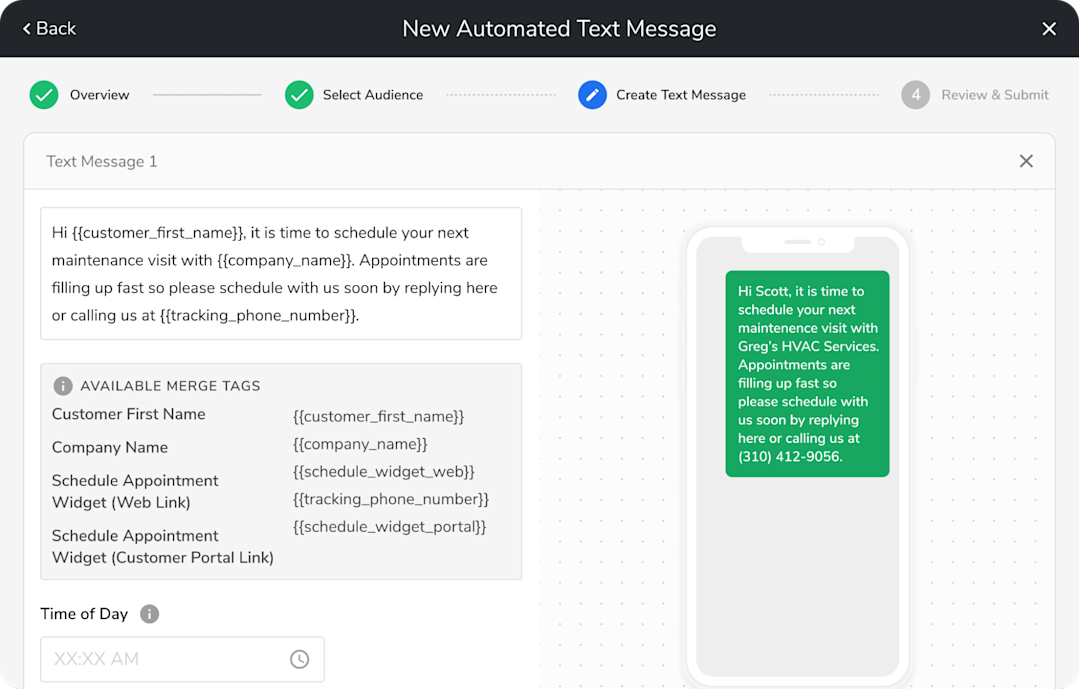
Instead of using separate messaging tools or emailing customers hours later, your team gets a single platform that handles communication from the first call to job completion.
There’s a consolidated record of all your interactions with customers, which makes it easier to keep track of requests. Everyone on your team has the context they need to deliver a consistent, professional customer experience.
Precision estimating tools that help teams close more jobs
In systems like Successware, estimates rely on manual data entry, basic templates, or limited pricebook connections. This slows down the sales process and makes it harder to present compelling options to homeowners.
ServiceTitan’s precision estimating tools change that. Techs can build visual, professional, good-better-best estimates right from the field, complete with photos, videos, and financing options.

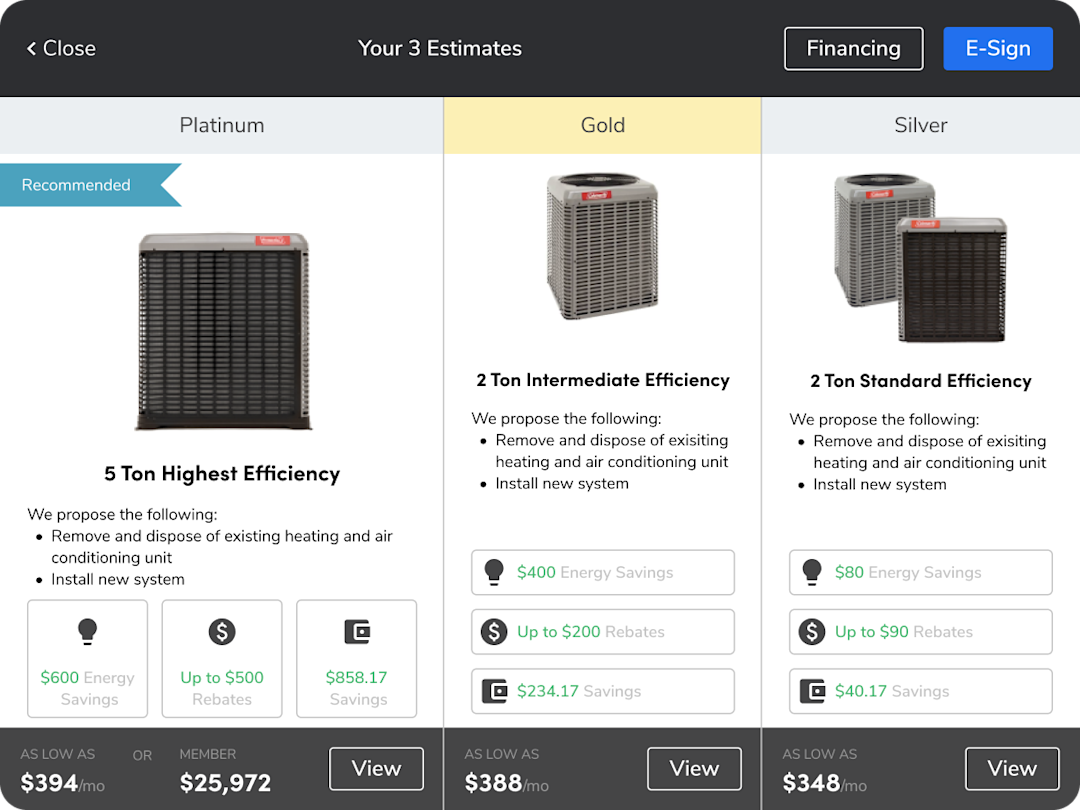
Every proposal automatically pulls from your pricebook and inventory, ensuring consistent pricing and reducing errors. This helps technicians close sales and generate more revenue from each service visit.
Real-time reporting and dashboards for full business visibility
Without access to real-time metrics, it’s harder to track technician performance, revenue trends, or profitability. ServiceTitan solves this with real-time dashboards that show:
Job costing
Technician efficiency
Close rates and revenue
Membership performance
Marketing attribution
Payroll and timesheets
Forecasting and business trends

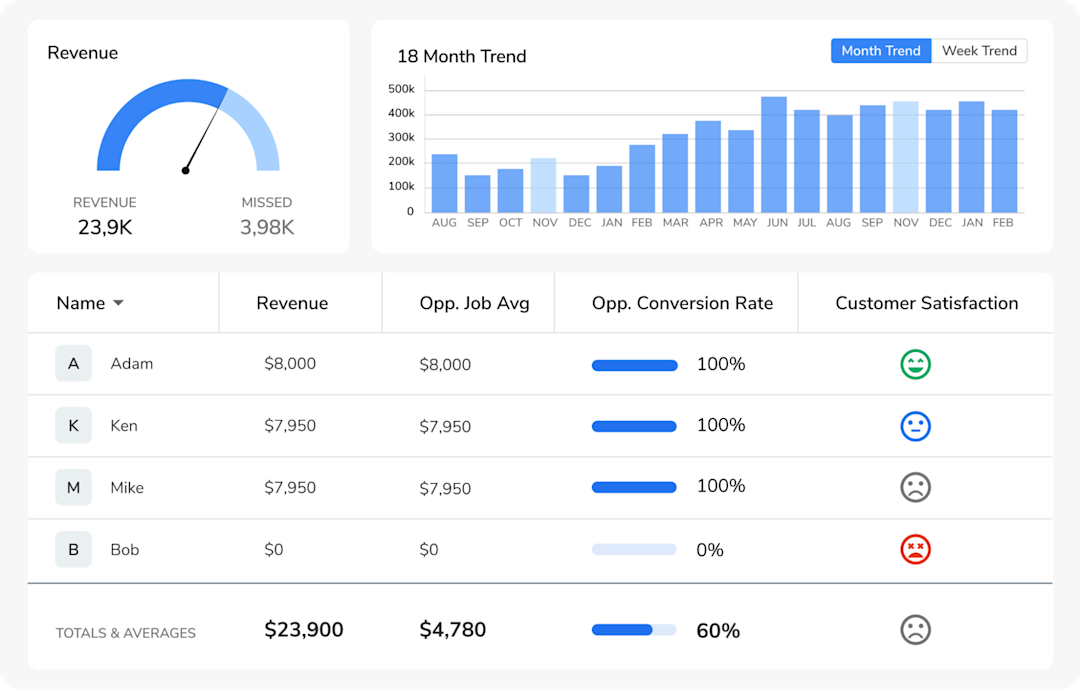
This provides managers with data to coach technicians, identify potential delays early, and uncover new opportunities for growth.
A platform that grows with your business
As teams add more technicians, open more locations, or expand into commercial or construction work, tool limitations begin to surface, especially around multi-tech jobs, multi-division management, and reporting.
ServiceTitan’s infrastructure is built to support companies at every stage of growth.
Here’s how it supports scaling:
Multi-location management for businesses with several shops.
Roll-up reporting across departments and divisions.
Support for large teams and multi-tech jobs.
Commercial, residential, and construction workflows in the same system.
Open APIs and 50+ prebuilt integrations for accounting, marketing, inventory, and more.
This flexibility ensures that as your business expands, you don’t need to switch platforms or use multiple systems.
End-to-end inventory management with automated restocking
Some platforms lack integrated inventory tools, forcing teams to use spreadsheets or separate apps to manage parts and materials. This creates problems like missing items, inaccurate stock counts, and delays on the job.
ServiceTitan includes full inventory management as part of the platform, so you can:
Track materials across warehouses and trucks
Monitor consumption from each work order
Scan barcodes for accuracy
Create replenishment templates
Automate restocking when items fall below minimums
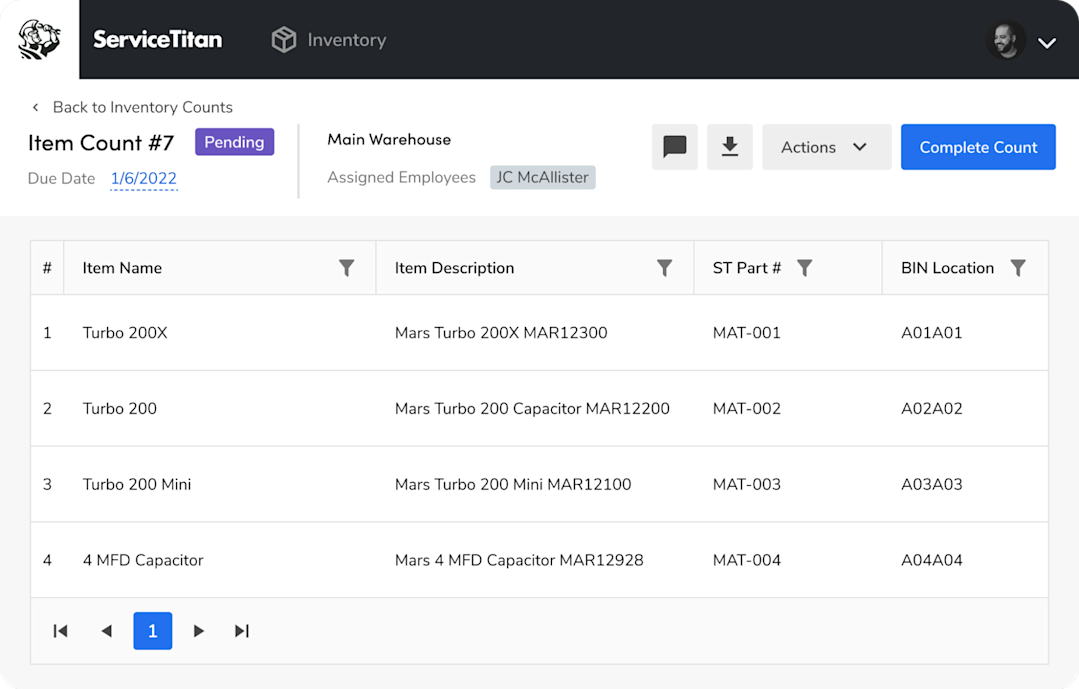
Whether you manage one warehouse or a fleet of stocked trucks, ServiceTitan keeps quantities accurate and helps techs arrive prepared for every job.
Bulk pricebook management that saves setup time
In many field service platforms, updating a pricebook means manually re-entering every service, material, and equipment item one at a time. This makes bulk changes slow and painful, especially for contractors switching over from spreadsheet-based pricing.
ServiceTitan closes this gap with a Pricebook Excel template. You can export your existing pricebook as an Excel file, then add or edit categories, services, materials, and equipment across dedicated tabs. Prices, costs, markups, and vendor details can be updated in bulk rather than one item at a time. The same goes for images, warranty details, and commission rules.

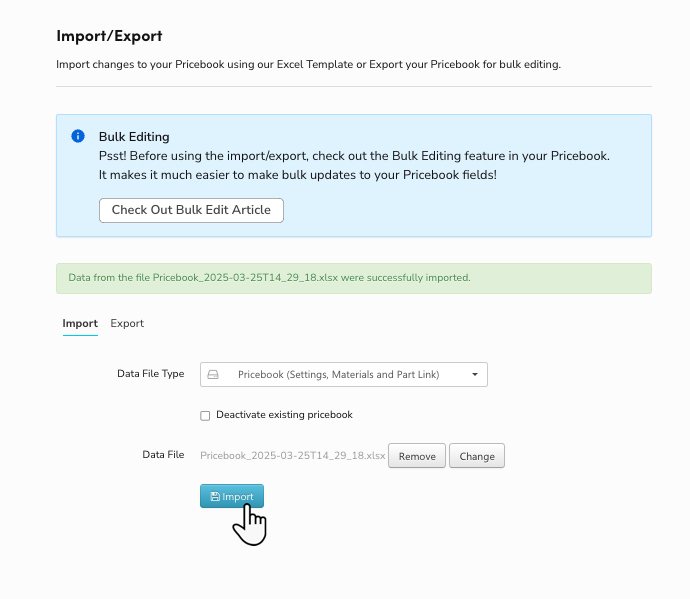
That way, there's one clean source for your pricing data, which makes it easier to catch errors, keep pricing consistent, and roll out numerous changes across your entire pricebook at once.
To make updates even simpler, ServiceTitan’s pricebook integrates with the catalogs of top suppliers such as Daikin, American Standard, Carrier, and Air Quest. Whenever they update the price of a material, it automatically changes simultaneously in your pricebook.

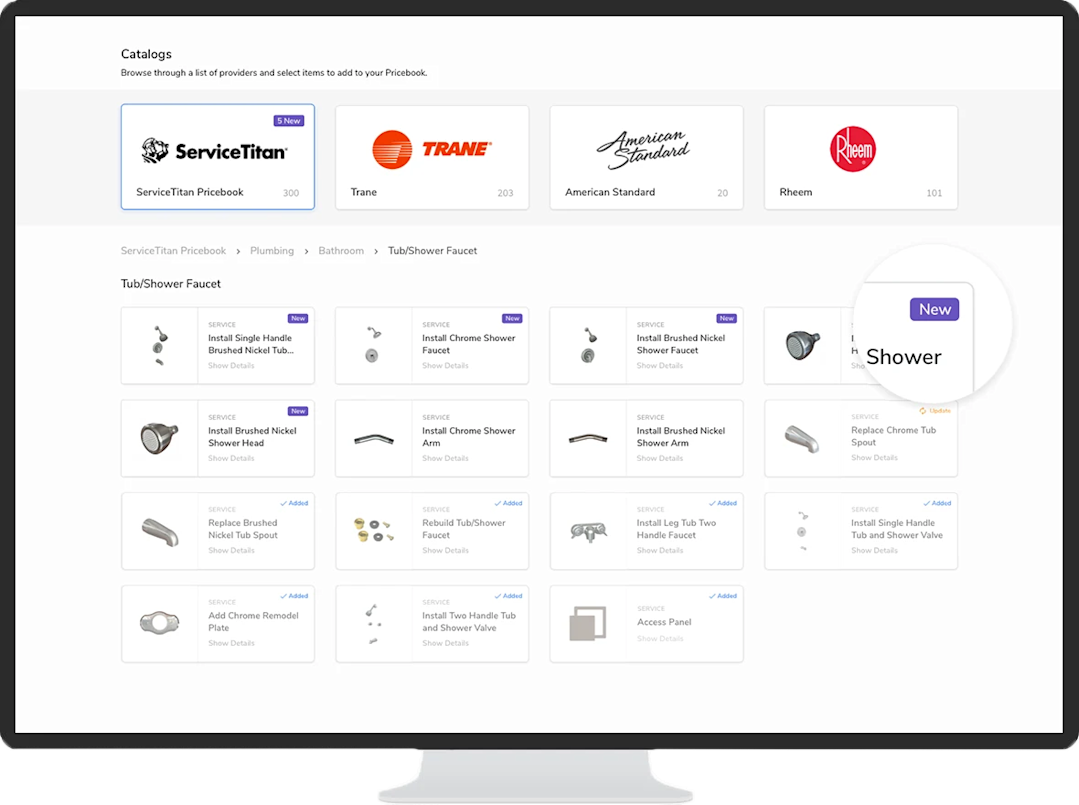
This ensures your pricebook is always up to date and that everyone on your team charges profitable rates.
To get a feel for how ServiceTitan works, you can book a demo now.
ServiceTitan is a comprehensive solution that helps trade businesses streamline dispatching, track technician performance, automate follow-ups, and uncover new opportunities.
The solution is trusted by thousands of trade professionals across the country. ServiceTitan is built to improve efficiency, eliminate guesswork, and ensure every service call runs smoothly.


Frequently Asked Questions (FAQs)
Below are some of the most common questions contractors ask when considering Successware.
Who uses Successware?
Successware is used by home service businesses that need an all-in-one system for scheduling, dispatching, accounting, job costing, and customer management.
Is Successware a CRM platform?
Successware includes CRM capabilities, but it is not a dedicated standalone CRM tool. Instead, CRM functions are built into the broader platform and support call booking, customer history, service records, communication logs, and job tracking.
It’s designed to help office staff manage customer interactions as part of their daily workflows rather than act as a standalone sales CRM.
What trades and industries does Successware help?
Successware primarily supports residential and commercial service businesses in HVAC, plumbing, electrical, and other mechanical trades. It is also used by contractors who need features such as dispatching, job costing, accounting, and back-office management to run their operations.
Can you use Successware for free?
No. Successware does not offer a free version of its software. Pricing is only available through direct contact with the Successware sales team, and plans vary depending on company size, number of users, and feature needs.
Does Successware have an API?
Yes, Successware offers API access and supports integrations with several third-party tools. These integrations help contractors connect Successware to payment providers, financing partners, CRM tools, and other operational systems to keep data synchronized across their tech stack.
ServiceTitan Software
ServiceTitan is a comprehensive software solution built specifically to help service companies streamline their operations, boost revenue, and substantially elevate the trajectory of their business. Our comprehensive, cloud-based platform is used by thousands of electrical, HVAC, plumbing, garage door, and chimney sweep shops across the country—and has increased their revenue by an average of 25% in just their first year with us.