Smart Service is a field service software platform built with one purpose: to turn chaotic scheduling, dispatching, and work management into an efficient process.
Smart Service reviews are useful to people who want a clearer picture of how the software performs in real-world scenarios, not just on paper.
They are also helpful for those evaluating Smart Service alongside alternatives like ServiceTitan.
In this detailed review, we’ve broken down the core features of the tool, pulled valuable insights from real user feedback, and highlighted what Smart Service does exceptionally well—and where it might leave users wanting.
So, let’s cut through the noise and help you figure out if Smart Service is the right fit for your business.
Disclaimer: The information in this review is as accurate as of July 2026 and subject to change as Smart Service updates its platform.
Smart Service Review Overview
Smart Service has the following ratings on different review sites (as of July 2026):
Smart Service doesn’t list public pricing; rather, it offers tailored estimates instead of one-size-fits-all plans.
The key Smart Service features are:
Scheduling and dispatching
Marketing
Quoting and invoicing
Work order management
Customer portal
Business management
The key pros and cons of Smart Service, based on user reviews from G2, are the following:
The #1 newsletter for the trades.
Pros:
As of July 2026, G2 reviewers noted the following pros:
Smart Service integrates well with QuickBooks, making scheduling simple.
The customer service is always helpful and has gone above and beyond to solve people’s issues.
The platform is always updating and adding new features.
Cons:
As of July 2026, G2 users noted the following cons:
The platform is buggy and crashes frequently.
The interface doesn’t feel very intuitive for some users.
Smart Service is best for:
Field service businesses that want straightforward scheduling, dispatching, and work order management without the complexity of a heavy enterprise platform.
It’s a strong fit for individual users (e.g., small maintenance contractors, independent HVAC techs) and for teams that need real-time communication through a mobile app and consistent job documentation.
Smart Service Pricing
As of July 2026, Smart Service positions its pricing around a mix of individual licenses and team-oriented packages, depending on your needs.
It offers two service types:
Cloud: Standard and enterprise subscriptions
Desktop: Standard and purchase option
Smart Service doesn’t publish detailed pricing tables, but customers can request a quote. Contact the team for an accurate estimate, depending on your crew size, business needs, and system architecture.
Smart Service Features
Smart Service offers features that maximize efficiency, productivity, and profits, such as marketing, estimates, routing, customer management, billing, and AI assistance.
Let’s explore them in greater detail.
Scheduling & dispatching
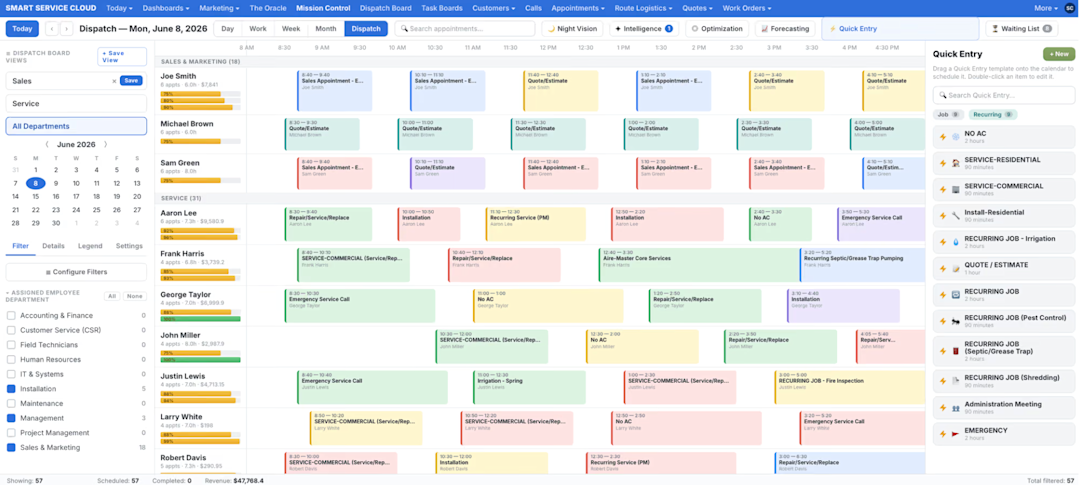
Smart Service’s scheduling and dispatching features are built to streamline how jobs move from the office to the field, from scheduling technicians to assigning crews.

Source: Smart Service
The purpose is to reduce back-and-forth communication and help you run daily operations more smoothly. That’s why it’s a great tool for dispatchers, office managers, and any other field service operation juggling multiple teams:
Drag-and-drop scheduling: Reschedule appointments, quotes, or jobs effortlessly by dragging and dropping to a new time slot.
Real-time status updates: Get full visibility into every job’s status and where your technicians are.
Mission Control: Combines scheduling, routing, forecasting, and dispatching into a single board for a real-time view of the entire operation.
Marketing
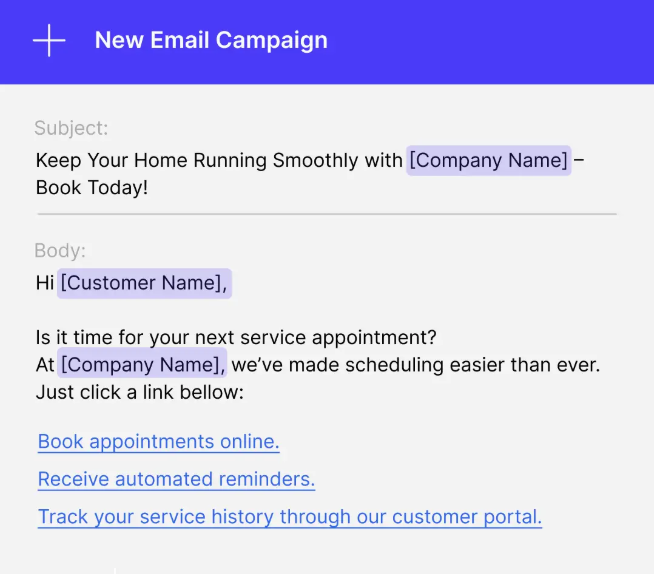
Smart Service’s marketing features help field service businesses stay top-of-mind with customers, attract new and existing ones, and streamline communication with email campaigns, online booking, and lead capture forms.

Source: Smart Service
While Smart Service isn’t a full-scale marketing automation suite, it offers enough functionality for office admins, customer service teams, and business owners who want consistent outreach:
Email campaigns: Reach and nurture leads with ease by managing contacts seamlessly and delivering relevant content.
Online booking: Allow customers to book jobs on their own terms. You can even collect payments at the time of booking.
Quoting & invoicing
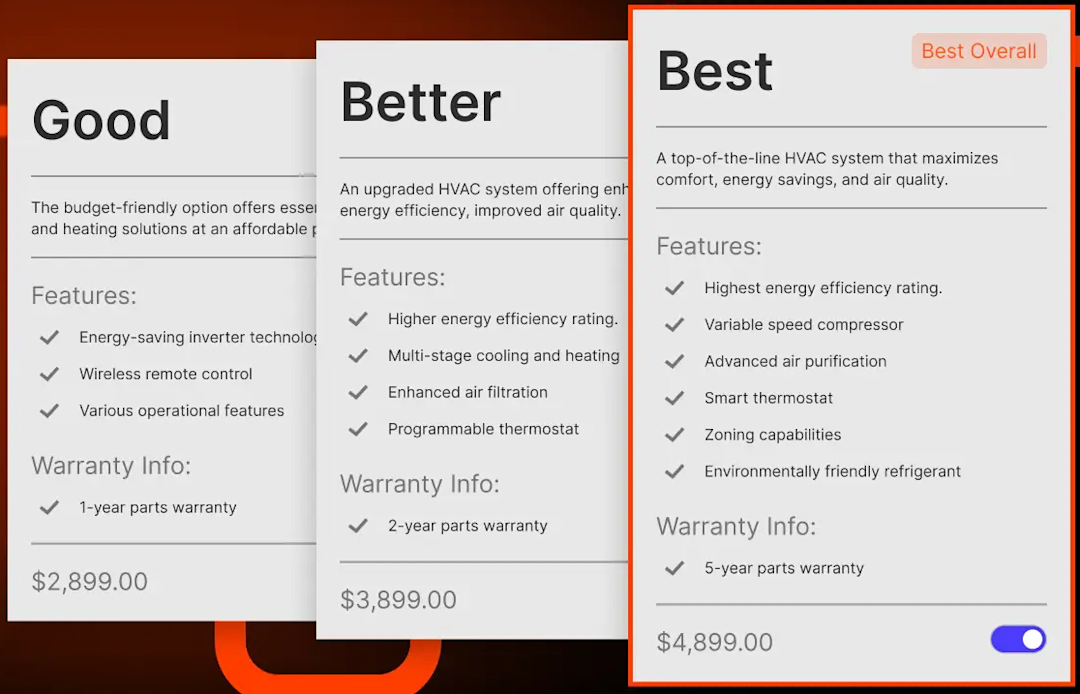
Smart Service’s quoting features cover how businesses handle quotes and estimates, from converting approved quotes into jobs to generating accurate estimates.

Source: Smart Service
These features are suitable for technicians, sales estimators, office managers, and anyone responsible for revenue.
Dynamic quoting: Allows technicians to present multiple service packages and pricing tiers.
Integrated invoicing: Teams can generate invoices from completed work orders and sync them back to the office.
Work order management
Smart Service’s work order management is designed to ensure your teams organize, update, and complete jobs across the entire service life cycle without losing track of paperwork.
It’s an important feature for field technicians, dispatchers, and admin staff who need clear, consistent workflows from the moment a job is booked:
Document and photo attachments: Keep service documentation, like before-and-after photos, tied directly to each job.
Status tracking: Monitor job progress, ensuring nothing slips through the cracks and follow-ups happen on time.
Customer portal
Smart Service’s customer portal is a self-service hub where clients can access key information without having to call the provider for help.
This reduces administrative load while improving the customer experience, and it’s a great feature for homeowners, commercial clients, and customer service representatives who value convenience and transparency:
Job scheduling alerts: Instantly notify customers when a job is scheduled.
Customizable messaging: Customize every message using dynamic placeholders for customer names or job details.
Business management
Smart Service’s business management is for administrators and business owners who want to better monitor performance, manage inventory, and generate reports on the spot:
Reporting and analytics: Offers insights into job performance, tech productivity, and other key metrics you set to guide strategic decisions.
Inventory and asset tracking: Helps teams manage parts, equipment, and usage to avoid shortages.
Smart Service Integrations
Smart Service can be integrated with a wide range of business tools that extend its scheduling, billing, and operational capabilities, helping teams streamline data flow and avoid double entry across systems.
Some key Smart Service integrations include tools like QuickBooks, Twilio, ChatGPT, SAP, and Sage.
Smart Service Mobile App
Smart Service has two mobile apps.
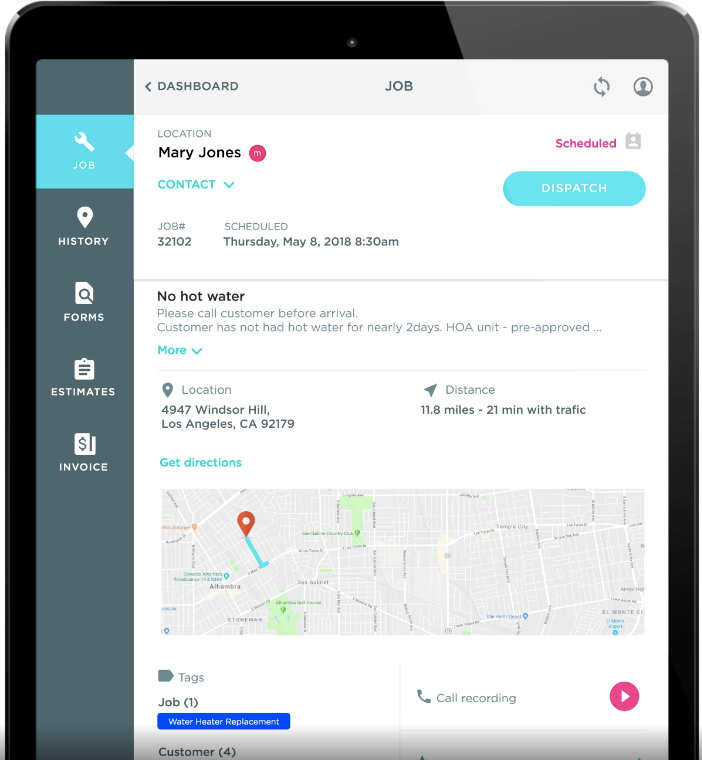
One is the Smart Service Cloud mobile app, allowing field technicians to operate paperless, capture data live, and stay fully in sync with the office.

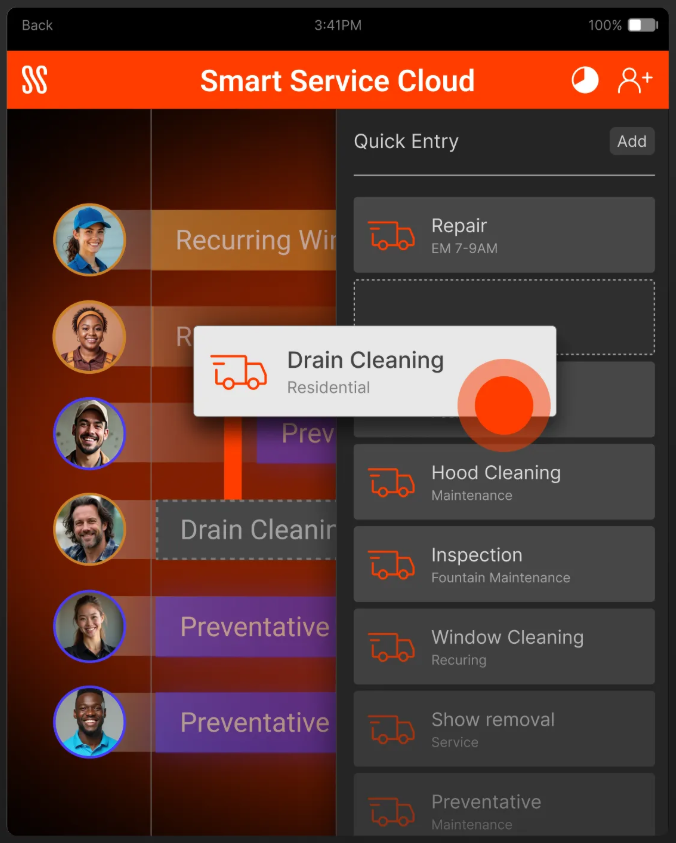
Source: Smart Service
Some of its key features are:
Interactive custom forms with photo capture and signatures
Real-time syncing of work orders, quotes, and customer data
Time tracking so techs can log hours directly in the field
GPS navigation to job sites
In-app payments for collecting credit card or check payments on site
Smart Service’s other app, the iFleet app, is ideal for field technicians who work with Smart Service Desktop, need offline access, or operate in areas with limited connectivity.
Key features include:
Real-time access to schedules, customer records, and equipment history.
Complete digital work orders.
Quote creation on site, as well as the ability to capture signatures.
Time tracking so techs can clock in and out of jobs.
Offline mode so technicians can continue working and sync the data when they reconnect.
Choosing one over the other depends on your backend setup, such as cloud versus desktop, or how tech-heavy your field operations are.
You can find both apps on the App Store. iFleet also supports Android devices, making it more flexible.
Smart Service AI Capabilities
Smart Service has AI capabilities that automate routine tasks, reducing the administrative burden and improving access to company knowledge. By integrating ChatGPT with your Smart Service account, teams can use AI directly within the platform to draft content, answer questions, and retrieve information.
For contractors, this means less time spent crafting job descriptions, service reports, or customer messages, and overall faster access to important internal information.
Let’s take a look at Smart Service’s key AI capabilities:
AI writing assistant: Feed it rough notes, and AI refines them into clear, professional service descriptions. You can also adjust the tone, simplify, expand, or rewrite text. The writing assistant supports multiple languages, so it’s ideal for businesses with diverse customer bases.
AI Knowledge Center: Upload equipment manuals, product specs, and internal documentation, then ask questions in natural language to get instant, context-aware answers.
Together, these AI capabilities help streamline documentation, improve communication, and scale knowledge-sharing between teams.
Smart Service Support
Smart Service offers robust U.S.-based support, with a dedicated team ready to assist you with the challenges you encounter.
You can reach them by:
Phone: 1-888-518-0818, Monday through Friday.
Email: support@smartservice.com.
Support request portal: Available directly on the website and both apps. Submit an issue via the ‘Help → Support Request’ button, which takes you to a secure online form.
Smart Service Security
Smart Service takes a multi-layered approach to security by combining protected payment processing and controlled data sharing so field service businesses can operate safely and compliantly.
For payments, Smart Service uses PCI-compliant encryption and secure transaction handling across its ‘Get Paid’ workflow. Payment processing is also facilitated through Fiserv/CardConnect, which provides encrypted card entry, merchant reporting, and automated billing.
Platform security continues to improve through regular updates. There’s a quarterly release cycle, and clients with an active support plan get help with installing new versions of the system.
Smart Service’s Privacy Policy emphasizes collecting and storing as little data as necessary, and its Google integration follows limited use requirements, meaning data access is purpose-bound and not repurposed for advertising.
Smart Service Pros and Cons
These pros and cons are based on real user reviews from G2, GetApp, Capterra, and Software Advice, reflecting feedback from actual Smart Service customers as of July 2026.
Smart Service pros
Based on reviews, users consistently highlight the following advantages:
Integration with QuickBooks: The biggest asset of the platform is its integration with QuickBooks, making scheduling and billing easier.
Scheduling: Users appreciate Smart Service for its robust scheduling features. They’re intuitive and efficient, keeping field techs organized.
Simplicity and ease of use: Not many users struggled to understand Smart Service, with several long-time customers noting that the core functions remain simple and reliable.
Smart Service cons
On the flip side, users also mentioned some recurring drawbacks:
Technical instability: A verified user in Construction mentioned in July 2025 that “it’s extremely buggy and crashes frequently.”
Aging interface and usability: Some customers feel that the app is lagging behind the times, and that the interface should be cleaner or more modern. Plus, it’s difficult to access new features.
Smart Service Alternative
Sometimes, Smart Service might not be enough. Users might look for Smart Service alternatives because they seek more advanced reporting, deeper CRM capabilities, and broader automation that supports large-scale operations.
For those exploring other options or who feel that Smart Service is limited in some areas, ServiceTitan is a viable solution worth considering.
ServiceTitan is a great alternative to Smart Service because it provides end-to-end workflow coverage, from call booking to invoicing to revenue insights—all within a highly polished platform.
It offers different features that help contractors scale operations, improve job profitability, and streamline both office and field workflows, including:
Advanced scheduling and dispatching
Integrated CRM and marketing automation
Smart estimates and proposal tools
Mobile app for technicians
Real-time reporting and dashboard analytics
Comprehensive invoicing and payment processing
Let’s explore some of them.
Advanced scheduling and dispatching
ServiceTitan’s scheduling and dispatching features are designed to help you assign the right technician to the correct job while keeping office and field in the loop at all times.
You have a centralized dashboard where you can view technician availability, monitor job progress in real time, and quickly adjust schedules as priorities change due to unpredictable weather or traffic delays.
This platform also provides GPS tracking and route optimization, making it easier to reduce drive times, quickly respond to emergencies, and maximize productivity.
Additional features include:
Live job status updates so office staff always know where technicians are.
Recurring service scheduling for maintenance agreements.
Integrated communication between dispatchers and technicians through the mobile app.
Drag-and-drop scheduling to quickly assign and reschedule jobs.

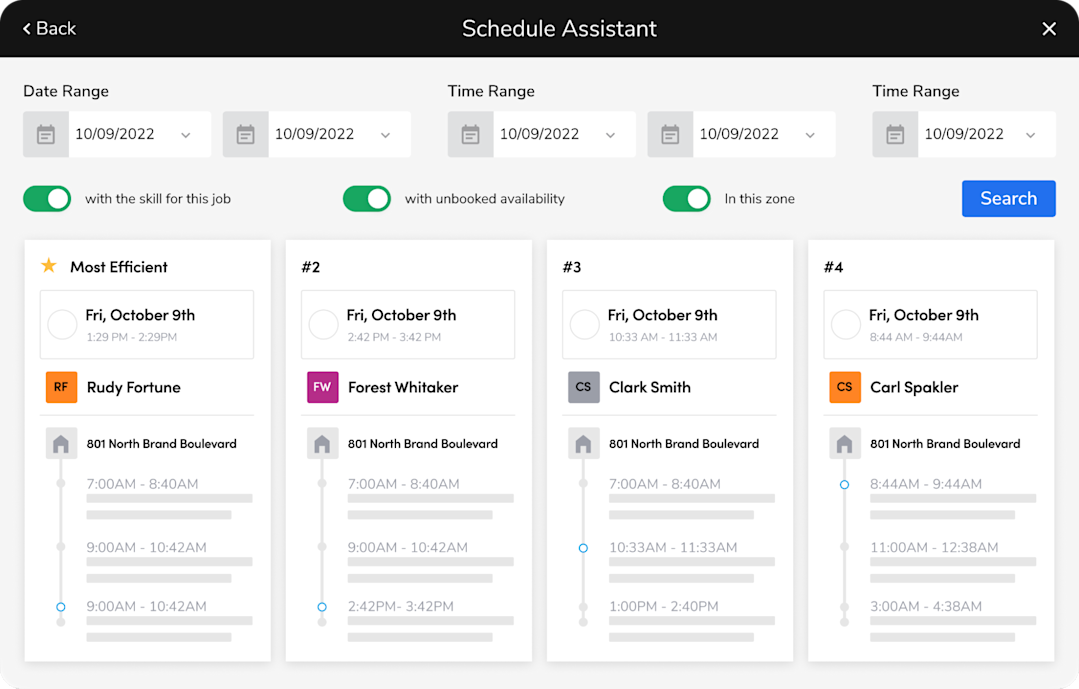
Smart Service focuses on AI-powered dispatch recommendations, while ServiceTitan combines advanced scheduling and dispatching with estimating, invoicing, customer payroll, and reporting.
But ServiceTitan also has built-in AI capabilities.
Through Atlas, ServiceTitan’s AI platform, contractors can automate repetitive tasks, surface business insights, and quickly access operational data using natural language.
The field mobile app also equips your technicians with AI-assisted workflows alongside real-time customer information, estimates, invoices, and communication tools, helping them complete jobs more efficiently.
This gives dispatchers complete visibility into every job and allows office teams to manage the entire service life cycle without switching between multiple systems.
The ServiceTitan dashboard displays technicians’ real-time availability based on your dispatch board, making it easy to assign jobs, avoid scheduling conflicts, and respond to last-minute changes.
Integrated CRM and marketing automation
ServiceTitan combines CRM functionality with marketing automation to help trade businesses attract new customers, nurture existing ones, and measure the return on investment. The platform offers a single, centralized place that stores contact information, service history, estimates, and invoices, giving everyone on your team a complete view of every customer interaction.
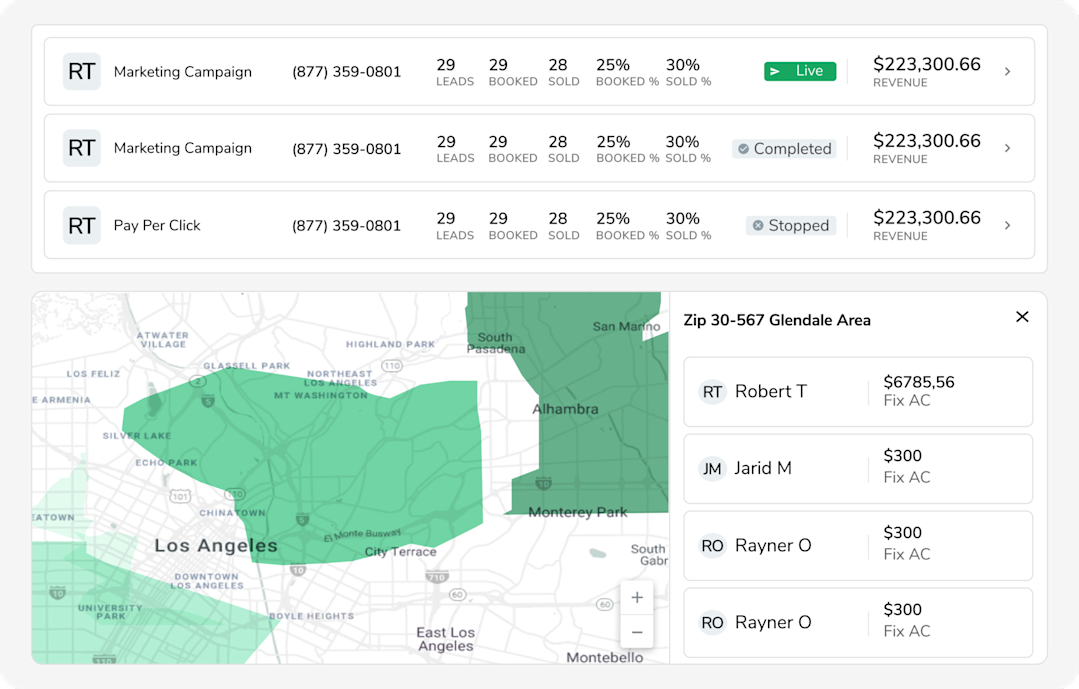
ServiceTitan integrates with Google Ads, Google Local Services Ads, and other lead sources to automatically attribute booked jobs and revenue to the marketing campaign that led to the booking, so you can assess which campaigns actually perform.
And it doesn’t track just clicks or leads—businesses can see which campaigns produce actual revenue, the types of jobs customers book, and the lifetime value of those clients.
Let’s not forget about ServiceTitan’s Marketing Scorecard, which ranks your campaigns based on key metrics such as revenue, booked jobs, and cost per lead. With these insights, you can identify which channels are driving work that’s profitable, optimize your advertising budget, and invest in campaigns that actually generate high-quality leads.

Real-time reporting and dashboard analytics
ServiceTitan also provides field reporting features that help you understand what’s working and what isn’t. Instead of waiting until the end of the week or month, you can monitor key operational and financial metrics as jobs are completed and new data flows into the platform.

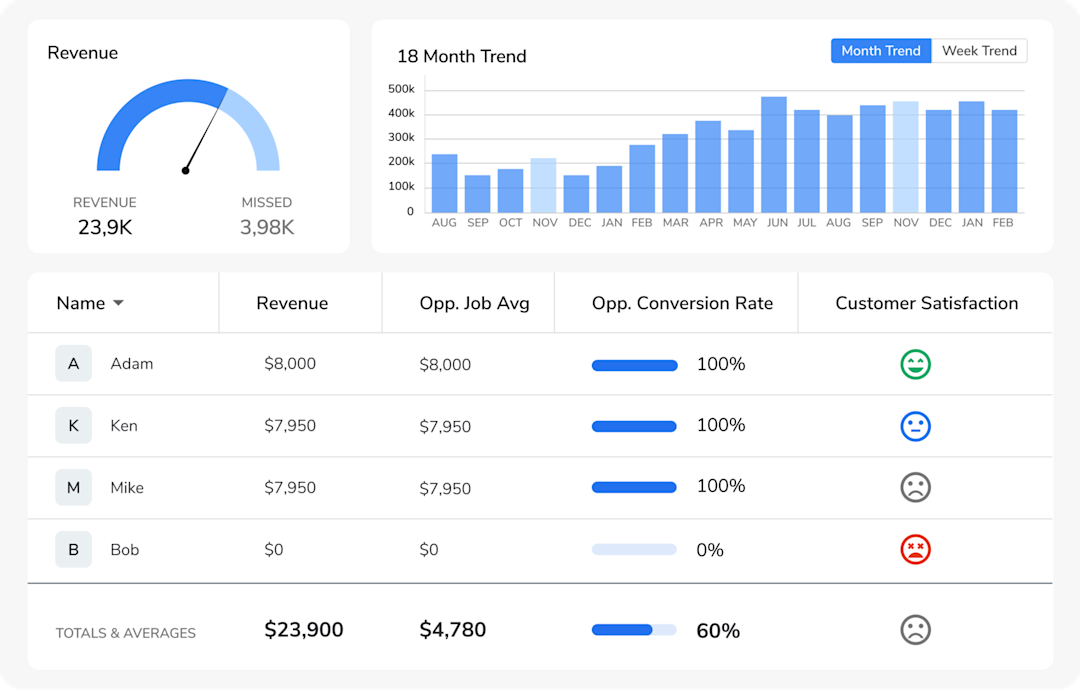
It also includes hundreds of pre-built templates covering areas such as sales, revenue, call booking rates, or marketing ROI, so users can build custom dashboard reports to track KPIs most relevant to their business.
ServiceTitan also lets you drill down from high-level dashboards into individual jobs, estimates, and invoices, to identify trends and opportunities for improvement. This allows you to identify bottlenecks before they affect profitability, optimize pricing, and make data-driven decisions.
Mobile app for technicians
ServiceTitan’s mobile app equips technicians with the information and tools they need to manage the entire service visit from the job site, reducing paperwork and keeping the office updated at all times.
For example, before arriving on site, technicians can access client profiles, service histories, equipment records, and previous estimates, giving them the context needed to diagnose issues faster and deliver quality customer service.

While on the job, technicians can create estimates, present repair or replacement options, capture photos or videos, and collect signatures—all from a single device.
The app also synchronizes job statuses, notes, and finished jobs with the office in real time, so dispatchers always have up-to-date information. This helps reduce administrative work, improve communication, and speed up the billing process.
Invoicing and payment processing
Accepting payments from anywhere, anytime is easy with ServiceTitan. It lets technicians generate professional invoices and collect payments before leaving the job site, shortening billing cycles and improving cash flow.
Once the work is complete, technicians can build invoices directly from completed tasks, applied materials, and labor, reducing manual data entry or billing errors. They can also present estimates, offer financing options, and convert them into invoices on the spot, without having to return to the office.
ServiceTitan also supports multiple payment methods, including credit card, ACH transfers, payment links, or online payments, all compatible with mobile devices.
Combined with real-time job updates and integrated accounting workflows, ServiceTitan helps you get paid faster while providing customers with a seamless payment experience.
To see how ServiceTitan can streamline invoicing, dispatching, and every other aspect of your field service operations, book a demo today.
ServiceTitan is a comprehensive platform that helps businesses streamline dispatching, monitor technician performance, and uncover new revenue opportunities. It’s trusted by thousands of trade companies across the country, and greatly appreciated for its ability to eliminate guesswork and improve efficiency.


Frequently Asked Questions (FAQs)
Who uses Smart Service?
Smart Service is primarily used by field-service businesses that need reliable scheduling, dispatching, and work order management.
Typically, it includes users in the HVAC, plumbing, electrical, lawn care, and cleaning services, along with office workers, dispatchers, technicians, and business owners who want to streamline daily operations.
Is Smart Service a CRM platform?
No, Smart Service is not a full-fledged CRM platform. While it includes basic customer management features, such as storing client information and managing communication, it is primarily designed for field service scheduling and dispatching.
What trades and industries does Smart Service help?
Smart Service serves trades and industries like:
HVAC
Plumbing
Electrical
Landscaping
Lawn care
Cleaning services
Appliance repair
Can you use Smart Service for free?
No. As of July 2026, Smart Service doesn’t offer a free version. Pricing is quote-based, and all versions require a paid subscription.
Does Smart Service have an API?
Yes, Smart Service supports custom API configurations for businesses that need tailored data syncs. However, there is no ‘open API’ for general use or a developer self-service functionality.
ServiceTitan Software
ServiceTitan is a comprehensive software solution built specifically to help service companies streamline their operations, boost revenue, and substantially elevate the trajectory of their business. Our comprehensive, cloud-based platform is used by thousands of electrical, HVAC, plumbing, garage door, and chimney sweep shops across the country—and has increased their revenue by an average of 25% in just their first year with us.