

Templates Guides
Fire Extinguisher Inspection Checklist: Free PDF Download
 Fire & Life Safety
October 22nd, 2026
ServiceTitan


A fire extinguisher inspection checklist is a practical tool for systematically checking whether fire extinguishers are accessible, visibly intact, and ready for use. It helps you catch issues during routine inspections that could prevent an extinguisher from working properly when your commercial customers need it.
The key components of a fire extinguisher inspection checklist are:
Location and accessibility: Confirm extinguishers are in designated locations and easy to reach.
Physical condition: Check for damage, corrosion, leaks, clogged nozzles, or other visible problems.
Pressure and gauge: Verify the pressure indicator is within the appropriate range or green zone.
Pull pin and seal: Make sure the safety pin and tamper seal are intact.
Label and instructions: Confirm operating instructions and markings are visible and legible.
Service information: Check inspection tags, service dates, and maintenance records.
A consistent checklist helps your team inspect every extinguisher the same way, document deficiencies, and flag issues that require follow-up.
This guide breaks down what to check during routine inspections, how to document the results, and when an extinguisher needs additional maintenance or testing.
To make inspections easier, download our free fire extinguisher inspection checklist template and use it as a starting point for your own process.
Why Use a Fire Extinguisher Inspection Checklist?
A fire extinguisher inspection checklist turns routine checks into a standardized, documented process for verifying and recording extinguisher condition.
For fire and life safety businesses, a checklist can also help:
Meet inspection requirements: A standardized process helps technicians consistently cover required inspection points.
Catch problems early: Checking accessibility, pressure, damage, corrosion, pull pins, and seals can reveal issues before an emergency.
Create consistent service: Technicians can follow the same monthly fire extinguisher inspection process across every customer site.
Document completed work: Inspection records provide a clear history of what was checked, when, and by whom.
Keep customers informed: Clear records show customers what technicians found and whether any issues require follow-up.
The #1 newsletter for the trades.
A checklist doesn't replace required maintenance or testing. It only helps technicians complete routine inspections thoroughly and keep a reliable record of the results.
As inspection volume grows, you might also need an ERP for fire and life safety contractors that connects inspection work with scheduling, deficiency management, reporting, and other business processes.
What Should a Fire Extinguisher Inspection Checklist Include?
A complete checklist should capture the extinguisher's identification, condition, inspection results, and any required follow-up. The exact checks depend on the type of extinguisher and whether you're performing a routine inspection, annual maintenance, or another required service.
Inspection Area | What to Check | Action |
Extinguisher identification | Facility, asset details, and inspection metadata | Confirm facility name, location, asset/serial number, extinguisher type, capacity, manufacturer, inspection date, and inspector initials are recorded correctly |
Designated location | Extinguisher is in its assigned location | Confirm it is present and has not been relocated or removed |
Accessibility and visibility | Clear, unobstructed access and visibility | Remove or report anything blocking access or obscuring the extinguisher |
Pressure and charge status | Gauge or pressure indicator, where applicable | Confirm the indicator is in the operable range and flag abnormal readings for service |
Safety pin and tamper seal | Pin is correctly positioned, and safety seal is intact | Report missing, damaged, or broken components for appropriate service |
Discharge horn, hose, and nozzle | Damage, blockage, deterioration, or improper positioning | Confirm components are clean, unobstructed, and properly secured |
Cylinder condition | Corrosion, dents, leakage, damage, or other deterioration | Document the defect and flag the extinguisher for appropriate service or corrective action based on applicable requirements |
Operating label and markings | Instructions, classification, and markings are legible | Confirm labels are present, readable, and appropriate for the extinguisher |
Mounting bracket or cabinet | Secure mounting and cabinet condition | Confirm the extinguisher is properly secured and the cabinet is accessible and undamaged |
Service tag | Inspection, maintenance, and service information | Verify required service information is present, current, and legible |
Extinguisher-specific checks | Features specific to the extinguisher type | Complete any additional checks required for the extinguisher's type, design, or applicable standard |
Inspection results and corrective actions | Deficiencies and work required | Document findings, corrective actions, parts or service needed, and follow-up requirements |
How Do You Use a Fire Extinguisher Inspection Checklist?
Use the checklist to identify each extinguisher, work through every inspection point, document any deficiencies, and track required follow-up.
Step 1: Identify the extinguisher
Record the facility, location, asset or serial number, extinguisher type, capacity, and inspection date. This ties the inspection to the correct asset and creates a clear service record.
Step 2: Work through every inspection point
Check each item on the checklist, including the extinguisher's location, accessibility, pressure or charge status, safety pin and tamper seal, physical condition, and service information. The Occupational Safety and Health Administration (OSHA) requires monthly visual inspections of portable fire extinguishers, while annual maintenance is a separate requirement.
Step 3: Document deficiencies
Don't simply mark an item as failed. Record the specific issue you found, its location, and any corrective action or additional service required.
Step 4: Review and submit the report
Review the checklist for missing information, add the technician's initials or signature where required, and submit the completed inspection report through your company's standard workflow.
Step 5: Follow up
Assign any required repairs, replacements, or maintenance and track them through completion so identified deficiencies don't get lost after the inspection.
How Do You Customize a Fire Extinguisher Inspection Checklist?
Customize your fire extinguisher inspection checklist around the customer, equipment, and inspection workflow, but keep all required inspection points and documentation fields intact.
You can customize fields such as:
Client and site details: Add customer name, facility type, address, building or floor, and service contract information.
Asset information: Include fields for serial number, extinguisher type, capacity, manufacturer, and asset ID.
Inspection items: Add checks specific to the extinguisher types or hazards encountered on a particular project.
Corrective actions: Include options for repair, recharge, replacement, removal from service, or follow-up.
Technician details: Add technician name, signature, license or certification number, and inspection timestamp.
Branding: Add your company logo, contact information, colors, and report footer.
Make sure any extinguisher-specific checks match the type of equipment and the inspection or service being performed.
What Are Some Common Fire Extinguisher Inspection Checklist Mistakes?
Even with a detailed checklist, mistakes can lead to missed issues, incomplete records, and unresolved deficiencies. Watch out for these common issues during your inspection:
Treating every extinguisher the same: Different extinguisher types can call for different inspection and service needs. For instance, dry chemical units don’t have the same maintenance and hydrostatic testing requirements as carbon dioxide extinguishers. Make sure your checklist accounts for those differences.
Checking boxes without documenting deficiencies: Don’t just mark an item as failed and move on. Record corrosion, physical damage, or any other issue and what needs to happen next so your team knows exactly what to fix or service.
Skipping inspections because an extinguisher looks fine: An extinguisher can look fine at a glance and still have issues. Stick to the required inspection schedule and work through the full checklist every time.
Losing inspection and service records: Keep completed records somewhere your team can easily find them. This makes it easier to check previous work, see what still needs attention, and provide documentation when needed.
Using an outdated checklist: Review your checklist periodically and update it when equipment, workflows, or applicable requirements change.
Failing to follow up on deficiencies: Finding a problem is only half the job. Assign corrective action and track it through resolution.
Fire and life safety contractors face plenty of challenges beyond the inspection itself. ServiceTitan’s 2026 Fire & Life Safety Report explores how contractors are using technology to tackle some of them.
How ServiceTitan Supports the Fire Extinguisher Inspection Process
ServiceTitan’s Fire & Life Safety Software is an all-in-one platform that helps commercial fire contractors manage their field operations, customers, workforce, finances, and business performance. It also gives your field and office teams a connected way to manage fire extinguisher inspections and keep accurate records throughout the process.
1. Recurring inspection scheduling
Keeping up with recurring inspections gets more complicated as you add customers, locations, and equipment.
ServiceTitan’s Recurring Service Events can generate upcoming service events based on the frequency you set. Your office team can view these events in Follow Up and book them as jobs when they're due.
This gives your team one place to keep track of upcoming inspection work instead of managing due dates across separate calendars or spreadsheets.
2. Custom digital inspection forms
ServiceTitan’s Inspection Forms let you create digital checklists that technicians can complete while they’re on site.

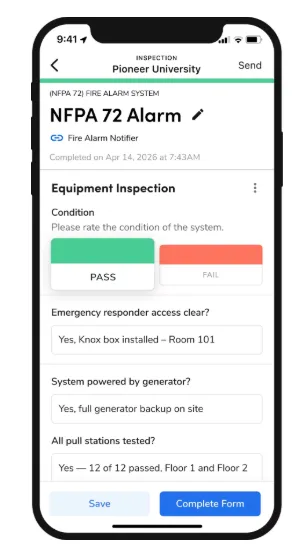
You can customize the forms around the information your technicians need to collect. Conditional Logic can also show or hide fields based on previous answers, so techs only see the questions that apply.
Once completed, the forms stay connected to the relevant job or equipment record, giving your office team access to the information collected in the field.
3. Equipment and asset tracking
When a customer has dozens or even hundreds of extinguishers, technicians need to know exactly which one they’re inspecting.
With ServiceTitan’s Equipment Scanning, your techs can scan a barcode or QR code to pull up the corresponding equipment record. They can also use Nameplate Scan to capture equipment information such as the manufacturer, model, and serial number.

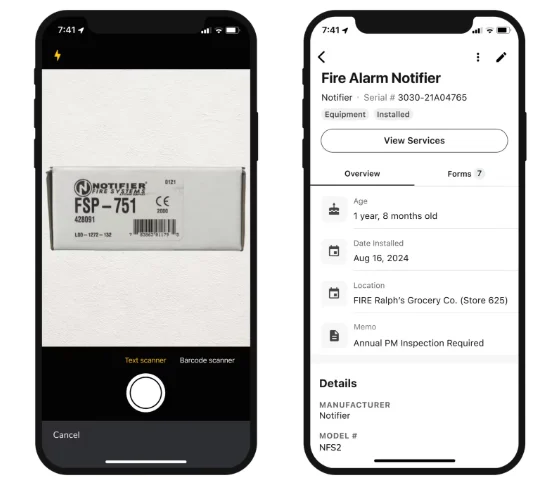
From there, technicians can access the equipment’s service history and record their work against the right asset.
4. Deficiency tracking and follow-up
Finding a deficiency is only useful if your team knows about it and takes care of it.
ServiceTitan’s Deficiency Tracking lets technicians document problems with photos and notes right from the field. Your team can see who owns each deficiency and track its status through resolution. Customers also receive automated notifications about open deficiencies and pending approvals.


ServiceTitan can also auto-generate repair quotes from deficiencies captured in the field, so your office team doesn’t have to re-enter the same information.
5. Photo and signature capture
Some inspection findings are easier to document with a photo than a written description.
ServiceTitan lets technicians add photos of damaged components, blocked access, missing seals, and other problems they find during an inspection. The photos are then added to the job record along with the rest of the inspection information.
Technicians can also collect customer signatures directly on digital forms when needed.
6. Compliance and customer reporting
After an inspection, your office team needs to turn what technicians collected in the field into documentation that customers and authorities can use.
ServiceTitan’s Reporting tools can turn inspection data into AHJ-ready reports without requiring office staff to manually rebuild information that technicians already entered in the field.


Your team can then keep those records accessible when customers or authorities need documentation.
Discover more features in ServiceTitan’s complete guide to Enterprise Resource Planning (ERP) software for fire and life safety contractors.
Over to You
Regular fire extinguisher inspections help you catch problems before an extinguisher is needed in an emergency. Download our free template to give your team a repeatable way to complete those inspections and document what they find.
As your customer base grows, keeping those inspections organized becomes just as important as completing them correctly. The right software can help you stay on top of recurring work, inspection records, and any deficiencies that need follow-up.
Schedule a free demo to see how ServiceTitan can support your business workflows.
ServiceTitan offers Fire & Life Safety Software built for commercial fire contractors who want to spend less time on admin work and keep their business running smoothly. It brings day-to-day operations into one system, from scheduling jobs and staying connected with customers to getting paid and monitoring business performance.


