
Templates Guides
Construction Field Report Template: Free Download
 Construction
November 26th, 2026

Every construction project should document daily on-site activities. If that record is missing or incomplete, it can lead to disputes, delays, and budget overruns.
With a construction field report template, your whole crew documents daily activities the same way.
In this guide, we’ll cover:
What a field report is
What sections you’ll need to include
How to fill it out and customize it
Our best tips for using a field report
How ServiceTitan helps digitize field reporting
Best of all, you can download our free template to get started right away.
What is a Construction Field Report?
A construction field report is a standardized document that general contractors, superintendents, and project managers use to track daily jobsite activities during a construction project. It covers everything from weather conditions and materials to job progress and workforce details.
It serves as a daily log of everything that happens on the jobsite, which you can later share with stakeholders, use to gauge overall project progress, or as evidence when addressing disputes, delays, or payment questions.
The #1 newsletter for the trades.
What to Include in a Construction Field Report Template
A complete field report should cover every jobsite activity, who worked on it, the weather conditions, and inspections. Make sure to include these key sections:
Project and report information: Include the project name and jobsite number, report number, date, location, weather conditions, and the name and signature of the superintendent, general contractor, or project manager.
Workforce and labor tracking: Record crew sizes by trade and subcontractor, company names, working hours, overtime, and total labor hours.
Work performed and activity description: Describe completed work by trade and location, percentage of completion where applicable, and any unfinished work.
Equipment and materials log: Track equipment types, quantities, operating hours, and deliveries or removals. Also document materials received, installed, or consumed.
Site conditions and observations: Note weather, ground conditions, access issues, utility conflicts, safety incidents, environmental observations, and visitors.
Quality control and inspections: Document inspections, responsible parties, pass or fail results, non-conformances, corrective actions, and punch-list items.
How to Fill Out a Construction Field Report
Effective field reporting must be done daily. Here’s a step-by-step process to help you gather the necessary information and keep your reports accurate:
Conduct a site walk and record conditions: As soon as you’re on site, check the weather and ground conditions, and note any other observations before work begins. Write everything down so you have a clear picture of the project site at the start of the day.
Track workforce, equipment, and deliveries throughout the day: Record who’s on site, what equipment is in active use, and what materials are coming in. When the crew comes in, write it down. When materials arrive at noon, note it. That way, you won’t have to rely on memory for the exact headcount and delivery times.
Document activities with specific context: As the project progresses throughout the day, you’ll need to document what’s being completed in detail. For instance, writing down ‘concrete work’ isn’t enough. But noting ‘X cubic yards of concrete poured in Section A’ helps avoid disputes later.
Log delays, issues, or relevant conversations: Late deliveries, bad weather conditions, or conflicting instructions can disrupt the day’s schedule. Record these in detail, noting when they happened and the cause of the delay or issue.
Review, sign, and submit the report: Before your shift ends, review the entire report, sign it, and submit it to your supervisors. This helps monitor progress against the project schedule.
How to Customize a Field Report Template for Your Project
Change your field report to reflect your contract requirements, trade mix, and regulatory environment. Here’s what to consider when adapting it to your project.
Align the template with contract documentation requirements
Review all contract specifics so you can match the project type and owner expectations for daily reports. This is especially important for public projects, which require specific fields and a defined submission schedule throughout the job.
Customize the template prior to the project kickoff to ensure it meets all the requirements. Add in the appropriate fields, get the format right to suit the owner, and include the submission schedule and the distribution list.
Add scope-specific sections
Depending on your trade mix, you’ll need to track different activities, which also means that you’ll need additional sections within your field report.
For instance, mechanical, electrical, and plumbing jobs may require system testing and commissioning, while concrete projects require pour logs, batch tickets, and cylinder tracking.
Incorporating safety and environmental compliance fields
Some projects have strict OSHA oversight or require environmental monitoring. In these cases, you’ll need dedicated sections that cover safety observations, personal protective equipment (PPE) compliance, incidents or near-misses, and any required environmental controls.
This helps maintain a compliance record and makes it easier to retrieve information if regulators ask for it.
Best Tips for Writing Construction Field Reports
A field report must be well-written to protect you from disputes. Here are several tips you can follow to get it right from day one:
Use specific, measurable language: Vague reports are useless in complaints, disputes, or delay claims. Always record quantities, materials used, locations, and times to keep your report defensible and accurate.
Write reports every day: Keep a daily log of jobsite activities without gaps so you have a complete record of the project’s progress. If you go weeks without filing reports, you won’t have the documentation needed when issues arise.
Include time-stamped and geo-tagged photos: Attach time-stamped, location-tagged photos to your reports so you can use them as visual evidence later. Record material deliveries, progress photos, or weather conditions to back up your claims in case of disputes.
Ensure consistency across all reports: Multiple people across sites and shifts may fill out your reports. A shared template keeps every report consistent and complete, without creating confusion.
Doing all this by hand, however, is time-consuming. That’s where digitizing the construction workflow makes sense.
How ServiceTitan Simplifies Field Reporting for Construction Workers
A physical template gives you a standardized structure for your progress report, but it’s still a manual process. Someone needs to fill it out, send it to the stakeholders, and connect it to the rest of the project.
If spreadsheets are getting too time-consuming for your scaling construction business, you should consider switching to all-in-one Construction Management Software like ServiceTitan, which digitizes and connects your field reports to the rest of your operations.
Capture job and project information digitally
Every detail of your projects, like estimates, schedules, and job data, lives under one platform. ServiceTitan’s project management software lets you automatically pull the information you need for a report instead of searching across different tools. This connects the construction process to a more modern approach to project management.

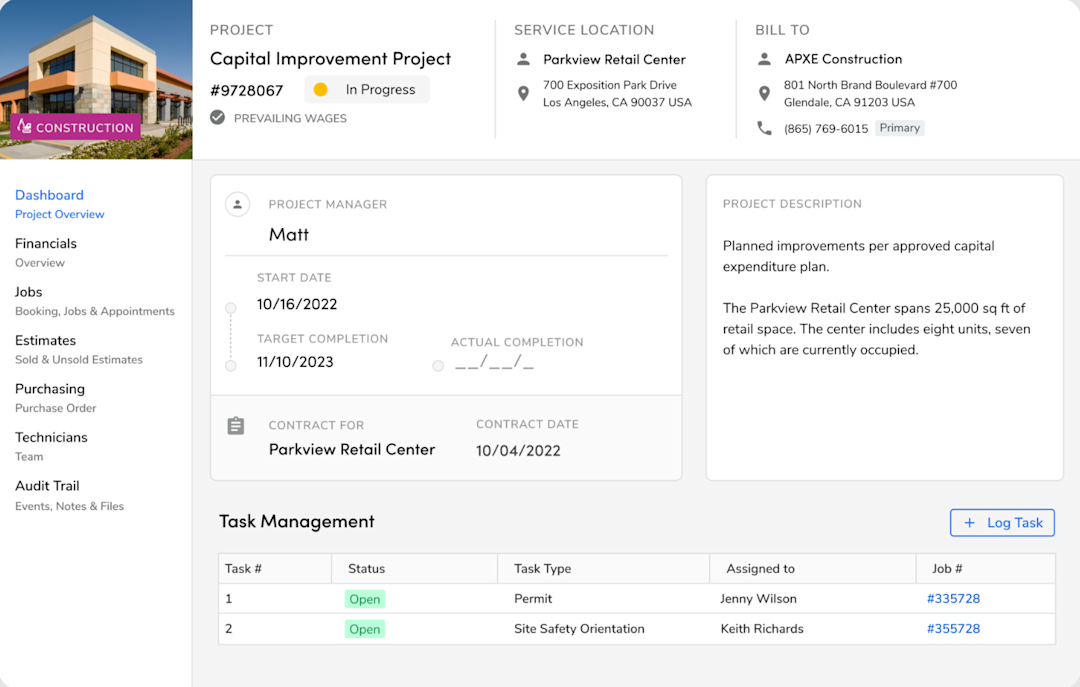
Plus, building or reviewing a progress report becomes faster, and the overall workflow for a project manager becomes easier.
Give field teams access to project details
Field teams can use the Field Service App to access all job details without leaving the jobsite and stay in touch with the office team. In practice, this means that the person creating the report can cross-check the schedule and record against what actually happened on site.

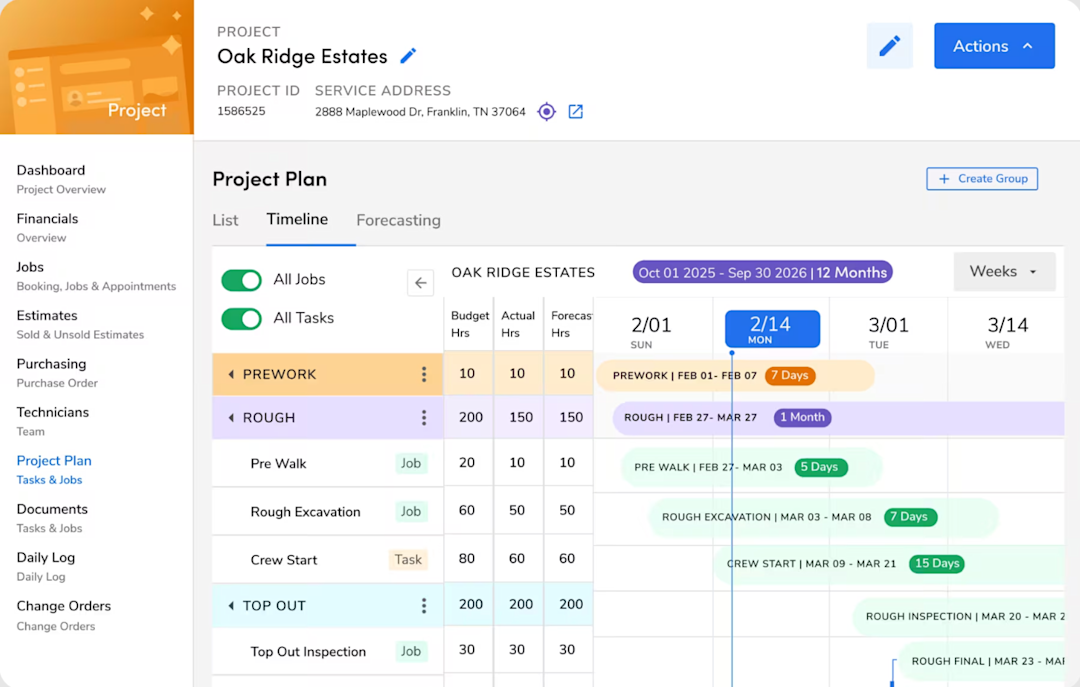
Document work and site activity from the field
Your crew can use ServiceTitan’s Daily Logs feature to record completed work, site conditions, and other job details included in the template. It captures daily work log information and generates summaries while letting field teams share notes and updates from the jobsite with the office team.

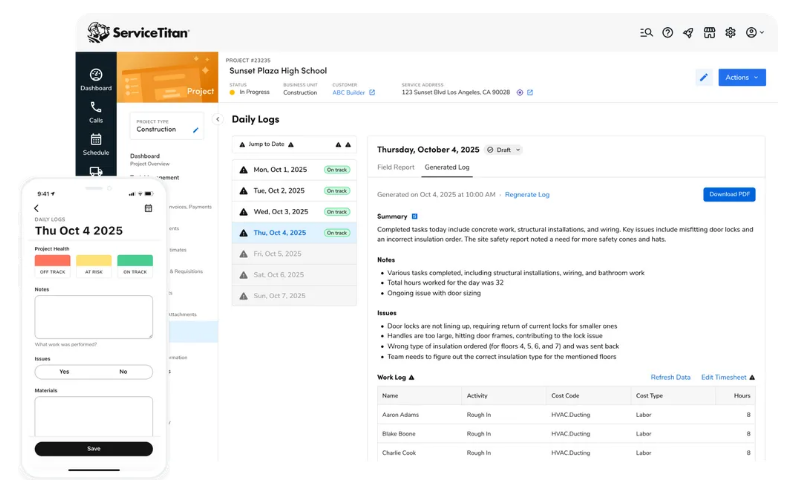
Attach photos and other documentation
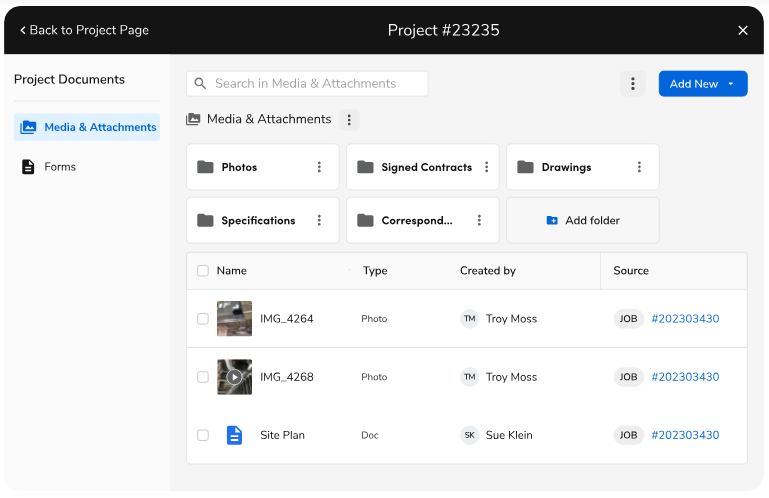
With ServiceTitan’s mobile app, your team can take photos on site and attach them to the relevant project, along with other supporting documents. This keeps progress photos, delivery confirmations, and other documentation organized and easy to access within the corresponding job.

Connect field information with project management, costs, and other records
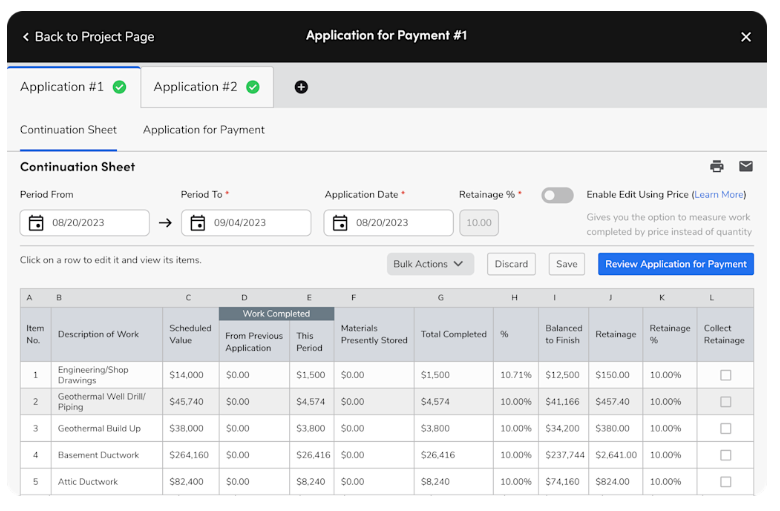
You can then use the details you gather from a field report across other operations, like reporting or job costing records. Contractors can compare actual progress from the reports against the plan, track any budget or billing changes, and flag potential discrepancies to prevent cost overruns.

Over to You
A construction field report is a must-have for daily field operations, as it keeps your projects documented and everyone off site aligned with what’s going on.
With a strong construction daily report template, you can keep these reports consistent across your team. Then you can move to a platform that handles the rest of your operations alongside daily reporting.
To see how ServiceTitan makes it easier to manage your construction field reports, contact us for a demo.
ServiceTitan is an all-in-one construction management software tool that helps contractors like you run your projects from one connected platform. With it, you can handle operations like daily logs and mobile field capture, as well as job costing and project management.


Frequently Asked Questions (FAQs)
Q1. Who is responsible for completing a construction field report?
Usually, the site superintendent, foreman, project manager, or site manager completes it. On some projects, subcontractors create their own reports, which the general contractor or project manager reviews.
Q2. Why are construction field reports important?
Construction field reports track daily progress, compare it against the schedule, inform stakeholders, and record on-site activities to protect you in potential disputes, delay claims, and payment questions.
Q3. What are the best construction management software tools for field reporting?
The best tools digitize field data capture and connect it to the rest of the project. ServiceTitan offers this functionality as part of its construction platform by including a mobile app that lets crews document job details and photos, as well as integrating with job costing, scheduling, and project management.
