





AutoCAD is a computer-aided design (CAD) program developed by Autodesk that professionals use to create precise 2D and 3D drawings for construction, engineering, and mechanical projects.
AutoCAD HVAC tools are built-in features that help you draft ductwork designs, connect equipment, and build HVAC system layouts inside the same design workspace.
However, drawing functionalities alone are not enough to design a complete heating, ventilation, and air conditioning system. You also need precise measurements, load calculations, airflow data, and other capabilities that AutoCAD doesn’t provide.
This guide covers the supporting HVAC tools and features that help complete your designs and make them more accurate and efficient.
What Are AutoCAD HVAC Tools?
AutoCAD HVAC tools are a set of design features available in the software’s mechanical, electrical, and plumbing (MEP) toolset that support the creation of technical drawings for heating, ventilation, and air conditioning projects:
You can draft residential or commercial HVAC plans, diagrams, and system layouts using precise 2D drawings.
Built-in part libraries let you add diffusers, VAV boxes, dampers, and air conditioning units without having to draw every piece by hand.
Layer management allows you to hide or show ducts, equipment, or building elements so you can work on different parts of the system more easily.
Many pros use AutoCAD together with Autodesk’s Revit MEP software to create more detailed HVAC models. This building information modeling program lets you work in a single 3D model instead of separate 2D plans to better understand how the HVAC layout fits inside the property. Clash detection also helps you spot areas where ductwork, pipes, or structural elements run into each other, so you can fix the problem before installation.
The #1 newsletter for the trades.
Why Are AutoCAD HVAC Tools Alone Not Enough?
Autodesk’s AutoCAD HVAC tools focus only on drawing the HVAC system, not on collecting building data, checking system requirements, and making sure the design follows industry standards. Without these steps, the layout can look good on paper, but perform poorly in reality.
Since AutoCAD doesn’t offer these capabilities, you need additional software to gather all the necessary information before you start drafting.
What Other HVAC Tools Do You Need to Complete a Full System Design?
To create a complete and efficient HVAC design, you need tools that collect technical data and calculate system needs with precision.
Digital measurement tools
Digital measurement tools such as laser distance meters, mobile measuring apps, or LiDAR scanners record the real size of the building faster and more accurately than any tape measure.
Once you have the correct wall lengths, ceiling heights, and room sizes, you can place ducts correctly, choose the right HVAC equipment size, and avoid delays caused by design changes.
Load calculation tools
Load calculation tools determine how much heating and cooling a property actually needs based on information about the space, insulation, windows, and local climate.
Accurate load calculation data helps you pick equipment that matches actual capacity requirements, reduces energy consumption, and meets industry standards.
Airflow analysis tools
Airflow analysis tools measure how air moves through the duct system and how much air each room needs in cubic feet per minute.
Based on these results, you can size the system correctly to avoid uneven temperatures throughout the building, noisy ducts, and poor performance.
What Features Should You Look for in a Supporting AutoCAD HVAC Tool?
A supporting AutoCAD HVAC tool should provide all the technical information you need to design a system that works properly once installed.


After acquiring Conduit Tech in 2025, a platform known for its on-site HVAC system design tools, ServiceTitan now offers all the features you need to complete your layouts.
1. LiDAR scanning
ServiceTitan’s LiDAR scanning records the size and layout of the property automatically using a compatible iPad, so you don’t need to rely on manual measurements.
As you move through the home, the software captures room dimensions, ceiling heights, windows, and wall positions in real time and saves them in the job file.
This automation speeds up measurements, improves their precision, and reduces layout mistakes.
2. Manual J load calculations
ServiceTitan’s Manual J Software automatically calculates a property’s heating and cooling loads in 15 minutes. The system analyzes the LiDAR scan measurements, building materials, windows, insulation, and climate data to generate accurate load calcs.
Knowing the exact HVAC system capacity needs helps you avoid oversizing or undersizing mistakes that reduce efficiency and comfort.
ServiceTitan follows ACCA (Air Conditioning Contractors of America) standards and ASHRAE (American Society of Heating, Refrigerating and Air-Conditioning Engineers) climatic design conditions to ensure compliance.
3. Airflow reports
ServiceTitan’s CFM Report (cubic feet per minute) analyzes the Manual J load calculation results to determine how much airflow each room needs. The report also shows total system CFM requirements and suggests the right duct sizes.
Based on this information, you can design the duct system correctly so air moves silently through the vents and every room stays at a comfortable temperature.
4. Equipment recommendations
ServiceTitan’s Equipment Selection Guidance recommends HVAC equipment that matches the property’s real needs based on the load calculation.
The software suggests system types, such as heat pumps and air conditioning units, capacity ranges, and efficiency options to help you pick the right equipment and build an efficient design.
5. 2D and 3D property visualization
ServiceTitan’s 3D Model and 2D Floor Plan automatically turn the LiDAR scan into a digital layout of the property, so you don’t need to draw it yourself.
The 3D view displays the interior of the home at scale, including rooms, doors, windows, and existing HVAC systems. The 2D floor plan shows the same layout from above with clear dimensions and labels.
These visuals make it easier to position and size ducts and equipment correctly and check that everything fits in the available space during design.
How Can Technology Further Improve Your HVAC Workflows?
New HVAC technology keeps every step of the job connected, reducing mistakes and increasing efficiency.
ServiceTitan’s HVAC Service Software brings scheduling, estimating, design, inventory, accounting, and customer management together in one system. When everything is in one place, you can easily track jobs, stay organized, avoid delays, and protect your profit margins.
Our software also includes a Field Service Mobile App that simplifies HVAC work, improves service quality, and keeps the office aligned through real-time updates from the field.
Gives full context before work begins
ServiceTitan’s Job History lets you access past service visits, installed equipment, and previous notes anytime, anywhere, from your mobile device. This data helps you plan HVAC replacements, upgrades, or repairs in advance.
If you know what to expect, you can bring the right parts or suggest the right service to avoid repeat visits and complete the job faster.


Standardizes field work
ServiceTitan’s Digital Forms allows you to create standardized checklists for inspections, installations, and maintenance visits in the mobile app. When every member of your crew, including new HVAC technicians, follows the same procedures, every customer receives the same service quality.
You can even set up HVAC forms to appear automatically on the screen at specific times to avoid missed steps.

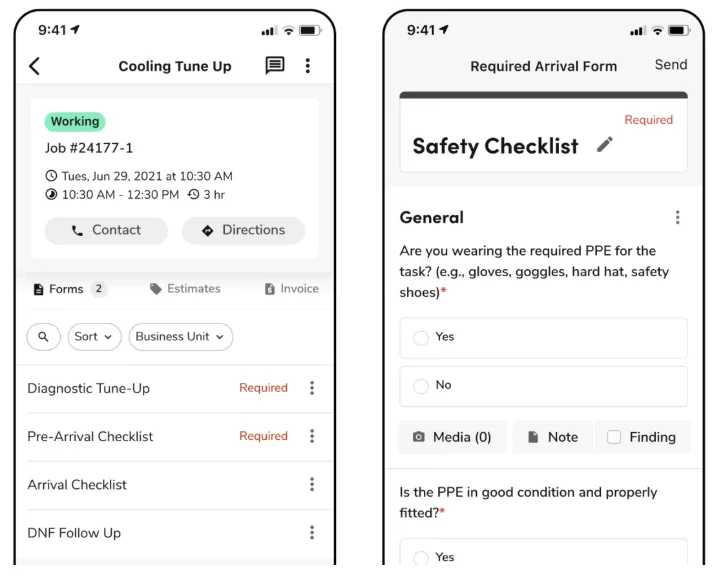
Once you complete the technician checklist or document, the system uploads it to the job record. Your office personnel can review the work in real time without waiting for paperwork.
Records equipment details and job photos
ServiceTitan’s Equipment Scanner records HVAC equipment brand, model, and serial number by scanning the unit label with the phone’s camera. The app saves these details automatically, saving time and reducing human errors.


You can also use the Field Service Mobile App to take photos or videos on site and upload them to the job record. When every technician has access to the same equipment data and images, future service, replacements, and warranty checks become much easier.
Creates estimates and collects payments on site
ServiceTitan’s mobile app helps you build estimates in the field. You can select equipment and parts from live supplier catalogs with up-to-date prices and present different options to the client.


Customers can review the estimate on screen and approve it right away to avoid delays. Once the job is complete, you can send the invoice from the app and use ServiceTitan’s built-in Payments feature to collect the payment on the spot.
Offers smart assistance
ServiceTitan’s Field Pro add-on gives you quick access to the information you need before and during the job to help you provide better services and improve customer satisfaction.
Before the visit, you can listen to an AI-generated summary of the job, equipment details, and service history, so you know what you’re walking into without digging through old records.
While working, you can use Atlas, ServiceTitan’s AI assistant, to find manuals, check system specs, or ask for HVAC troubleshooting suggestions. This guidance helps you diagnose problems quickly, recommend the right repairs, and complete service calls faster.


Over to You
AutoCAD HVAC tools help you draw system layouts, but accurate designs also need measurements, load calculations, airflow data, and the right equipment selection. Use supporting tools like ServiceTitan before you start drafting, to avoid mistakes and build efficient systems that work well after installation.
ServiceTitan offers an all-in-one HVAC Service Software platform that helps you manage every part of your business. From load calculations and system designs to scheduling, estimating, and job tracking, everything is in one place, improving efficiency and reducing mistakes.


ServiceTitan HVAC Software
ServiceTitan is a comprehensive HVAC business software solution built specifically to help service companies streamline their operations, boost revenue, and achieve growth. Our award-winning, cloud-based platform is trusted by more than 100,000+ contractors across the country.


