Templates Guides
Roofing Inspection Checklist: Free PDF Download
 Roofing
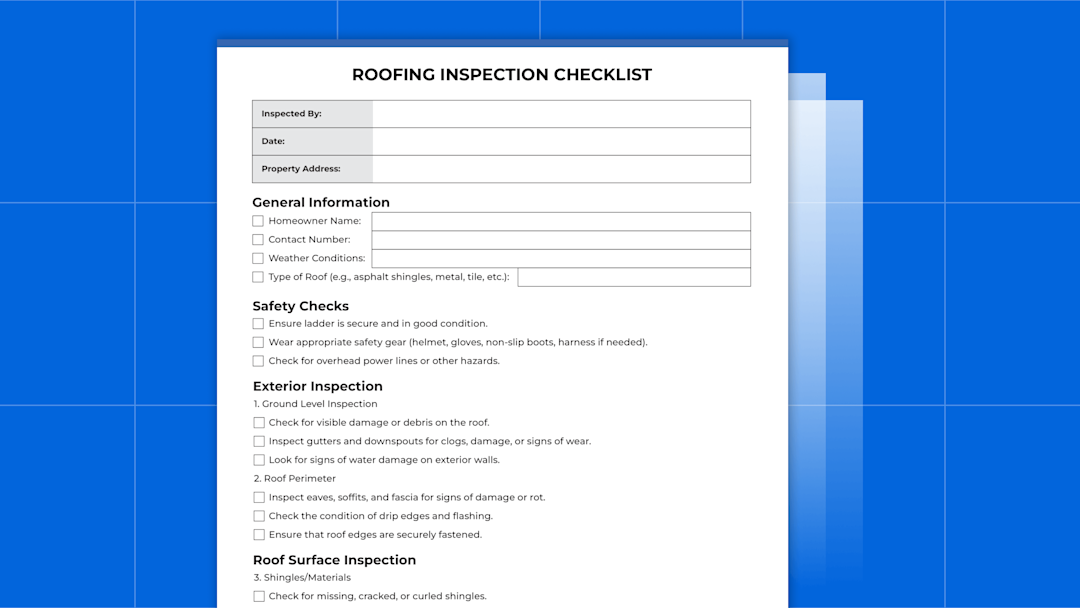
In this post, we share a free roofing inspection checklist for roofers. It includes the following sections:
General information (inspector name, property address, homeowner contact information, etc.)
Safety checks
Exterior inspection (ground level and roof perimeter)
Roof surface inspection
Attic inspection
Additional components (gutters, downspouts, fascia, chimney, etc.)
Final steps
Notes
Homeowner acknowledgement
Below, we’ll provide a link to download the checklist so you can begin using it for your roofing business.
However, while this checklist is useful for inspectors to reference during inspections, it’s important to note that PDF templates have some key limitations.
For example:
You can’t ensure they’re used for every job. This can increase the chance of a roofer failing to spot potential issues and sales opportunities.
PDFs don’t integrate with the other apps you use to run your business, such as your CRM, so it’s easy to lose records from inspections.
The details of issues discovered during inspections can’t be easily shared between field & office staff, causing delays in any next actions (e.g., checking warranty or inventory information, drafting estimates, ordering materials).
So, in addition to sharing the free roof inspection checklist below, we’ll also walk through how our roofing contractor software, ServiceTitan, solves these challenges and more.
Schedule a call with us to learn more about how our software, and accompanying mobile app, can help you streamline and grow your roofing business.
Roofing Inspection Checklist

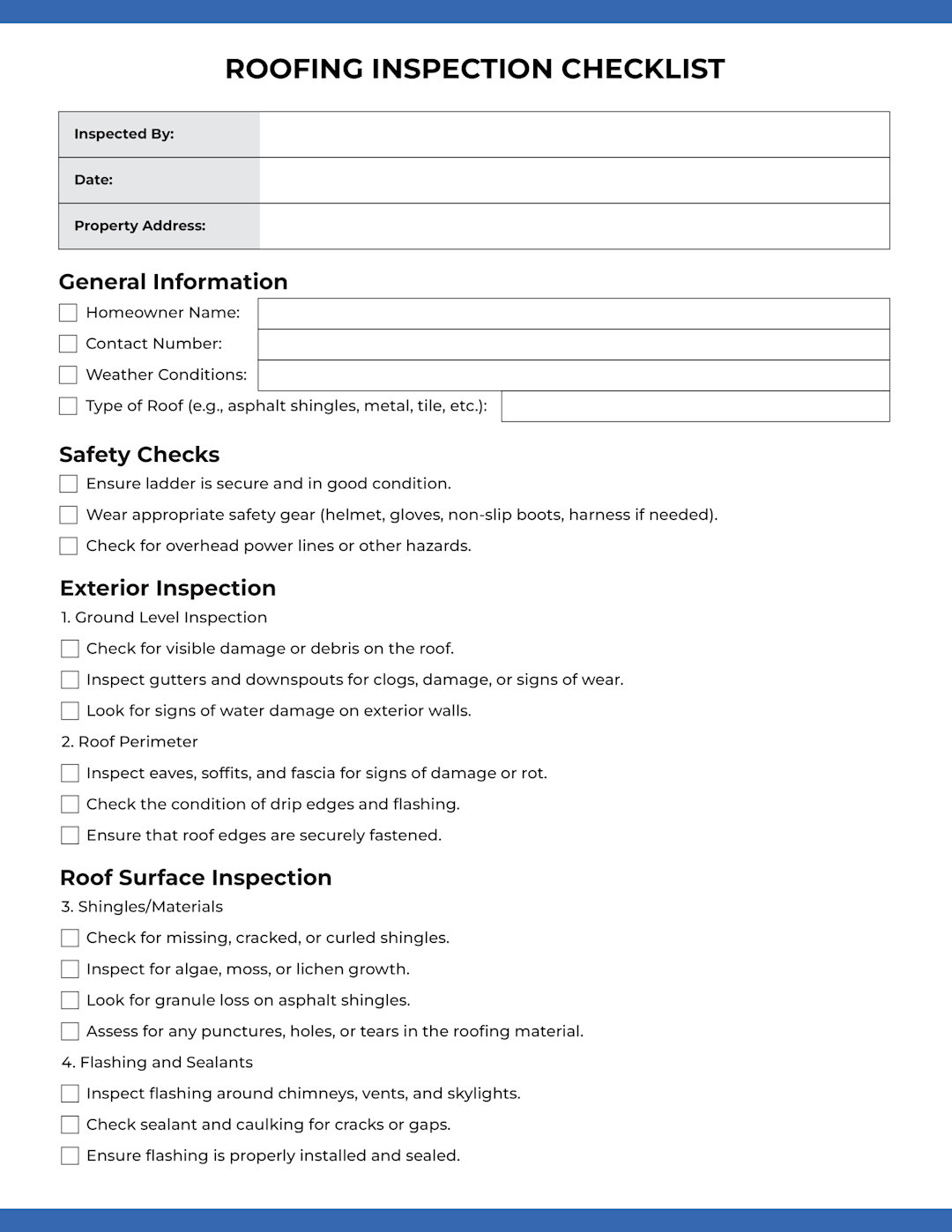
Click here to download our free roofing inspection checklist.
At the top, there’s a section to document general information for the job, including the date, inspector name, and property address.
Below that, the checklist is categorized into the following sections:
General Information
Homeowner name
Contact number
Weather conditions
Type of roofing system (e.g., asphalt shingles, metal, tile, PVC)
Safety Checks
Ensure the ladder is secure and in good condition.
Wear appropriate safety gear (helmet, gloves, non-slip boots, harness if needed).
Check for overhead power lines or other hazards.
Exterior Inspection
1. Ground Level Inspection
Check for visible damage or debris on the roof.
Inspect gutters and downspouts for clogs, buildup, damage, or signs of wear.
Look for signs of water damage on exterior walls.
2. Roof Perimeter
Inspect eaves, soffits, and fascia for signs of damage or rot.
Check the condition of drip edges and flashing.
Ensure that roof edges are securely fastened.
Roof Surface Inspection
3. Shingles/Materials
Check for cracked, curled, or missing shingles/exposed roof decking.
Inspect for algae, moss, or lichen growth.
Look for granule loss on asphalt shingles.
Assess for any punctures, holes, or tears in the roofing material.
4. Flashing and Sealants
Inspect metal flashing around chimneys, vents, and skylights.
Check sealant and caulking for cracks or gaps.
Ensure the flashing is properly installed and sealed.
5. Roof Penetrations
Examine vents, chimneys, and skylights for leaks or damage.
Ensure proper sealing around all penetrations.
Check for proper ventilation and airflow.
Attic Inspection (If accessible)
6. Attic Interior
Check for signs of water stains or leaks.
Look for mold growth, mildew, or rot.
Inspect insulation for moisture or damage.
Ensure proper ventilation in the attic.
Additional Components
7. Gutters and Downspouts
Ensure gutters are securely attached and not sagging.
Check for rust, cracks, or other damage.
Confirm that downspouts are clear and directing water away from the foundation.
8. Soffits and Fascia
Inspect for signs of rot, damage, or pest infestation.
Ensure vents are clear and not obstructed.
9. Chimney
Check for cracks, loose bricks, or mortar deterioration.
Ensure the chimney cap is in good condition and securely attached.
10. Skylights
Inspect skylight lenses for cracks or damage.
Ensure seals and flashing around skylights are intact.
Final Steps
Take photos of any damage or areas of concern.
Make note of any urgent repairs needed.
Provide recommendations for maintenance or repairs.
Clean up any debris or materials used during the inspection.
The final sections include fields for notes and signatures from the homeowner and inspector.
If followed, filling out this roofing inspection checklist can help ensure roofers thoroughly inspect a roof’s condition, spot potential problems, and recommend correct roof repairs. However, as we mentioned above, PDF or paper checklists have key limitations when it comes to:
Ensuring these checklists are filled out on every single job.
Storing and organizing inspection data.
Sharing information about roof problems or sales opportunities between field and office staff.
The #1 newsletter for the trades.
Below, we’ll discuss how roofing software like ServiceTitan can help contractors address these challenges.
How ServiceTitan Custom Forms Streamline Roofing Inspections
ServiceTitan’s roofing software allows contractors to create versatile and customized forms, including roofing inspection checklists.

Users can create checklists and easily add them to specific jobs, customers, locations, or equipment. All forms can be accessed on site via our mobile app (compatible with Android and iOS mobile devices), as well as by office staff via our desktop app.
With this functionality at their fingertips, salespeople no longer need to keep stacks of paper checklists in their trucks or transfer job and customer data to a computer system. Likewise, office staff no longer need to worry about printing these forms and distributing them to field staff.
Since ServiceTitan stores all information entered into the platform in the cloud, it’s fast and easy to find and access forms and customer info.
ServiceTitan Forms lets users build forms from scratch or start from customizable pre-built templates, like these roofing templates, tailored to a shop's specific needs.
Require the Right Forms on the Right Jobs
ServiceTitan lets you set rules that control which forms must be completed, by whom, and at what point in the job workflow. You can require that an inspection checklist is filled out before a job can be marked complete so there's no scenario where a crew finishes a roof and drives away without documenting the inspection.
Capture Photos and Notes Directly in the Form
Instead of taking photos on a phone and hoping someone matches them to the right job later, crew members capture photos and video directly within the form. Each image is tied to the specific inspection item it documents, so when you need to pull up the photo of how penetrations were flashed on a particular job, or show a homeowner that their skylights were properly sealed at installation, it's right there in the form, attached to the job record.
Use Conditional Logic to Guide Inspectors
Dynamic forms use conditional logic to show or hide fields based on previous answers. If an inspector marks a line item as "No" or "Fail," the form can automatically require a comment explaining the deficiency and prompt a photo upload.
This ensures flagged issues are documented with enough detail for the office to act on. Instead of a checkbox and a blank comments column, you get a specific description of the problem, a photo showing what's wrong, and a record of who flagged it and when.
Attach Forms to Jobs, Projects, Customers, or Locations

Completed inspection forms are stored directly on the job or project record in ServiceTitan. That means the checklist, photos, inspector notes, and sign-offs are all accessible from the same place where you track financials, scheduling, estimates, and invoices for that job.
Complete Forms On Site from Any Mobile Device
Crew leads and inspectors fill out forms on site using the ServiceTitan Field Mobile App, available on iOS and Android. Forms can be completed even in areas with spotty cell service and will sync once connectivity returns. Digital signatures from both the roofing contractor representative and the site supervisor can be captured right in the app, replacing the paper sign-off at the bottom of a traditional checklist.
The net result is inspections become a built-in part of your roofing workflow rather than an add-on that depends on PDFs and manual follow-up. Roofing professionals can focus on doing high-quality work while the system ensures that every inspection is documented, every deficiency is tracked, and every completed job has these records attached to it.
Other Ways ServiceTitan Helps Roofing Businesses Improve Efficiency and Profitability

Centralize Customer & Job Data (and Access It Anywhere)
ServiceTitan offers a customer relationship management (CRM) system to record, store, and access all of your job and customer data, beginning the moment a potential roofing customer calls in.
Our call booking functionality provides CSRs and office staff with the name and contact information of the incoming caller and prompts them to fill out a series of form fields that ensure they collect all of the necessary information to kick off a potential roofing job.

From the booking page, they can view the availability of their sales team, assign a team member to the job, and schedule a visit if the business or homeowner agrees to have someone come out.
At that point, a customer page is automatically created in which their contact information and job details can be stored as the job progresses. This data can be shared and accessed from the office via our desktop application, as well as remotely from a job site or elsewhere through our user-friendly field mobile app (compatible with iOS and Android devices).

Users also have the option to create a roofing project page in which financials can be tracked, appointments can be made, material orders can be placed, and other aspects of project management can be carried out.
Streamline Roof Measurement, Estimating, and Material Orders
Spec-Based Estimates

ServiceTitan spec-based estimates offer a streamlined approach to generating material lists and estimates. This feature leverages pre-built templates and forms to automatically calculate material costs and quantities, resulting in accurate and efficient estimates for your customers.
Here's a breakdown of how Spec-Based Estimates work and their advantages:
Forms and Templates: The process begins with creating a form tailored to your specific service, like reroofing. This form, accessible on both desktop and ServiceTitan Mobile, is used to gather crucial job details and measurements. This information is then fed into a Spec-Based Template, which links form fields with Pricebook items and applies predefined calculations. The template also allows you to offer different service tiers (Good, Better, Best) based on a single form submission.
Automated Calculations: The magic lies in the Excel file integrated with the template. This file houses the rules and calculations that determine material quantities and costs based on the form inputs. For instance, if a customer needs 20 squares of roofing, the template automatically calculates the required shingles, underlayment, and other materials, ensuring precise estimates.
Efficiency and Accuracy: Instead of manually calculating materials and costs, the system does it for you, freeing up your team to focus on customer interactions and other essential tasks. This automation not only speeds up the process but also eliminates the risk of human error, leading to accurate and consistent pricing.
Mobile Accessibility: The convenience of creating and presenting Spec-Based Estimates extends to ServiceTitan Mobile. This allows field staff to gather measurements on site, complete the form, and generate estimates instantly, providing a seamless experience for both your team and your customers.

Roofing Supplier Integrations
We offer integrations with roofing suppliers such as SRS Distribution, which auto-updates your pricebook with the most current pricing, product images, and descriptions.

Integrate with Popular Roofing Measurement Apps
ServiceTitan now integrates with popular roofing apps like EagleView and GAF QuickMeasure. These integrations further assist roofers in managing the entire job workflow, from the initial call to final estimates and material orders, offering a seamless experience between the business’s CRM and estimating/measurement apps.
Offer Modern and Impressive Customer Experiences
ServiceTitan offers a variety of features that help roofing businesses communicate professionalism and trustworthiness with their customers.
For example, our dispatching functionality includes text message notifications and Uber-style GPS tracking that keeps customers up to date about when sales reps, field supervisors, or crews are scheduled to arrive.

During the sales process, salespeople can offer prospects immediate financing, improving customer experiences while helping to close more sales.

Upon completing a job, companies can also offer convenient payment options — including cash, check, or credit card — right from their mobile device (iPhone, iPad, etc.).
Facilitate Crew Scheduling and Project Management

When it comes time to execute on new roof construction or roof replacement projects, ServiceTitan helps keep you on track with intuitive scheduling and project management tools.
Crew Scheduling provides a centralized view of workforce availability and assignments. You can:
Create and manage crews with designated leads for clear accountability.
Plan ahead using a one-week calendar view that shows real-time crew availability.
Avoid conflicts by assigning crews to multi-day jobs and instantly seeing updates when schedules change.
Project Management ties everything together. From a single dashboard, you can:
Track real-time project financials
Book or attach jobs
Track and manage estimates, invoices, and applications for payment
Add purchase orders, requisitions, and tasks
Together, these features help roofing businesses stay organized, improve communication between teams, and keep complex projects on track.
Gain More Visibility with Access to Real-Time Business Data
One of the biggest challenges for roofing contractors is getting timely and accurate financial data to track their cash flow and the overall health and performance of their business.
This is one area where ServiceTitan roofing software can deliver immense value. With ServiceTitan reporting, roofing contractors get a complete real-time view of their most important business KPIs, including:
Sales numbers
Revenue trends
Booking and conversion rates
And much more

They can also customize dashboards and create in-depth reports, allowing them to drill down into the sources of the numbers being reported in their financial data and roll up multiple locations into single reports, making ServiceTitan a particularly powerful platform for enterprise roofing businesses.
Understand the True ROI of Marketing Efforts to Optimize Your Campaigns
One of the most important aspects of effectively marketing a roofing business is measuring the ROI of your various channels and campaigns to know which campaigns are performing well.
ServiceTitan makes this data easily accessible to roofing companies, eliminating the struggle to understand ROI. Specifically, ServiceTitan offers campaign-tracking telephone numbers and real-time ROI reporting for all of your marketing campaigns.

You can calculate the ROI for each of your campaigns and also break it down into cost per lead. You can track the number of calls your campaigns brought in, the jobs your reps booked from these calls, and the actual revenue of those jobs.
By measuring the marketing ROI of each campaign, ServiceTitan helps roofing companies:
Know how much revenue each roofing marketing campaign generates.
Track how well staff convert new leads into jobs and sales.
Focus marketing dollars on the campaigns that actually make money.
Stop wasting money on ads — and platforms — that don’t perform.
See If ServiceTitan Is the Right CRM for Your Roofing Business
For over a decade, ServiceTitan has provided innovative products to help HVAC, electrical, plumbing, and other trade businesses run more efficiently and improve their profitability. And we are now investing heavily in developing an all-in-one business management solution for the roofing industry.
Throughout this post, we’ve discussed how our forms features can help streamline roofing inspections, and shared a sampling of our CRM features that benefit roofing businesses the most. However, we also offer automation and features for time tracking, invoicing, accounting, and more.
To see what our platform can offer your roofing business, schedule a free demo call.