
Templates Guides
Construction Work Order Template: Free Download
 Construction
November 26th, 2026


When you’re leading a construction project, you need a consistent way to document upcoming work, completion dates, and who’s in charge.
A construction work order helps office and field crews stay aligned. With the right template, you can create a standardized record of assigned tasks, responsibilities, and deadlines.
In this guide, we’ll cover:
What a construction work order is
What sections you’ll need to include
How you can create your own using the template
The benefits and drawbacks of a work order template
The best practices to follow when filling it out
How construction software automates work orders
To make things easier, you can download our work order template and tailor it to your specific needs.
What to Include in a Construction Work Order Template
A work order gives your crew the information they need to complete their tasks and provides the office team with a way to track the work. Here are the key fields to include in your work order form:
Project and customer information: Include your company name and info, customer information, and the project name and address. These details make it easy to see who’s working on which part of the project.
Work order number and rate: Every work order must have a unique, sequential number and the rate or pricing for your work. You can then use the work order number to reference a specific construction job, and the payment terms set expectations for total costs.
Project scope and description: Go into detail about what work will be done and what its scope is, providing clear job descriptions for the tasks involved.
Labor and materials: List required materials and labor, along with the subcontractor responsible for the work. This gives the crew a clear idea of what they’ll need to complete the job and who’s overseeing it.
Costs and estimates: Cover the total material and labor costs, including the estimates and the actual numbers when the work is done. This is the best way to track whether you stayed on budget.
Project scheduling: Cite the start and end dates of the project to clarify when the work happens and what’s next on the schedule.
Approval and signatures: Include authorization or approval signatures so the task can proceed once signed by an authorized person.
Additional notes: Add any notes or terms and conditions for details and context that don’t fit elsewhere.
The #1 newsletter for the trades.
What Is a Construction Work Order?
A construction work order is a standardized document you can use to describe what the work entails when planning a project. It covers what needs to be done, who’s responsible for each task, how much it’ll cost, the labor and materials needed, and the timeline and status.
It’s easy to confuse work orders with other documents used throughout the construction project. However, each serves a different purpose.
Contracts establish the terms of the entire project, while purchase orders cover goods and materials ordered from suppliers. Change orders modify the contract’s scope or price, while invoices bill for completed work.
A work order takes a more task-specific approach, outlining how activities or parts of the project should be carried out.
How to Create a Construction Work Order
Creating a work order involves several steps, from receiving the initial request to assigning work to the right team. Here’s how to build one from scratch.
Receive or identify the work order request: Get the initial request from the client or general contractor.
Assess scope and feasibility: Determine what work needs to be done and whether you can do it as requested.
Estimate labor, materials, equipment, and costs: Calculate the resources required and the total estimated job cost.
Assign priority level and timeline: Set milestones for each activity and prioritize the work against ongoing tasks.
Draft the work order using the template: Fill in all the required sections using the information you’ve gathered.
Route for approval and authorization signatures: Obtain signatures from the appropriate people before work begins.
Issue the work order to the crew or subcontractor: Assign the job to the team or trade partner responsible for finishing the work.
Monitor progress and document changes: Have your office team track the work and identify changes that require a separate change order form.
Perform quality inspection upon completion: Verify that the work meets the required standards and specifications.
Obtain completion sign-off: Get final confirmation from the customer that the work is complete and accepted.
Benefits and Drawbacks of Using a Construction Work Order Template
Work order templates are better than writing one up on the spot or not having one at all because they provide a standardized document. This keeps every work order consistent and helps you avoid missing required fields.
They also keep records consistent between the field and the office. Everyone knows what they’re assigned to do and who’s responsible for each task. Work orders let you track estimated costs and compare them to the actual costs, and they serve as your main document in case of disputes.
But they can have some caveats.
Someone still needs to fill them out manually, which means they can miss small details. And since spreadsheets in Excel or Google Sheets don’t update automatically with field data or connect to the rest of the operations, like cost and invoicing, it can lead to mistakes and duplicates.
Also, managing multiple sites and projects at once makes work order management difficult, and reviewing them requires extra effort.
Best Practices for Managing Work Orders
There are a few best practices you can follow to make your work orders as accurate and reliable as possible, such as:
Assign a unique sequential number to every work order: This makes each work order traceable to the day when a task was done and helps you keep them organized.
Never authorize work verbally—always document first: If you get the go-ahead verbally, you have no record if questions come up later about the work and costs.
Require dual signatures (issuer and performer) before work starts: Everyone agrees on the scope from the get-go.
Attach relevant drawings, photos, or specifications: Sharing these with your crew helps avoid guesswork about what they need to do.
Update work orders in real time as conditions change: You’ll have more accurate, useful records of what’s actually happening on site.
Establish dollar-amount thresholds for escalated approvals: It’s especially important for larger jobs that need sign-offs from higher-level stakeholders.
Reconcile completed work orders against invoices before payment: Catch errors between billed work and completed work to avoid disputes.
Archive all work orders with project close-out documents. Keep a complete archive to share in disputes or audits.
How Construction Management Software Simplifies Work Orders
A template can be a consistent and simple way to fill out a work order, but it still requires a lot of manual effort that you could otherwise automate.
With ServiceTitan’s construction software, you can connect your work order workflow with your daily operations in one platform, so everything updates automatically. This means fewer duplicates and less manual work.
Here’s how this software can help.
Create and assign work orders
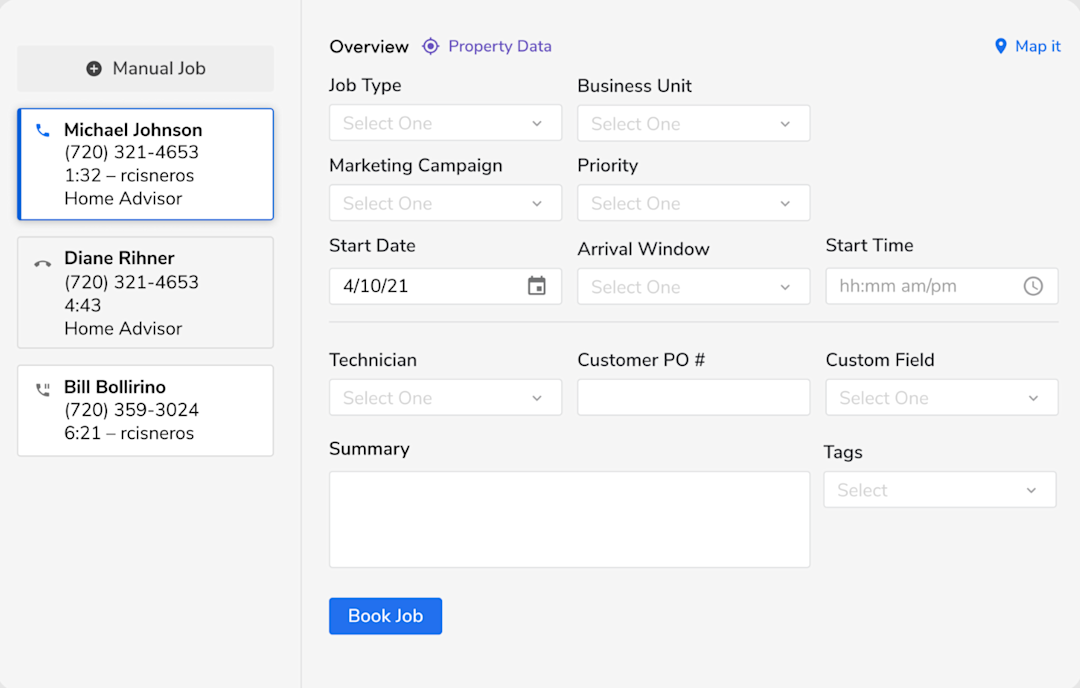
With ServiceTitan’s Call Booking feature, client info and project details fill in automatically as soon as a work request comes in. CSRs see the full history for that job site, including past work orders, so they don’t have to look anything up or re-enter it. The software carries that data into every document that follows.

Schedule and dispatch work
Once the work order is ready, use the service scheduling feature to set a job date and assign the right crew. ServiceTitan’s crew management tools help you stay on schedule, track labor hours and job progress in the field, and allocate resources more efficiently to maximize labor use.

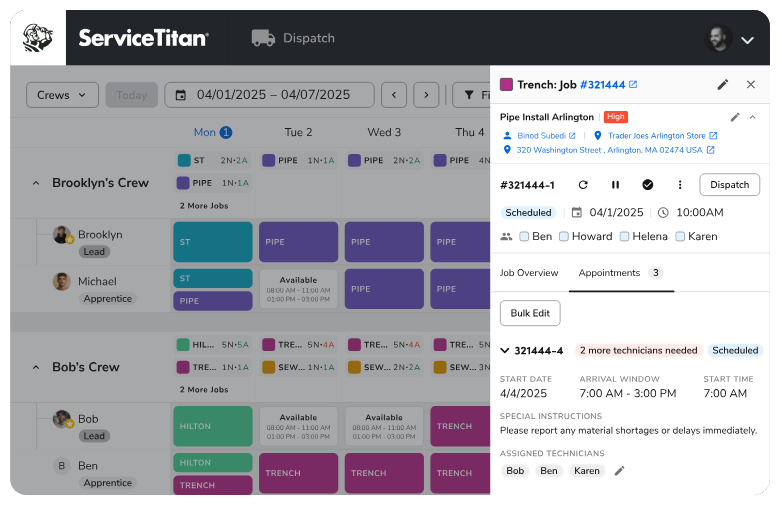
With the Field Service Dispatch software, you get a clear overview of each job and its current status, whether it’s assigned, confirmed, or paused. This reduces back-and-forth between your teams and customers.
Track labor and materials
ServiceTitan’s Pricebook Pro keeps your material and labor costs up to date in one centralized platform that your entire team can access. These prices flow directly into estimates and invoices, so everyone uses consistent, current pricing instead of outdated spreadsheets.

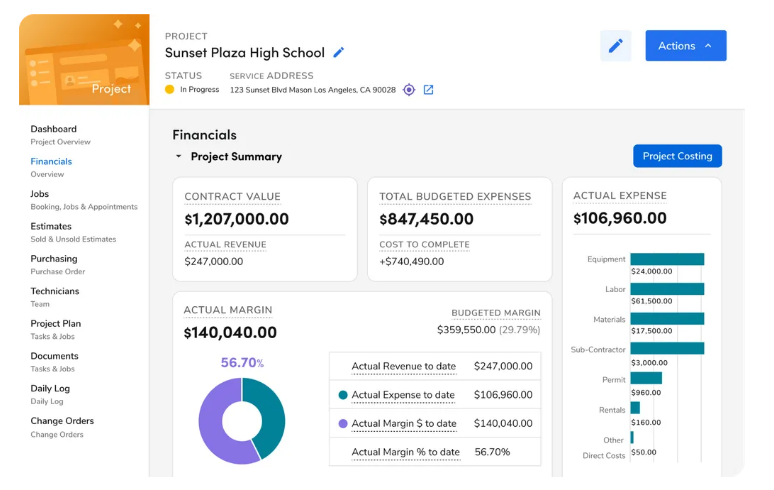
It also helps to keep your projects from running over budget.
Keep field and office teams aligned
With the Field Service App, office teams can stay connected.
Technicians can view all job details and customer history, including previous forms, estimates, and invoices, without calling the office. Dispatchers can message techs and see their current status, further reducing the communication gap.
In essence, the office knows what’s happening on the job instantly, while the crew has all the information available on their phones.
Connect work orders to invoicing and payments
Because the job information already lives in the system, ServiceTitan lets you handle billing directly from the completed work order, without re-entering items or prices.

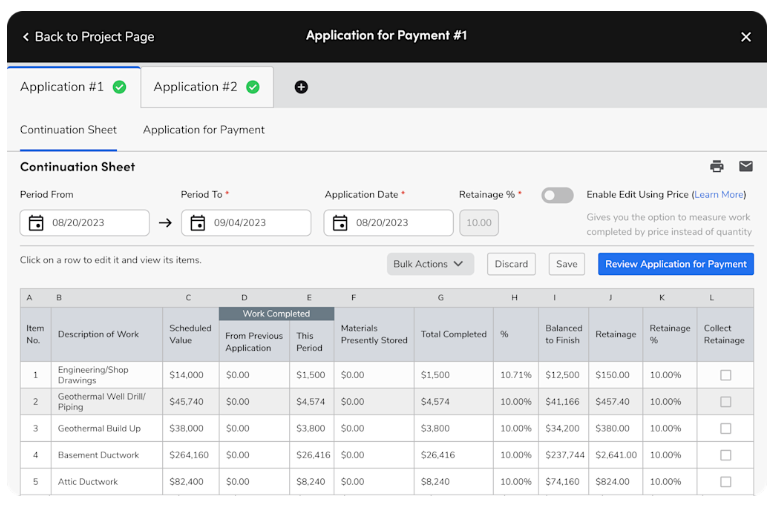
Invoices also include photos and video documentation to reduce disputes, while customers pay on site, online, or through other integrated payment options.
All of these features together make work orders a standardized, complete workflow, which is how you can scale without adding overhead.
Over to You
A construction work order is a simple way to keep your work documented and shared across the field and office.
With a template, you can keep this consistent across every job.
As your work order volume grows, a connected platform helps you manage all of the orders across every project and crew.
To find out how ServiceTitan makes work order management simpler for construction teams, book a demo.
ServiceTitan is an all-in-one construction management software platform built for contractors like you, designed to help you run your projects in one place. With it, you handle work orders and dispatch, as well as daily operations like invoicing and project management.


Frequently Asked Questions (FAQs)
Q1. What is the difference between a work order and a work request?
A work request is the client’s or general contractor’s request for specific work that needs to be done.
A work order is the document that instructs and assigns the crew to that specific task and covers everything from the work request to cost and timeline.
Q2. How long should you keep a construction work order?
Keep completed work orders archived, as they’re valuable documents if you need to handle disputes, audits, and warranty claims. The actual time you must keep these on hand is based on your contract terms and any local requirements.
Q3. How do you create a simple work order?
Start with the template and fill in the project details, scope of work, and client information. Assign the work to the appropriate subcontractor and crew, create estimates, set the timeline, and get approval.
