

 Roofing


Our team has developed a sample roofing contract outlining the terms for roofing projects. This versatile legal document suits various types of jobs, such as residential roofing contracts or new roof construction contracts.
To get your free template, simply fill out the form above (on mobile devices) or to the right (on desktop), and we’ll email it to you immediately.
What’s Included in the Free Roofing Contract Template
The editable PDF template includes fields to define the following:
Relevant dates: Creation date; commencement and completion dates for the roofing work.
Relevant parties: The contractor and their roofing company name; the client name (business owner, property owner, homeowner, etc.), and their contact information.
Contract price: The total sum of the contract to be paid under the payment terms and payment schedule set forth.
Signature lines: Fields for the client and contractor to sign the contract.
Note: Visit our roofing templates hub to access related templates, such as our roofing invoice template, roofing inspection report, or shingle roof inspection checklist.
What Every Roofing Contract Should Cover (and Common Mistakes to Avoid)
Our template gives you a clean starting framework with the core elements: parties, dates, price, signatures. Most contractors will want to expand on it with additional clauses tailored to how they run their business.
If some of the sections below look like they overlap with what you'd put in a roofing proposal or estimate, that's intentional. Your estimate covers what you'll do and what it costs. Your contract is where those details become binding and where you add the terms that protect your business when the job doesn't go as planned. A vague contract with a detailed estimate is a problem if a dispute ever comes up, because the contract is what's enforceable.
The sections below cover both: the job details that need to carry over from your estimate into the signed agreement, and the protective clauses that a contract provides.
Detailed Scope of Work
"Roof replacement" tells your customer almost nothing about what they're paying for. Your contract should spell out whether the job involves a full tear-off or an overlay, the specific materials being installed (manufacturer, product line, color), the square footage or number of squares, and any ancillary work like flashing replacement, gutter reattachment, or soffit repair. The more specific you are here, the fewer arguments you'll have when a homeowner says they assumed something was included.
Payment Schedule and Terms
Lump-sum billing puts all the cash flow risk on one side. Many established roofing contractors use a milestone-based schedule instead. A deposit, typically 30–50%, covers materials and mobilization. Progress payments are tied to defined stages of completion. A final payment comes due upon inspection or sign-off. Spell out the exact amounts, when each payment is due, and what happens if a payment is late. Cash flow problems on roofing jobs almost always trace back to payment terms that were too loose or never documented clearly.
Change Order Process
Roofing jobs hit surprises. Rotted decking, structural issues hidden under old shingles, a client request mid-project. Without a defined change order process in the contract, you're left negotiating scope and cost changes verbally, which rarely ends well.
Your contract should require written approval for any work outside the original scope before that work begins, along with the associated cost adjustment. This protects your margins and gives the customer a clear record of what changed and why.
Timeline, Delays, and Weather Provisions
Include your projected start and completion dates, but also address what happens when the schedule slips for reasons outside your control. Weather is the obvious factor for roofing. But material delivery delays and permit hold-ups happen, too. A good contract defines how delays are communicated, how the timeline adjusts, and makes clear that weather-related pauses don't constitute a breach.
Warranty Terms
Roofing customers care about warranties, and confusion here generates callbacks and complaints. Your contract should clearly separate workmanship warranty from manufacturer warranty. For workmanship, define what your labor covers, the coverage period, and any exclusions. For the manufacturer warranty, reference the specific product warranty documentation and make clear that claims go through the manufacturer's process, not yours. Specify what actions by the customer might void either type of coverage, such as improper maintenance or unauthorized modifications.
Permits, Inspections, and Code Compliance
Be explicit about who is responsible for pulling permits and scheduling inspections. In most cases this falls on the contractor, but if your contract doesn't state that, you're opening the door to finger-pointing when an inspection doesn't happen or a code issue surfaces. This section should also confirm that all work will be performed in compliance with local building codes, which protects both you and the property owner.
Insurance and Liability
Your contract should confirm that your company carries general liability insurance and workers' compensation coverage, and state that you'll provide proof of insurance upon request. This is table stakes for any professional roofing contractor, but putting it in the contract signals credibility and gives the customer confidence that they're not exposed if something goes wrong on their property.
Cleanup and Debris Removal
This sounds minor until it becomes a dispute. State clearly that your crew will remove all debris, old materials, and equipment from the property upon completion, and that you'll perform a final walkthrough including a magnetic nail sweep of the yard and driveway. Property owners get anxious about the mess a roofing job creates. Setting the expectation upfront eliminates one more source of friction at closeout.
Why PDF Contract Templates Fall Short in the Roofing Business
The sections above give you a solid foundation for what a roofing contract agreement should cover. But managing contracts with that level of detail across dozens of active jobs using static PDFs or Word documents creates its own set of problems:
Contracts Live in Isolation from the Rest of the Job
A PDF contract can't talk to your estimate, your pricebook, or your invoicing system. When material costs shift between the proposal and the contract signing, you're manually updating numbers in a disconnected document. When a change order adjusts the scope and payment schedule mid-job, the original contract sits unchanged in someone's email or downloads folder. Over time, the signed contract and the actual job can diverge, and reconciling them at closeout becomes its own project.
Tracking and Retrieval Across Jobs Breaks Down
Physical contracts or scattered PDFs get saved in the wrong folder, stuck on individual devices, or buried in email threads. When a customer calls six months later with a warranty question, your team shouldn't have to spend 20 minutes finding the signed agreement. And when you're running 15 or 30 active jobs, each with its own contract, change orders, and signed documents, the filing problem compounds quickly. Without a centralized system, contract management becomes a constant low-grade drag on your office staff.
Why Settle for Outdated PDFs or Tools? ServiceTitan Solves These Pain Points
PDF contract forms may work for small independent contractors, but as a business scales, contract management tools that are integrated within your customer relationship and project management systems offer a better solution.
In the next section, we’ll explain how ServiceTitan’s roofing software helps contractors manage contracts, protecting every job with airtight documentation from first handshake to final payment.
The #1 newsletter for the trades.
How ServiceTitan Modernizes Roofing Contract Management
The majority of ServiceTitan users include contractual details in their proposals, with the proposal representing the entire agreement between the contractor and the client (whether that’s the general contractor or the building owner).
For jobs that require legal contracts beyond what you’d reasonably include in a proposal, ServiceTitan digital forms and project documentation make it easy to share, sign, and keep contracts organized.
Below we’ll cover how both of these workflows work.
Option #1: Roofing Proposals with Contract Details Included
Speed Up Roof Measurements

ServiceTitan integrates with popular roofing measurement tools, including EagleView, GAF QuickMeasure, and Hover, moving roof measurements seamlessly into your estimating process. Instead of manually entering dimensions, your team can use professional measurement reports to speed up estimating and maintain consistency across projects.
Auto-Generate Roofing Material Lists with Supplier-Integrated Pricing

Once measurements are captured, ServiceTitan’s spec-based estimating tools automatically calculate material quantities based on your predefined rules. Material lists are generated using your pricebook, which can stay current through integrations with roofing suppliers like SRS Distribution. These supplier integrations automatically update pricing, product images, and descriptions, helping ensure estimates reflect real-world costs.
Build Spec-Based Estimates Using Templates and Forms

Spec-based estimates are powered by customizable templates and forms designed around common roofing services, such as residential roofing replacements. Your team enters job details and measurements once, and ServiceTitan applies predefined calculations to generate accurate estimates. Templates can support tiered options (e.g. designer shingles, high-definition shingles, and 3-tab shingles) from a single form, making it easier to present choices without rebuilding estimates from scratch.
Because calculations are automated, estimators spend less time doing math and more time reviewing scope and pricing with customers—while reducing the risk of manual errors.
Compile Estimates Into Multi-Option Project Proposals

Completed estimates can be quickly compiled into clear, professional proposals that build trust and are easy for customers to review, approve, and e-sign. Field teams can create and present proposals directly from ServiceTitan Mobile, enabling same-day estimating and faster decision-making while still following your company’s pricing rules and standards.
Offer Convenient Financing Options to Close More Deals

During the sales process, salespeople can offer immediate financing, improving customer experiences while helping to close more sales.
Together, these tools help roofers produce consistent, accurate proposals—moving smoothly from measurements to materials to estimates, all within a single system.
Option #2: Digital Forms and Project Documents to Manage Contracts

ServiceTitan’s project management tools include document and form management. Any contracts associated with the job can be sent to clients, e-signed, and stored alongside all of the other project documents.
Other Ways That ServiceTitan Helps Roofing Contractors Run and Grow Their Businesses
Commercial Sales Pipeline Management


Staying on top of sales opportunities can be a major challenge—especially when relying on spreadsheets, whiteboards, or disconnected CRM tools. ServiceTitan’s commercial service CRM functionality brings order to the chaos by letting you manage every sales opportunity in the same system you use to run your jobs.
Key capabilities include:
Opportunity tracking: From site surveys to proposal follow-ups, track and manage your pipeline in one place, fully integrated with the rest of your operations.
Sales meeting–ready reports: Out-of-the-box reports let sales managers see performance by rep, review pipeline health, and track closed vs. lost deals.
Task assignment by sales stage: Assign next steps automatically as opportunities move from New to Proposal Sent to Won—keeping your sales team organized and accountable.
If your roofing business is looking to streamline your sales process, reduce manual data entry, and gain full pipeline visibility, ServiceTitan’s CRM gives you the tools to close more deals with less friction.
Centralize Customer Data & Job Management
ServiceTitan offers a customer relationship management (CRM) system to record, store, and access your job and customer data, beginning when a potential roofing customer calls in.
Our call booking functionality provides CSRs and office staff with the name and contact information of the incoming caller and prompts them to fill out a series of form fields that ensure they collect all of the necessary information to kick off a potential roofing job.

From the booking page, they can view the availability of their sales team, assign a team member to the job, and schedule a visit if the business or homeowner agrees to have someone come out.
At that point, a customer page is automatically created in which their contact information and job details can be stored as the job progresses. This data can be shared and accessed from the office via our desktop application or remotely from a job site through our user-friendly field mobile app (discussed below).

Users also have the option to create a roofing project page in which financials can be tracked, appointments can be made, material orders can be placed, and other aspects of project management can be carried out.
Empower Estimators and Production Managers with a User-Friendly Mobile App
ServiceTitan’s mobile app, compatible with both Android and iOS operating systems, offers an intuitive user experience that sales teams love, beginning with the home screen dashboard where field staff can quickly and easily see the meetings or jobs they have scheduled for that day:

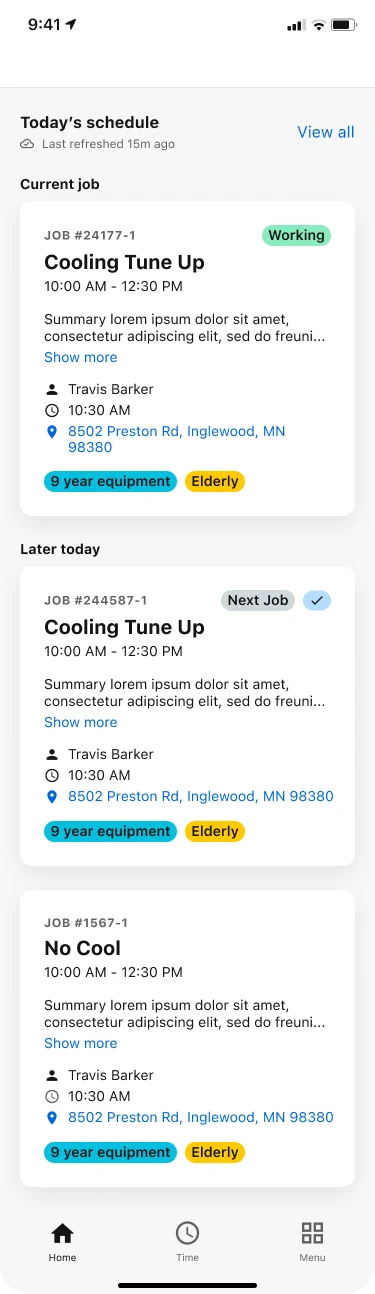
Each job card can be tapped to pull up a dedicated page with further details about that job.
Teams can also access the essential tools they need throughout the lifecycle of a job.
Via the left sidebar, they can view and utilize:
Customer History: Easily view roofing quotes, customer details, photos and videos from the job site, relevant customer docs, and more.

Job Forms: Teams can access customizable forms that require e-signatures such as roofing contract templates, as well as roofing inspection checklists, report forms, and more.
Estimates: Present good-better-best proposals via our mobile app estimate presentation.
Invoices: Roofers can quickly generate and send invoices to customers in various ways. ServiceTitan AI features, including our invoice summary generator and invoice email generator, further automate this process.
Closeout: Once they complete a job, production managers can accept payments on the spot from customers via check or credit card.
Offer Modern and Impressive Customer Experiences
ServiceTitan offers a variety of features that help roofing businesses communicate professionalism and trustworthiness with their customers.
For example, our dispatching functionality includes text message notifications and Uber-style GPS tracking that keeps customers up to date about when sales reps, field supervisors, or crews are scheduled to arrive.

Store, Track, and Automate Follow-Ups on Open Estimates
Once an estimate or job proposal is created and added to ServiceTitan, it is automatically stored in our cloud-based software, accessible both from the office and the field. From there, our follow-up features allow you to track and consistently follow up on unsold estimates to take advantage of every sales opportunity.


When an estimate is created for a job but isn’t sold, an opportunity is automatically created and alerts can be set up to remind staff to follow up with customers.
Opportunities can be in the following statuses:
Open: Opportunities that haven't been won or dismissed. Click on open opportunities to see the next scheduled follow-up date. Open opportunities can be:
Not Attempted: No contact has been made since the opportunity was originally created or presented to the customer. This is the default state once an opportunity is created.
Unreachable: The last time someone tried to follow up on this opportunity, the customer could not be reached.
Contacted: The customer was contacted on the last follow-up date, but no estimate has been sold to them yet.
Won: An estimate was sold to the customer with a subtotal equal to or greater than the sold threshold.
Dismissed: The customer decided not to proceed with the roofing contract, and the opportunity was dismissed. Also, an opportunity with a sold estimate subtotal under the sold threshold is dismissed.
These features offer large- and small-business owners peace of mind that every open opportunity is followed up while eliminating the need to manually track open estimates in spreadsheets.
For the majority of our users, this means more closed deals and increased revenue.
Facilitate Crew Scheduling and Project Management

When it comes time to execute on new roof construction or roof replacement projects, ServiceTitan helps keep you on track with intuitive scheduling and project management tools.
Crew Scheduling provides a centralized view of workforce availability and assignments. You can:
Create and manage crews with designated leads for clear accountability.
Plan ahead using a one-week calendar view that shows real-time crew availability.
Avoid conflicts by assigning crews to multi-day jobs and instantly seeing updates when schedules change.
Project Management ties everything together. From a single dashboard, you can:
Track real-time project financials
Book or attach jobs
Track and manage estimates, invoices, and applications for payment
Add purchase orders, requisitions, and tasks
Together, these features help roofing businesses stay organized, improve communication between teams, and keep complex projects on track.
Real-Time Reports and Customizable Dashboards

One of the big challenges for roofing contractors is getting timely and accurate financial data to track their cash flow and the overall health and performance of their business.
This is one area where ServiceTitan roofing software can deliver immense value. With ServiceTitan reporting, roofing contractors get a complete real-time view of their most important business KPIs, including:
Sales numbers
Revenue trends
Booking and conversion rates
They also can customize dashboards and create in-depth reports, allowing them to drill down into the sources of the numbers being reported in their financial data and roll up multiple locations into single reports, making ServiceTitan a particularly powerful platform for enterprise roofing businesses.
Understand the True ROI of Marketing Efforts to Optimize Your Campaigns
One of the most important aspects of effectively marketing a roofing business is measuring the ROI of your various channels and campaigns to know which campaigns are performing well.
ServiceTitan makes this data easily accessible to roofing companies, eliminating the struggle to understand ROI. Specifically, ServiceTitan offers campaign-tracking telephone numbers and real-time ROI reporting for all of your marketing campaigns.

For each of your campaigns, you can track the number of calls they brought in, the jobs your reps booked from these calls, and the actual sales results of those jobs. You can also calculate the ROI on your roofing advertising campaigns, as ServiceTitan identifies how much revenue you make from each ad and breaks it down into cost per lead.
By measuring the marketing ROI of each campaign, ServiceTitan helps roofing companies:
Know how much revenue each roofing marketing campaign generates.
Track how well staff convert new leads into jobs and sales.
Focus marketing dollars on the campaigns that actually make money.
Stop wasting money on ads—and platforms—that don’t perform.
Get a ServiceTitan Demo to See How We Can Help You Optimize and Grow Your Roofing Business
Using end-to-end roofing software like ServiceTitan empowers contractors with the tools they need to improve efficiency and grow their revenue.
In addition to the features we’ve discussed throughout this post, our software offers additional features to facilitate other core business functions, including:
Want to see for yourself how ServiceTitan’s roofing software can give you the tools you need to streamline operations and grow your business? Schedule a call for a free product tour.


