

Templates Guides
HVAC Calculation Excel Sheets: A Guide for Accurate Load Estimates


How do you determine how much heating and cooling a building needs?
Instead of spending hours manually calculating everything from scratch (and basically rebuilding the same spreadsheet from six months ago) you can use a heating, ventilation, and air conditioning (HVAC) calculation sheet. It’s a simple, but powerful tool for estimating how many air handling units a space needs.
In this guide, you will learn:
What an HVAC calculation sheet includes
How to calculate heat and cooling loads in Excel
The difference between an HVAC load calculation and an estimate
Who uses HVAC calculation Excel spreadsheets
And to make things even easier, we’ll also explore how tools like ServiceTitan can automate calculations and completely replace manual spreadsheets.
What Is an HVAC Calculation Sheet?
An HVAC load calculation sheet is a spreadsheet used to calculate the heating and cooling load requirements of a building.
It helps HVAC technicians estimate the amount of heating and cooling a space needs to maintain comfortable indoor temperatures or even improve indoor air quality.
Most spreadsheets use a combination of input fields and prebuilt formulas to simplify the calculations. You simply enter the data, such as ceiling height or insulation levels, and the formulas will automatically calculate the values, such as heating loads, cooling loads, and equipment capacity.
It cuts down the back-and-forth and makes it a lot harder to miss something before you size the system.
Tip: Quickly determine the amount of heating and cooling a building needs with our free calculator.
The #1 newsletter for the trades.
What Does an HVAC Load Calculation Include?
HVAC load calculation sheets include key measurements and other variables needed to determine the right heating and cooling capacity for a certain space.
For example, maybe you only want to heat one room, so you might want to use a single-zone ductless system to improve natural ventilation or flow rate in the space. Without this sheet, it’d be harder to properly size HVAC systems for energy efficiency and comfort.
Calculate SEER energy savings with this easy-to-use free calculator.
Cooling load: Estimates the amount of heat that must be removed from a space to maintain the desired indoor temperature.
Heating load: How much heat is needed to keep a building warm during cold temperatures.
Airflow requirement: Determines the amount of conditioned air needed in each room.
Discover how much money and energy you can save with your HVAC system using our tool.
Duct sizing: Calculates the correct ductwork dimensions needed to distribute airflow efficiently throughout the building.
Figure out the right size for your projects.
Safety factors: Adds a small margin to account for unexpected heat gains, system inefficiencies, or changing environmental conditions. If you want to spot symptoms that indicate an internal issue, read our guide on troubleshooting.
How Do You Calculate Cooling Load in Excel?
To calculate if a central air conditioner can cool a home or has the right energy efficiency ratio (EER) you must first enter all variables into Excel. Then use the formula below to estimate the amount of heat you need to remove from the space:
TOTAL COOLING LOAD = AREA LOAD + OCCUPANCY LOAD + EQUIPMENT LOAD + SOLAR GAIN
How Do You Calculate Heat Load in Excel?
How much heat does a building lose when it’s cold outside? That’s how much a heating system must compensate for to maintain a comfortable indoor temperature.
A typical formula for calculating heat loads and establishing whether you need a heat pump, furnace, radiator, or boiler is:
HEAT LOSS = U-VALUE x SURFACE AREA x TEMPERATURE DIFFERENCE
Of course, there are additional formulas you can use to account for heat that gets lost through roofs, floors, windows, doors, and the outside air entering the building.
Each component contributes to the overall HVAC design. You must calculate them separately, then bring them all together to determine the total heating load.
What Is the Difference Between HVAC Load and Estimate?
The main difference between an HVAC load calculation and an HVAC estimate is that a load calculation determines the technical heating and cooling requirements of a building, while an estimate calculates the projected costs of installing or repairing an HVAC system.
Although they’re both used during HVAC planning, they have different purposes:
Purpose: A load calculation determines the correct HVAC size needed to maintain indoor comfort, while an estimate focuses on pricing the labor, materials, and equipment costs.
Inputs: Load calculations use technical building data such as square footage, window exposure, and climate conditions. On the other hand, estimates use pricing factors like equipment type, labor rates, and material costs.
Outputs: A load calculation produces results like required BTUs, CFM, and system capacity. An estimate produces a projected project cost or quote for the client. If you want to properly measure ventilation, use this handy calculator.
Knowing the difference between the two matters: a load calc tells you what a system needs to do, while an estimate tells customers what it’ll cost them.
Who Uses HVAC Calculation Excel Sheets?
Any HVAC professional who needs to estimate heating and cooling loads, size equipment (e.g., mini-split systems), and select the right refrigerant and other components needed (such as air handlers, humidifiers, dehumidifiers):
HVAC contractors to ensure equipment is not oversized or undersized, no matter if it's a residential or commercial project.
Mechanical engineers to analyze building performance and support correct HVAC system planning during the design phase.
HVAC estimators to create accurate project quotes based on the system requirements.
Small HVAC business owners who want to perform load calculations without breaking the bank.
It’s how they can plan installations without delays or repeat visits. A simple heat load calculation sheet is enough to help them organize building data, perform technical calculations on the spot, and review system requirements before selecting the right equipment.
How Can ServiceTitan Replace HVAC Excel Sheets?
Tired of manually entering building data every time you need to calculate the heating or cooling load of a building?
To avoid duplicated work, inconsistent documentation across projects, and other headaches, ServiceTitan can easily replace error-prone Excel sheets by managing load calculations, estimating, and business operations in a single system.
Instead of relying on manual spreadsheets, you use a tool that automatically connects calculations with real project data.
Technicians and office teams perform load-based equipment sizing more easily and generate professional estimates directly in the system without re-entering vital data.

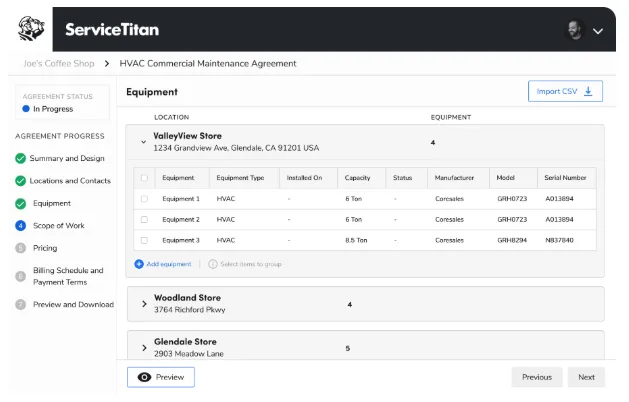
The platform also connects estimates with job scheduling, dispatching, and customer management, so it’s even easier to track projects from first estimates to final installations and beyond.
ServiceTitan’s dispatch board shows real-time availability of each technician in the field, giving you a complete view of your business’s situation. You can also set up workflows that streamline the entire scheduling process, helping your team reduce manual tasks and ensure the right technician is assigned to the job.


ServiceTitan’s Field Reporting software helps you understand what works and what doesn’t, giving you actual numbers on what’s working (aka, if your ops are running smoothly) from wherever you happen to be.
And if you want to get into the nitty-gritty, customize the dynamic dashboard to display the metrics and KPIs that mean the most to you. For example, you can monitor what your techs do in the field to keep your team sharp and productive.


Over to You
HVAC calculation Excel sheets are a practical way to estimate heating and cooling loads before selecting or installing equipment.
But while they can help organize inputs and basic formulas, a spreadsheet can’t keep up with more complicated calculations. That’s why ServiceTitan is capable of handling the whole calculation workflow for you, as well as creating estimates, scheduling jobs, and analyzing performance through real-time reporting.
ServiceTitan is a software platform that helps teams manage the entire calculation process, as well as create estimates and proposals, schedule jobs, and analyze performance through real-time reporting.


