





The right HVAC checklist app does more than replace paper forms. It helps technicians work more consistently, complete inspections accurately, and capture the information your office needs without slowing down the job.
With so many options available, choosing the right tool can be challenging. Some apps focus solely on digital forms and checklists, while others, like ServiceTitan, integrate checklist functionality into a broader platform that also manages scheduling, dispatching, customer relationships, and billing.
To simplify your decision, we’ve compared 10 of the best HVAC checklist apps on the market. In this guide, you’ll find:
A side-by-side comparison of top HVAC checklist apps
Key strengths and limitations of each option
Guidance on when a standalone checklist app is sufficient and when an all-in-one field service platform is the better choice
Let’s get started!
Disclaimer: The information below is accurate as of July 2026.
Want to see how ServiceTitan’s HVAC software can streamline operations and grow your business? Schedule a call for a free product tour.
Here’s a Quick Comparison of The Top HVAC Checklist Apps
Tool | Best For | Checklist Approach | Starting Price (Verified) |
ServiceTitan
| Full-service HVAC/plumbing/electrical shops
| Checklists embedded in job workflow, tied to invoicing/CRM | Custom quote |
Klipboard | Multi-trade field service teams
| No-code checklist/certificate builder | $25–55/user/mo (Starter, 2-user min, annual) |
Alpha Software
| Businesses with unusual/complex workflows | No-code + low-code custom checklist builder | Starts from $30/month/per user with unlimited forms |
Jobber | Solo operators and small teams | Basic checklists (Connect plan and up) | $29/mo (Core, annual, 1 user) |
Housecall Pro
| Mid-market home service businesses | Custom checklists from Basic plan up | $59/mo (Basic, annual) |
measureQuick | Diagnostic standardization, not FSM | Companywide diagnostic checklists (Premier) | Free forever (diagnostics); $49/user/mo for Premier |
Snapii | Businesses with complicated workflows seeking a fully custom solution
| Build-your-own checklist app, no template | From ~$17/user/mo; custom builds quoted separately |
GoCanvas | Teams needing a large template library | Pre-built HVAC checklist templates + custom builder
| Reported between $29–49/user/mo (3-user min) |
Fieldpoint | Commercial HVAC, project-based work | Checklists trigger automated follow-up actions | Custom quote (not published) |
FieldInsight | Asset-heavy commercial HVAC/electrical/fire | Asset-based checklists with instructional images | From $139/ user/ month |
1. ServiceTitan
ServiceTitan is an all-in-one field service management software solution built specifically for HVAC, plumbing, and electrical businesses. Rather than treating checklists as a standalone tool, ServiceTitan becomes your HVAC buddy by building them directly into the job workflow.
This means employees can complete tasks and capture important details without switching between multiple systems. At the same time, back-office staff get a single, reliable record of completed work within the same platform they already use to dispatch technicians and manage operations.
So, how does it work in practice? From creating and assigning a checklist to completing it in the field and reviewing the results, the entire process stays connected within ServiceTitan.
Managers and supervisors can use forms to create checklists from scratch or templates to direct HVAC techs to thoroughly assess details such as:
Refrigerant levels / refrigerant charge
Refrigerant lines
Proper airflow
Duct sizes
Drain pans
Heat exchangers
Flue system
Pulleys
Once created, you can assign the checklists to specific jobs, tasks, customers, locations, or equipment. You can also automate workflows by having certain actions trigger a checklist, requiring HVAC techs to complete specific steps before moving forward. With conditional logic, the checklist can change based on the technician’s answers, so they see only the questions and next steps that apply to the situation.
For example, if an HVAC tech identifies that a system isn’t cooling properly, the checklist would prompt them to check the thermostat, airflow, refrigerant levels, and other common causes. If they identify a heating issue instead, the maintenance checklist would surface a different set of questions and diagnostic steps related to the furnace or heat pump.
To mark a job as complete and access checklists, technicians use the desktop or mobile app (compatible with Android and iOS devices). Every action they take syncs automatically to the customer's record, the invoice, and the office dashboard, so every detail stays up to date.

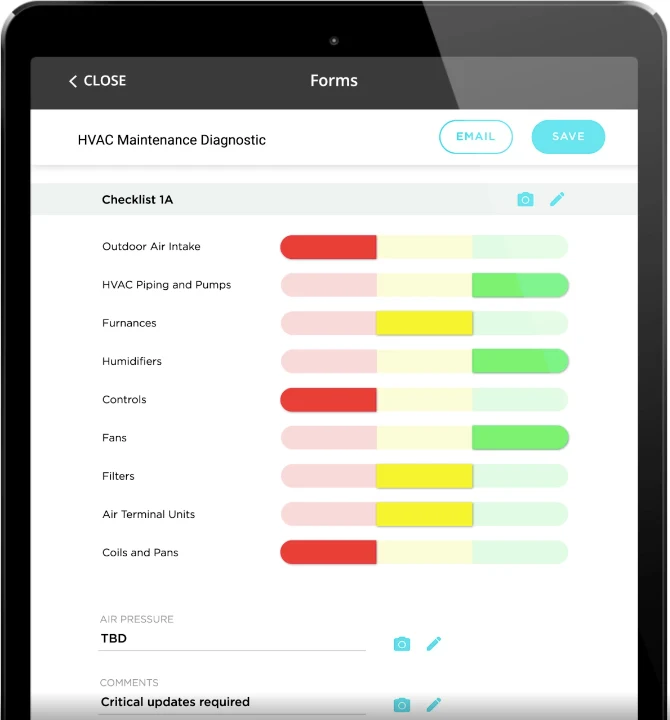
With this functionality at techs’ fingertips, there’s no need to keep stacks of paper checklists stocked in your trucks or to transfer job and customer data from one app (or Excel spreadsheet) to another. This convenience allows HVAC professionals and business owners to save time and eliminate errors.
Key features that deliver these capabilities include:
Customizable forms and templates: Build checklists from scratch or customize pre-built TitanExchange templates by adding, removing, or adjusting fields to match your company’s procedures.
Conditional logic: Design “if-this-then-that” style forms that automatically adjust based on previous answers, only showing the relevant next steps. One input triggers one set of follow-up questions and actions, while another triggers a different set.
Flexible assignment and completion rules: Attach checklists to specific jobs, tasks, customers, locations, or equipment, and require technicians to complete them before closing a job.
Desktop and mobile access: Office and field employees can access and complete forms through ServiceTitan’s desktop platform or its Android and iOS apps on mobile devices.
Real-time records and reusable forms: Checklist data is stored in the cloud for immediate access across the business, while forms can be duplicated at the job site to document multiple units.
Pricing:
ServiceTitan pricing is customized based on business size, number of technicians, and which modules you need. You'll need to request a quote for exact numbers.
Pros:
Checklists connect directly to scheduling, invoicing, and customer records. There’s no need to manually update records.
Managers can program forms to force technicians to complete forms, upload photos, and collect signatures before a job is closed.
Purpose-built for HVAC, plumbing, and electrical rather than general field service, and scales to large multi-crew operations.
Cons:
Pricing isn't published, so you'll need a sales conversation to get a number.
More robust than what some solo operators or very small teams may need, with a longer onboarding process than lightweight checklist apps.
Other HVAC Checklist Features For Job Workflows That Surround HVAC Inspections
ServiceTitan is more than an HVAC checklist app. It provides additional features that help HVAC business owners manage their entire operations, including workflows surrounding inspections. This includes:
Estimate creation, presentation, and follow-up: When technicians uncover an issue, they can build Good-Better-Best proposals from the integrated pricebook, and make presentations to showcase photos, specifications, and pricing.


Centralized membership management: Store, search, and update maintenance agreement details in one place, with access for both office staff and field technicians. You can also create preventive maintenance events and remind customers ahead of time.


Connected call booking and dispatch: Give customer service representatives access to caller histories. They can use dropdowns to collect required details for more efficient job scheduling, and add jobs to the dispatch board.
Integrated invoicing, payments, and financing: Convert estimate details into accurate invoices, collect signatures and payments online or in the field. While presenting invoices, techs can present customers with financing options to close the deal.
Want to see how ServiceTitan’s HVAC software can streamline operations and grow your business? Schedule a call for a free product tour.
The #1 newsletter for the trades.
2. Klipboard


Source: Klipboard.io
Klipboard is a job management platform for field service businesses across multiple trades, including HVAC, electrical, and facilities maintenance.
Its checklist functionality lives inside a broader planned-maintenance and job management workflow. With it, managers can create clear, step-by-step checklists without coding. Important questions can be made mandatory, and tasks can be arranged in the order they need to be completed.
HVAC techs can then complete them and add photos and captions to document work done and issues encountered.
This helps your team follow the right process and deliver consistent, high-quality work on every job.
Key Features:
Custom mobile form builder: Create tailored checklists, risk assessments, and maintenance audits using a drag-and-drop system.
Mandatory data capture: Set specific checklist items as mandatory to prevent field workers from submitting incomplete jobs.
Rich media formatting: Build checklists that let technicians insert photos, drop-down options, tables, and free text notes directly.
Compliance templates: Access industry-standard forms, including Gas Safe, electrical certificates, and HVAC service sheets.
Real-time office sync: Checklists completed on the mobile app are uploaded to the web dashboard instantly for immediate review.
Digital signatures and PDFs: Generate custom-styled PDF reports with embedded customer or technician finger-drawn signatures upon completion.
Pricing:
Klipboard's own pricing page lists three tiers:
Starter from $25/user/month (two-user minimum)
Innovator from $35/user/month (four-user minimum, includes checklist/form templates)
Professional from $55/user/month (five-user minimum, includes the custom form builder and asset management).
Pros:
Users say the team is always on hand to assist, especially during the onboarding process.
The flexibility to create fully customizable forms, complete with photo and signature capture, allows users to collect exactly the information needed for every job.
The mandatory entry module allows supervisors to restrict technicians from proceeding to standard task checklists until preliminary safety or risk assessments are finished.
Cons:
Custom checklist builder and asset management require the top Professional tier, not entry-level plans.
The software has a steep learning curve, especially for first-time users.
3. Alpha Software


Alpha Software offers two products designed to help businesses digitize inspections and field operations.
First is Alpha TransForm. It is a no-code platform for creating digital inspection forms, checklists, and audits. The checklists are simple to create and have offline functionality. This means any detail entered in an area with low internet connectivity automatically syncs to the cloud and its associated record once the tech gets to an area with a stronger network.
Second, Alpha Anywhere is a low-code development platform for building custom workflows with advanced logic in days or weeks, rather than months. All you need is a fundamental knowledge of programming languages.
Together, these tools help businesses replace paper forms with mobile-friendly digital workflows tailored to their processes.
Key Features:
Conditional logic: Questions change based on previous answers. For example, if a technician marks an item as 'Fail,' the checklist can automatically require follow-up questions, photos, or additional details.
Smart forms: Technicians can complete inspections more quickly with pass/fail buttons, custom number keypads, dropdown menus, and built-in timers.
Photo capture and annotations: Users can take photos during an inspection, draw on them, or add notes to document issues more clearly.
QR code and barcode scanning: Scanning an asset's code automatically pulls up relevant equipment information, reducing manual data entry.
Offline calculations: Forms can perform calculations and generate scores even without an internet connection.
Automatic corrective actions: If an inspection identifies a problem, the system can automatically create a Corrective and Preventive Action (CAPA) task for follow-up.
Pros:
Strong offline capability built for connectivity-challenged environments.
There is a no-code option for non-technical users, and a low-code option for technical users.
New users can try out the tool with the free option before committing financially.
Cons:
Because the software is too robust, users struggle to know how to build the perfect product.
A major gripe for users is that the web-based application has a large learning curve.
4. Jobber


Source: Getjobber.com
Jobber is a popular field service management tool for small home service businesses in fields like HVAC, landscaping, and cleaning services. Its Form feature (now called Checklist) lets you build checklists with spaces (checkboxes, image uploads, answer fields, and dropdown menus) for data entry and then attach them to jobs and assessments.
One major feature worth pointing out is the checklist’s structured nature.
Rather than a single long list of fields, each checklist is organized into sections, with individual questions nested inside. This means related information (say, everything about a unit's refrigerant levels) can be grouped together instead of scattered throughout the form.
Technicians filling it out in the field get a clearer sense of what belongs where, and office staff reviewing completed checklists can find specific answers faster without scrolling through an undifferentiated list. Certain questions can also be marked as required, so a technician can't submit the checklist without providing critical information upfront.
The software helps businesses manage scheduling, quoting, invoicing, and client management from a single platform.
However, the checklist functionality is only available in the Connect plan and above.
Key Features:
Job and assessment linkage: Checklists attach directly to active job sheets or initial on-site property assessments, giving technicians a clear to-do list while on location.
Basic task management: Creates clear, actionable lists where workers can check off steps as they complete them to maintain a consistent standard of service.
Media attachment support: Allows technicians to upload photos directly from their phone camera roll or snap live images within the app, which are automatically consolidated into the client's filterable file and media library.
Pricing:
Core starts at $29/month (one user, annual billing).
Connect starts at $99/month annually (one user) and includes a checklist feature.
Grow starts at $149/month annually (one user).
Pros:
Affordable entry point for solo operators.
Beyond checklists, the software has tools for other HVAC business processes. This ensures every detail captured via a checklist is linked to the right job or customer, and can be easily accessed.
Cons:
Checklists aren't available on the entry-level Core plan—they require Connect or higher plans.
Per-user pricing gets expensive as teams grow.
Reporting is a commonly cited weak point, with no custom report builder or technician performance dashboards.
The email button is labeled 'Pay Invoice' instead of 'View and Pay Invoice,' which leads customers to assume they're being asked to pay blindly without seeing the invoice first. This delays payments and causes extra back-and-forth.
Customers complain about having to pay additional fees for some features, such as in-platform messaging.
5. Housecall Pro


Source: Housecallpro.com
Housecall Pro is a field service platform built for home service professionals, offering scheduling, dispatching, invoicing, and customer communication tools.
Unlike Jobber, its custom checklist feature is built into its basic tier. This means HVAC businesses don't have to pay extra or move up a pricing tier just to access structured checklists for their jobs.
Even better, the checklist feature comes with an added capability: a status tracker. Using red, yellow, and green tags, technicians and office staff can see at a glance whether a checklist is incomplete, in progress, or fully done. This gives managers a quick way to spot which jobs need attention without opening every checklist individually.
Key Features:
Visual condition badges: Forms support a direct 'Pass / Flag / Fail' evaluation toggle, marking on-site equipment status with instant green, yellow, or red visual indicators.
Enforced submission rules: Specific critical steps can be toggled as 'Required.' The mobile application blocks field techs from finalizing estimates or finishing a job until those lines are marked off.
Seamless estimate linking: Field findings and deficiency notes captured in the checklist populate directly into the quoting system, letting technicians generate upsell pricing for repairs within minutes.
Integrated customer sharing: Office staff can choose to link a completed checklist PDF directly as an email attachment alongside the client's final invoice.
Pricing:
Housecall Pro offers a 14-day free trial to new users, while its paid plans start from $59/month.
Pros:
Checklists available starting on the entry-level Basic plan, unlike several competitors that gate this feature to higher tiers.
Solid mid-market option with strong marketing automation (postcards, review requests) that many competitors lack.
14-day free trial with no credit card required, and no long-term contract on any plan.
Cons:
Users on the Basic and Essential plans can't see job locations on a map while scheduling, making it difficult to group nearby jobs together. This leads to inefficient routing.
Costs can climb quickly, as several core features (flat-rate pricebook, vehicle GPS, sales proposals) are paid add-ons on top of the subscription.
6. measureQuick


Source: measurequick.com
Unlike the general business platforms on this list, measureQuick is built specifically for HVAC diagnostics, commissioning, and performance testing.
It does not focus on tasks such as scheduling or invoicing. Instead, it helps technicians measure system performance and compare the results with industry standards.
The app connects to Bluetooth-enabled HVAC tools from brands such as Fieldpiece and Testo. It collects live readings and assigns an HVAC Vitals score from 0 to 100.
Its Companywide Checklists feature allows service managers to create standard diagnostic procedures and send them to every technician’s device. These checklists support more than simple tick-box tasks. Technicians can add photos and short video clips to specific inspection points, such as thermostat wiring, ductwork, indoor coils, and condensate drainage. The files are then saved automatically with the job record.
Key Features:
Live Bluetooth sync: The checklists do not rely on manual text entry. They link to over 80+ smart Bluetooth probes and tools from 17+ brands (like Fieldpiece and Testo) to automatically pull and check live pressures, temperatures, and static airflows.
HVAC vitals score: Rather than a simple 'pass/fail' checkmark, the system normalizes live measurements against outdoor weather conditions to score a system's true operating efficiency on a 0–100 scale.
ACCA QI certification: A passing checklist and Vitals score automatically map to the Air Conditioning Contractors of America (ACCA) Quality Installation criteria, instantly generating official compliance certificates.
Rich media verification: To prove the work was completed correctly, checklist items support standard checkbox verification, photo captures, and short annotated video clips embedded directly into the final homeowner report.
Pricing:
measureQuick offers a two-tier plan. The free plan and the paid plan, which starts at $49/ user/ month.
Pros:
Free tier offers genuine diagnostic value with no trial period or card required.
Standardizes diagnostic procedures across an entire team via companywide checklists tied to specific workflow types.
measureQuick works with over 80 Bluetooth-enabled tools across 17+ brands, so technicians aren't tied to a single manufacturer's equipment to use the platform's diagnostic features.
Cons:
Companywide Checklist features require the paid Premier tier at $49/user/month.
Provides so much information at once that newer technicians can experience analysis paralysis.
Designed to be used alongside (not instead of) a full field service management tool.
7. Snapii


Source: Snapii.com
Snapii is a no-code mobile app and form builder designed for construction, inspection, and field service teams.
Rather than providing a dedicated HVAC checklist out of the box, it gives businesses the tools to create their own mobile checklists, inspection forms, reports, and workflows.
Teams can start from a template, build a form from scratch, or upload an existing document and convert it into a mobile-friendly format. Or send their requirements to Snapii and have its team create a custom solution.
Technicians can complete forms in the field, even without an internet connection, with data submitted once they reconnect. Forms can include photos, videos, audio, voice-to-text answers, location data, and electronic signatures.
This makes Snapii a flexible option for HVAC businesses that are willing to build a checklist around their own processes, rather than use a ready-made, HVAC-specific inspection system.
Key Features:
Visual drag-and-drop builder: Allows businesses to design completely bespoke mobile inspection checklists and multi-page field reports without writing a single line of code.
Bespoke app commissioning: For companies lacking internal resources, Snapii provides an option to commission their in-house development team to build and configure a tailored checklist app from scratch.
Ready-made deployment blueprints: Ships with pre-built app templates and baseline configurations across multiple sectors, including building maintenance, HVAC audits, logistics, and heavy machinery checklists.
Resilient offline mode: Field technicians can execute complex safety audits, log equipment states, and capture media in remote environments without cellular or Wi-Fi connectivity.
Multimodal verification: Supports rich inputs within checklist forms, including device camera photos, touch-drawn digital signatures, audio notes, and instant GPS location stamps.
Document processing: Automatically converts completed mobile checklists into custom-structured PDF or Excel files, which can be immediately emailed to clients or archived internally.
Pricing:
Snapii runs a pay-per-use plan and also charges an additional $0.99 per additional submission.
Pros:
Maximum flexibility to design a checklist exactly how you want it, with a codeless drag-and-drop builder.
No coding skills required to build basic forms, and offers ready-made industry templates as a starting point.
Option to have Snapii's team build a fully custom app rather than DIY.
Cons:
Opaque, project-dependent pricing makes upfront budgeting harder than with a fixed-tier competitor.
Requires more setup time than an out-of-the-box HVAC app since there's no pre-built checklist template to start from.
Not built specifically around HVAC scheduling or invoicing workflows.
8. GoCanvas


Source: gocanvas.com
Acquired by Nemetschek Group in June 2024, GoCanvas is a mobile form builder that helps HVAC, plumbing, and electrical companies digitize checklists, inspection reports, and work orders.
The software includes a library of ready-made HVAC templates alongside dispatch and scheduling features, making it a middle-ground option between a pure form tool and a full field-service management platform.
Using its drag-and-drop editor, teams can adapt existing forms or build new workflows without writing code. Checklists can include electronic signatures, photos, videos, GPS data, push notifications, and offline data collection, allowing technicians to complete documentation even when an internet connection is unavailable.
Key Features:
Unlimited forms and submissions: Field crews can fill out and submit an unlimited number of custom digital forms. The platform offers a drag-and-drop builder to turn existing paper processes into mobile applications without writing code.
Rich field-data capture: Technicians can capture high-resolution photos directly inside forms, tag exact locations automatically with GPS coordinates, and operate seamlessly in remote locations via offline mode, which queues data and auto-syncs when service returns.
Dispatch and scheduling module: Supervisors can assign jobs, schedule tasks, view technician workloads, and track completion progress in real time directly from the central GoCanvas Work Hub Dashboard.
HVAC template library: GoCanvas maintains a robust directory of thousands of pre-made templates. These include standardized forms for HVAC system inspections, preventive maintenance checklists, safety audits, change orders, and professional invoices.
Pricing:
GoCanvas offers a three-tier pricing system:
Essential starting at $29/ per user/ month, billed annually
Pro at $39/per user/ month, billed annually
Max tier costs $49/per user/ month, billed annually
Pros:
Large library of ready-made HVAC checklist templates included at every tier.
Strong offline reliability, built specifically for field data collection with automatic sync on reconnect.
Unlimited forms and submissions included at every published tier.
Cons:
Three-user minimum makes it less accessible for true solo operators.
Users report a real learning curve for building and managing custom forms, plus mixed experiences with the cancellation process.
9. Fieldpoint


Source: Fieldpoint.net
Fieldpoint is a field service platform built for commercial HVAC and refrigeration businesses managing complex, project-based work. As such, the checklist feature is one of many, designed to help ensure all jobs are executed to preset standards.
To build a checklist, you simply need to drag and drop the blocks you need. You can make key questions mandatory and use conditional logic to reveal follow-up questions based on a technician’s answers. This helps guide them through different situations and ensures they follow the right steps for each job.
To facilitate accurate documentation, there are fields for technicians to record every data point, upload photos, and take down detailed notes.
When technicians are working in areas with limited or no internet access, they can continue recording information offline. The data then syncs automatically once a reliable connection is available.
Key Features:
ERP-integrated data execution: Checklists do not just sit isolated in a field app. When a technician completes an asset compliance list or records material changes, the data updates live and syncs into heavy back-office ERP systems like Oracle NetSuite, Microsoft Dynamics, CMiC, and QuickBooks.
Tiered-service quoting links: A distinct feature of Fieldpoint is its ability to build multi-option spending plans (e.g., Standard vs. Premium vs. Emergency tiers) within a quote. Technicians use checklist inspection findings to build these tier packages directly on site, converting a customer's selected plan instantly into an active work order.
Deep multi-layer configuration: Checklists can be tailored down to the specific branch, customer site, asset type, or even the precise nature of the recurring repair call. Dispatchers can also modify active checklists on the fly if an unexpected issue arises on site.
Subcontractor enforcement: Companies can push specific checklist protocols out to third-party vendors or external subcontractors via the mobile interface, ensuring outside labor maintains exact corporate audit trails and safety standards.
Pricing:
Fieldpoint doesn't publish flat pricing; businesses need to request a custom quote based on team size and modules needed.
Pros:
Fieldpoint centralizes time tracking, expense management, and client invoicing in a single system, making billing more efficient.
Multi-tier quoting logic lets customers choose between standard, premium, and emergency service packages from one quote.
Handles complex, multi-stage commercial projects with real-time job costing and AIA progress billing.
Deep ERP integrations (NetSuite, Microsoft Dynamics, CMiC, QuickBooks) for larger back-office operations.
Cons:
Pricing isn't published, so budgeting requires a sales conversation.
Extensive customization increases the risk of system issues or broken workflows if changes aren't thoroughly tested.
The software needs a really good internet connection to work, otherwise the information won't sync to the server.
10. FieldInsight


Source: Fieldinsight.com
FieldInsight is useful for HVAC businesses that need to keep technician qualifications, safety records, and internal procedures up to date.
You can use its Forms feature to manage documents such as trade licenses, refrigerant-handling certifications, safety training, site inductions, SOP acknowledgments, vehicle licenses, and incident reports. Expiration dates can be added to each form, so recurring requirements automatically become due for renewal instead of relying on manual reminders.
Forms can be organized by category, making it easier to separate technician credentials, safety documents, and company procedures. You can also add custom fields for details such as license numbers, issuing authorities, supporting documents, and instructions.
When a technician submits a form, it can be sent directly to a nominated manager for approval. Technicians receive requests by email or SMS and complete them from the field, while you can quickly see which records are outstanding, submitted, approved, or approaching renewal.
Key Features:
Equipment-bound forms: Checklists are tied directly to an asset's unique record. When a technician selects a specific unit on site, the system auto-populates its historical data and loads matching technical checklists.
Mandatory SWMS and compliance: Safework Method Statements (SWMS) and safety audits can be configured as mandatory. The mobile app ensures technicians check off on-site safety steps and collect digital signatures before the work is completed.
Long-term PPM scheduling: Checklists are integrated into a Planned Preventive Maintenance (PPM) scheduler that lets service managers program asset service routines up to two years in advance.
Offline connectivity guard: Technicians can review asset service logs, execute inspections, and record field data completely offline. The local inputs synchronize back to the office as soon as a cellular signal is detected.
Pricing:
FieldInsight lists two pricing tiers:
Administrator for $139/ user/ month
Technician for $65/ user/ month
Pros:
FieldInsight is highly intuitive and lets users connect multiple accounting software accounts.
The platform offers comprehensive onboarding and responsive live chat support, making it easier to learn the software and resolve issues.
The software lets technicians complete service reports and invoices on site as soon as a job is finished.
Cons:
A user pointed out that the product inventory tracking is basic and could be improved.
The initial set-up process can be time-consuming and tricky.
Some users note small usability issues, such as inconsistent button placement across the platform, a job search function that could be more effective for ongoing jobs, and the mobile app lacking a way to add job numbers directly to timesheets.
How to Choose the Right HVAC App
The right checklist app depends less on which tool has the longest feature list and more on how it fits into your daily workflow. Here are a few steps that can help you:
Map your current workflow: Note where paperwork or manual checklists currently slow your team down (during inspections, installations, or maintenance visits) so you know exactly what the app needs to solve.
Decide between a point solution and an all-in-one platform: A standalone checklist app might be cheaper upfront, but if it doesn't connect to your scheduling, invoicing, and customer records, your office staff will end up re-entering the same data across multiple systems.
Test offline reliability: HVAC technicians often work in basements, rooftops, or areas with poor signal, so confirm the app captures data offline and syncs reliably once connectivity returns.
Compare total cost at your team size: Per-user pricing can look affordable at five technicians and become expensive at 20.
Over to You
Every HVAC business eventually outgrows paper checklists and disconnected apps. Whether you choose a lightweight, standalone checklist tool or a fully integrated platform, the goal is the same: consistent work quality, fewer missed steps, and less time spent on admin.
If you're ready to see how a checklist feature that's built into your entire operation (including scheduling, dispatching, invoicing, and customer records) can save your team hours every week, check out the ServiceTitan software.
Ready to see how ServiceTitan works? Contact our sales team for a personalized demo.
ServiceTitan is an all-in-one digital software solution designed to serve HVAC businesses. With this software, you're certain of efficient operations, increased revenue, and sustained business growth. Our cloud-based platform is trusted globally by thousands of trade businesses.


ServiceTitan HVAC Software
ServiceTitan is a comprehensive HVAC business software solution built specifically to help service companies streamline their operations, boost revenue, and achieve growth. Our award-winning, cloud-based platform is trusted by more than 100,000+ contractors across the country.


