


Your total cost to complete a service job involves multiple cost centers, such as labor, inventory and parts, fuel, and other overhead. When you fail to accurately track these costs, it’s easy to mistakenly undercharge and cut into your profits. And if you’re managing it all manually, mistakes are almost guaranteed.
That’s where job costing software comes in. It automates cost tracking, giving you a clear picture of every job's actual cost, so you can price your services profitably.
In this guide, we’ll break down what job costing software is, its key benefits, and a few top solutions to consider.
Want to grow your construction business? Click here to get a demo.
What is job-costing software?
Job costing software automates an accounting system that tracks the accumulation of costs and revenue for each job. Key areas of job costing include labor costs, materials, and overhead. Accurate budgeting and estimates depend on the accuracy of these figures.
The #1 newsletter for the trades.
How Does Job Costing Software Work?
Here’s a breakdown of how job costing software works:


Let’s take a closer look at them.
1. Tracks progress on job details
Stay on top of job progress from start to finish
Make adjustments based on real-time data
Tracking a job in detail gives you greater control. ServiceTitan’s Job Costing Software tracks work in progress and identifies potential risks, so you can complete jobs on time and within budget, from service and maintenance to construction projects.
With it, you can tag expenditures with color-coded labels, allowing you to easily find the cost for specific items or project stages at a glance.


Change orders can throw a project off budget, as can increased material costs or additional labor, such as specialty subcontractors. With ServiceTitan, you can track your budgets and proactively manage risks by tracking productivity, inventory, and change requests in detail, providing instant insight into job progress and status.


Since labor often comprises the biggest expense of a service management job, use time tracking to stay on top of costs. Track time with ServiceTitan’s Payroll Software, which designates payroll and timesheet job costs when technicians work jobs across different departments.

This allows you to see what’s happening in real time, so you can make quick, data-driven decisions to keep projects on budget and maximize profitability.
2. Manages project financials
Integrate with construction accounting software for up-to-date data
Make faster budgeting decisions
A successful work-in-progress project requires detailed financial oversight, from labor rates to material surcharges. Automation through integrated construction and accounting software leaves nothing overlooked.
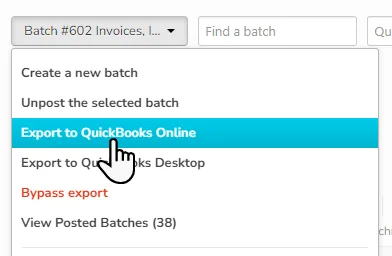
ServiceTitan seamlessly integrates with QuickBooks and Sage Intacct, recording data from sold estimates, job invoices, purchase orders, payroll, and accounts receivable.

Up-to-date financial data means you can stay on top of budgeted versus actual cost, allowing you to manage cash flow, make faster decisions, and stay within budget. The breakdowns show clear variances in cost, as well as at-a-glance percentages of the budget used, to increase functionality.


Even better, technicians can avoid charging wrong amounts by using ServiceTitan’s mobile app to confirm the current prices of each item.
3. Improves cash flow
Efficiently manage billing cycles
Increase revenue in the field
ServiceTitan’s software helps your business get paid faster.
You can set billing schedules based on how a project progresses, so you invoice at the right time and always know what’s still owed. Updating project costs as work changes keeps your finances accurate and prevents surprises.


It also helps you win more business. By offering good-better-best estimates and clear task descriptions, your team can show customers exactly what they’re getting—and at different price points.


ServiceTitan’s Payment Processing Software makes it even easier: techs can accept payments in the field, customers get flexible payment options, and your office spends less time on accounting. That means faster payments, smoother operations, and better cash flow.
4. Forecasts profit
Track profit margin on every job
Capture data to boost profit
Job costing software helps you accurately predict how much you’ll be making on each job by allowing you to track your profit margin from the beginning to the end of a project.
ServiceTitan’s Construction Management Software helps you see exactly how much profit each job is making. Integrated financial tools let you compare costs to revenue, showing your profit margin in dollars and percentages.

You also get a clear view of expenses. By tracking labor, materials, equipment, and taxes in real time, you can control costs, stick to budgets, and increase profit.
Using real-time data for every job keeps your finances accurate and helps your company stay on track to meet profit goals.
5. Advances company direction
Leverage data for future profit
Focus on profit-generating jobs
A job costing software solution also gives you the information you need to make better decisions on service, maintenance, installation, or construction jobs.
Whether you work in the home services or construction industry, data from past jobs enables you to create more accurate estimates and make better management decisions.
Data from job costing software provides a template for future estimates, because you can see how many actual hours it took to complete a certain type of job, or the exact amount of material costs. Plus, it gives you data-driven insight into which projects generate profit, so you can steer your company toward growth.
Overall, job costing software benefits both large construction companies and small businesses in project management, as it keeps all projects financially on target.
Companies gain from future jobs, too, because this business intelligence enables them to examine past job costs and compile more accurate estimates and customer pricing. This generates a greater profit margin and enables realistic growth projection.
What Are the Benefits of Job Costing Software?
Spreadsheets and clipboards enable you to record and track project costs without incurring any fees. However, their limitations cancel out any cost savings they bring:
They're prone to human error
They make it harder to track expenses and profits in real time
They don’t integrate with other tools
Job costing platforms are the direct opposite. Although they charge premium fees, the benefits they bring far outweigh the dollar amount you pay for them. Some benefits include:
More accurate cost tracking: Expenses—labor, materials, and overhead—are automatically assigned to specific projects. Compared to using a spreadsheet, this minimizes the odds of billing and budgeting errors, ensuring you make a healthy profit margin on each project.
Clearer profitability insights: Your exact profit margin is displayed in both dollars and percentages, and automatically updates as the project progresses. This helps you to know when to cut costs, to protect your profits.
Cost-overrun prevention: Actual vs. budgeted costs are compared throughout your project. This allows you to anticipate overruns and know when to adjust your expenses or submit a change order to request more money.
Better resource allocation: You get a snapshot of all resources—materials, labor, and equipment—assigned to a project. With this information, you can allocate resources to places where they’ll have the most impact.
Cash flow protection: Billing milestones are highlighted at each stage of the project. That way, you send invoices early, ensuring that you’re paid quicker and have sufficient cash flow to complete the project.
However, to help you make an informed decision about using job costing software, you also need to know the challenges you might face.
What Challenges Come With Job Costing Software?
Like any tool, job costing platforms come with their challenges. The good news is that each of these challenges has a solution. With the right platform, you can overcome them and unlock the full benefits that job costing software has to offer.
Here, we explore the most common challenges and show how the right software helps you solve them.
Setup complexity
Getting started with job costing software can be overwhelming, especially if the tool requires extensive customization. In some cases, you might have to seek the help of an IT expert.
To make setup easier, choose a platform that provides step-by-step onboarding guides and ready-to-use templates. Before subscribing, confirm that the support team will walk you through the setup process.
Employee adoption
If the tool is difficult to use, employees may ignore it and defer to the manual job costing method they’re familiar with. This defeats the purpose of subscribing to the platform.
You can avoid these issues by choosing a tool with a simple, mobile-friendly interface—something your team can easily use in the field. Ideally, look for an all-in-one home service software that includes built-in job costing features. This way, your team only needs to learn one system, saving time and reducing the hassle of learning multiple platforms.
Data migration
If you already use job costing software and need to migrate to a new system, the risk involved in moving old jobs and financial data into the new platform can be an impediment.
When such migration is done incorrectly, you may lose historical job records and misclassify costs for ongoing projects. This damages your financial reporting. For service businesses that rely on accurate financial history to forecast and price jobs, this can be a major setback.
To reduce such risk, go for a tool that offers to help you migrate, integrates with your existing tools, and can assign an expert to work with you to ensure all your data transfers correctly.
ServiceTitan provides all these solutions and more for service businesses migrating from other tools. Learn more in our comprehensive setup guide.
Cost implications
Some job costing platforms have high up-front fees or hidden charges. This can make such tools prohibitively expensive for small businesses.
Cost can feel like a barrier. However, relying on manual processes will ultimately result in higher costs due to errors, delays, and lost profits.
The smarter approach is to select a job costing tool that aligns with your budget. Or, better yet, an all-in-one service business management platform that replaces multiple subscriptions and saves you money in the long run.
What Industries Use Job Costing Software?
Service businesses from diverse industries use job costing software for various purposes. Some examples are:
Construction
HVAC
Plumbing
Electrical
Roofing
Landscaping
These industries use the software to accurately determine the actual cost of every project, make informed financial decisions, and safeguard profitability.
How Is Job Costing Software Different From Project Management Software?
The main difference between job costing software and project management software is that while the former focuses on tracking job costs, the latter is used to track timelines and tasks.
Here’s a detailed distinction between the two:


How Much Does Job Costing Software Cost?
The subscription fee for job costing platforms depends on factors such as the feature suite, the number of users it supports, and the complexity of the system. However, you should typically expect to pay around $100–$350 per user, per month.
When Should a Business Invest in Job Costing Software?
Every business can benefit from job costing software. However, we’ve found that for service business owners who use our job costing platform, their decision to invest in software is caused by specific triggers:
Growth: As a business expands, managing costs across more jobs, teams, or locations becomes harder without automation.
Increasing project complexity: Larger or more detailed jobs require precise tracking of labor, materials, and overhead to stay profitable.
Profitability concerns: When margins start shrinking or estimates don’t match actual costs, businesses realize they need better visibility into job-level finances.
Manual tracking inefficiencies: Relying on spreadsheets or paper records often leads to errors, delays, and missed billing opportunities.
Examples of Job Costing Software
Here are some top job costing software examples you can consider:
ServiceTitan: This platform is part of a broader all-in-one business management suite designed for home service companies. It includes tools to track job progress, compare budgeted vs. actual costs, and monitor spending by expense category.
QuickBooks: Provides intuitive dashboards to help you track job-related labor, materials, and overhead costs. You can also create custom dashboards to track metrics that matter to you.
Jobber: Uses timesheet, expense, and line-item data to automatically calculate profitability for one-off and recurring projects. Even better, the profitability is displayed in percentage and dollar amounts, and updates as you incur more expenses.
Over to You!
Using software for job costing can make it much easier to track project expenses. Instead of manually updating spreadsheets, the software automatically records new costs as they occur, giving you a real-time overview of your profit margin in both percentages and cash.
However, if you're using a dedicated job costing tool, the efficiency you gain can be lost when you have to manually copy and paste data between different programs.
An all-in-one business management platform like ServiceTitan solves this problem by including job costing features.
This means any cost incurred on a project—whether it's materials removed from the warehouse or technician labor hours—automatically syncs with your job costing records.
Ready to try it out? Schedule a personalized demo today.
ServiceTitan is a comprehensive solution that helps service trade businesses to track job costs and streamline business operations, all in one place. The solution is trusted by thousands of service trade professionals across the country.


ServiceTitan Software
ServiceTitan is a comprehensive software solution built specifically to help service companies streamline their operations, boost revenue, and substantially elevate the trajectory of their business. Our comprehensive, cloud-based platform is used by thousands of electrical, HVAC, plumbing, garage door, and chimney sweep shops across the country—and has increased their revenue by an average of 25% in just their first year with us.


