Download our invoicing template!
Whenever a plumbing job is done, the tech usually packs up, and the invoice is sent later that day or that week. The details get fuzzy, some line items are vague, others aren’t even there, and your customer is complaining about being overcharged.
That’s why it’s important to make your plumbing invoicing process as easy as possible. It’s the last step of every job well done, and you should treat it as the most important one. Otherwise, you’ll end up with disputes and unpaid jobs.
Throughout this guide, we’ll look into what a professional plumbing invoice should include, some operational mistakes that could be costing you, and how you can get paid faster using software.
Let’s quickly go over some of the basics of plumbing invoicing.
» Want to grow your plumbing business? Click here to get a demo.
What Is Plumbing Invoicing?
Plumbing invoicing is the last step of every job and, when done right, customers know exactly what they’re paying for and do so on the spot. But some plumbing invoices can include several moving parts, which aren’t always tracked correctly.
Plumbing jobs can range from one-time installations, quarterly maintenance or service jobs to multi-day operations and after-hours emergencies. A simple template showing just the total amount due isn’t going to cut it, as you might be shorting yourself or giving your customers a reason to dispute it.
That’s why invoicing happens at the end of the job, compared to a plumbing estimate at the start.
Estimates give customers an idea of what the cost will be, but the invoice actually includes any additional labor or equipment needed that wasn’t covered within the estimate. So, creating an accurate invoice answers the ‘why’ behind all this.
And this whole process should ideally start before your tech leaves the job site.
The #1 newsletter for the trades.
Creating a Plumbing Invoice: a Step-by-Step Process
Creating a plumbing service invoice is simple most of the time, especially if you’re running a small plumbing company. You just outline the total costs, add taxes, review it, and send it to your customer (or share it on site).
Things get difficult when you’re running a multi-tech team that needs to coordinate with the office for the whole invoicing process. So, here’s a step-by-step sequence you can use to make sure invoicing goes smoothly every time.
Capture job details before leaving the site
The most important part of the whole process is for your technicians to capture every detail while still on site. Any missing detail becomes guesswork, and that’s where you start to get complaints or lose money.
As soon as the tech reaches the site, they should take photos, regardless of the job type, to compare them with the ‘after’ photos later.
For the actual work, every little detail counts, including labor, material, and equipment costs, as well as any changes in the scope that were approved by the customer on site. Then, after the work’s done, they should always get the customer’s signature and take those ‘after’ photos.
All of these make up the plumbing work order, which should be as detailed as possible. ‘Fixed old water heater’ is very different, billable-wise, to ‘Replaced 50-gallon water heater and hauled away the old one,’ for the team back at the office.
Once all the details are in, you’ll need a consistent way to present them to your customers.
Select or build the right invoice template
You can either use plumbing software or a simple plumbing invoice template for this, but it must be consistent across your entire team. Make sure to include all the following details:
Company name, contact information, and license number (some states require your plumbing license number to appear on invoices, so make sure to check your state's requirements)
Customer name and contact details (phone number, address)
Unique invoice number
Service date, invoice date, and payment due date
Itemized labor, materials, and fees
Subtotal, taxes, discounts, and total amount due
Payment terms and accepted payment methods
Commercial jobs require a few more additional details:
A purchase order (PO) number
The correct billing entity and accounts-payable (AP) contact
Explicitly stated net terms (Net-15, Net-30, or Net-60)
A project or cost-code reference
Using a template does two things at once: regular customers (especially commercial ones) learn what to expect when they receive an invoice, and your team never leaves out a detail.
Of all the details to include in the invoice, line items are the most important.
Itemize labor, materials, and fees accurately
One of the main reasons for customer disputes is vague line items. If your invoices say ‘plumbing work’ and then the total, customers have the right to give the office a call and ask why they were charged that much. By contrast, ‘Replaced water heater, two hours of labor, after-hours call’ clearly justifies the total.
Itemizing labor, material, and fees is very dependent on your pricing model for specific jobs. For a service job, you can go with flat-rate pricing, where each task’s price is agreed upon upfront, which makes it less likely to be an issue with customers.
For a deeper itemization, you’ll have to go with time-and-materials to account for labor and parts costs separately.
Regardless of your pricing model, every invoice should clearly list all fees. Haul-aways, equipment rentals, and after-hours premiums are all extra costs for the customer that might end up eating into your profitability if not clearly outlined.
So, once the job's costs are itemized and written down, it’s time to apply the extras.
Apply taxes, discounts, and payment terms
Sales taxes are the most complicated of the bunch, so it really comes down to which state you’re in. Some apply tax to labor or parts, others to both or neither, and it can vary by the type of work. So you’ll have to read up on how to stay tax compliant in your state.
Apart from that, the rest are straightforward. Payment terms are set to make sure you get paid on time and don’t have to chase invoices weeks or months later.
Residential payment terms are usually due on receipt or collected on site. Commercial terms are Net-15 or Net-30, but you’ll still have to name them on the invoice.
If you're applying discounts, membership pricing, or warranty coverage, show them as line items rather than just quoting a lower number. A customer who sees ‘Member discount –$75’ understands why they’re getting a lower number and appreciates it.
With the invoice complete, the last step is getting it out the door and tracking it.
Review, send, and track the invoice
Before an invoice goes out (whether on site or afterward) your plumbers or customer service representatives (CSRs) should review it. Better yet, the software you use should check if it’s complete and includes the correct info. Any missing info (especially on commercial jobs) can make the invoicing process much longer than it should be.
Then, just send it. The faster you send an invoice, the faster you’ll get your payment. But you’ll always have to make sure to send follow-ups in the case of outstanding invoices.
That’s why you'll also need to track every invoice, either manually or with plumbing software.
And even if you followed this process to a T, there are some invoicing mistakes that could be hurting your cash flow.
Best Practices for Getting Plumbing Invoices Paid Faster
Getting paid quickly is mostly based on how easy you make it for customers to pay you fast. The best practices to follow are:
Invoice on site or the same day, as real-time invoicing is your biggest driver for getting payments fast.
Collect on site when you can, especially on residential work, as it's far easier than collecting later.
Offer multiple payment methods, including credit cards and financing, so payments are never held up by ‘I'll have to send a check.’
Make sure every invoice has clear payment terms, especially for commercial work.
Send automated reminders on outstanding invoices rather than relying on someone to remember.
Ask for deposits on large jobs so you're not financing materials out of pocket.
Invoice at different milestones for multi-day work instead of waiting until the end.
Then, you’ll have to think about what type of job you’re billing.
How Do You Handle Invoicing for Different Plumbing Job Types?
Jobs aren’t always billed the same, with some including premium rates, others with flat-rate pricing, and a few commercial ones requiring additional info and documents attached to be paid. Let’s see each instance:
For emergency and after-hours work, disclose premium rates upfront, mention that this was an urgent job, and collect on site.
For standard service calls or simple maintenance, use flat-rate task pricing, and make sure it’s collected before the tech leaves.
For construction projects and remodels, use progress billing against milestones and offer longer payment terms.
For most commercial work, net terms and PO numbers are required. Plus, if a commercial invoice doesn't match the customer's accounts-payable requirements, it will stay unpaid.
For warranty and callback work, you’ll still issue an invoice, even at zero dollars, to keep it in your records if the issue happens again.
Common Plumbing Invoicing Mistakes That Cost You Money
Invoicing mistakes can slowly drain your revenue and add up to large sums over time. The most common ones to avoid are:
Vague line items, which can lead to disputes, delayed payment, and write-offs when you can't justify why a customer was charged as much as they were.
Sending invoices late can lead to slower payments and a higher chance of them being forgotten entirely.
Overlooked fees eat your revenue, so make sure to always include trip charges, permits, and disposal fees.
Inconsistent pricing across techs loses trust and creates disputes when two customers end up paying different prices for the same job.
If you don’t spell out payment terms upfront, you have far less leverage when a customer pays late, and you generally can’t charge a late fee you never disclosed.
Not collecting on site once the job is completed and your customer is satisfied can leave you chasing a residential payment for weeks that could've been collected in the driveway.
Manual re-entry can create errors, wasting your office team's time on something that could have been automated and error-free.
If you don’t follow up on overdue invoices, you’re less likely to collect money you’ve already earned, and the longer a bill sits, the harder it gets to recover.
While these aren’t a big issue in single jobs, they can add up to significant revenue loss when you’re running a multi-plumber team.
Most of these mistakes happen because you’re generating invoices inefficiently. And that can be solved.
How Does ServiceTitan Handle Plumbing Invoicing End to End?
With ServiceTitan, your plumbers will be able to handle the entire invoicing process from the point when a job’s done to getting paid, without needing to go back to the office.
ServiceTitan’s Field Service Mobile App makes mobile invoicing possible. Your techs can use the mobile app on site to capture all the details before leaving and send the invoice without having to wait until they're back in the office.

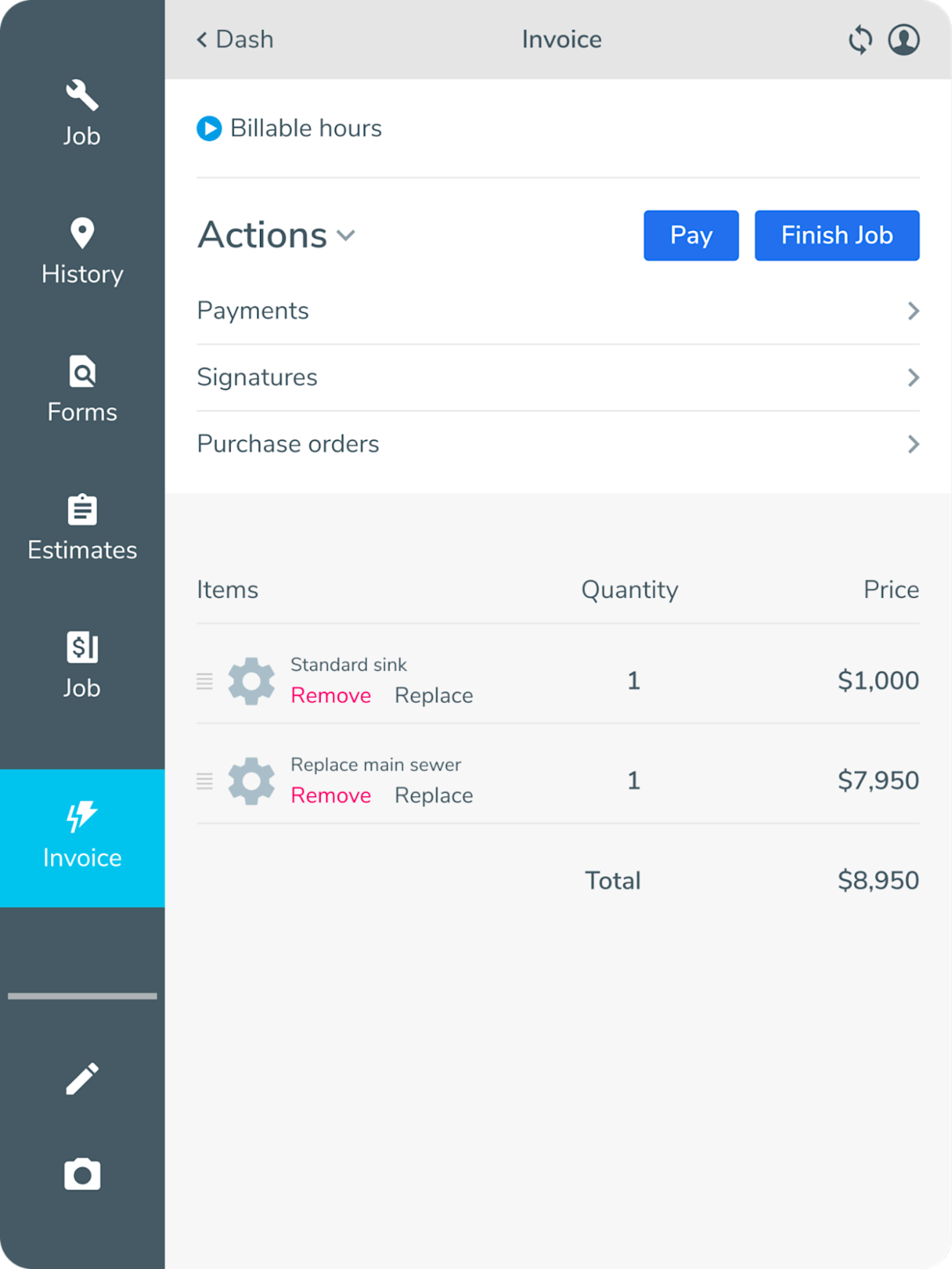
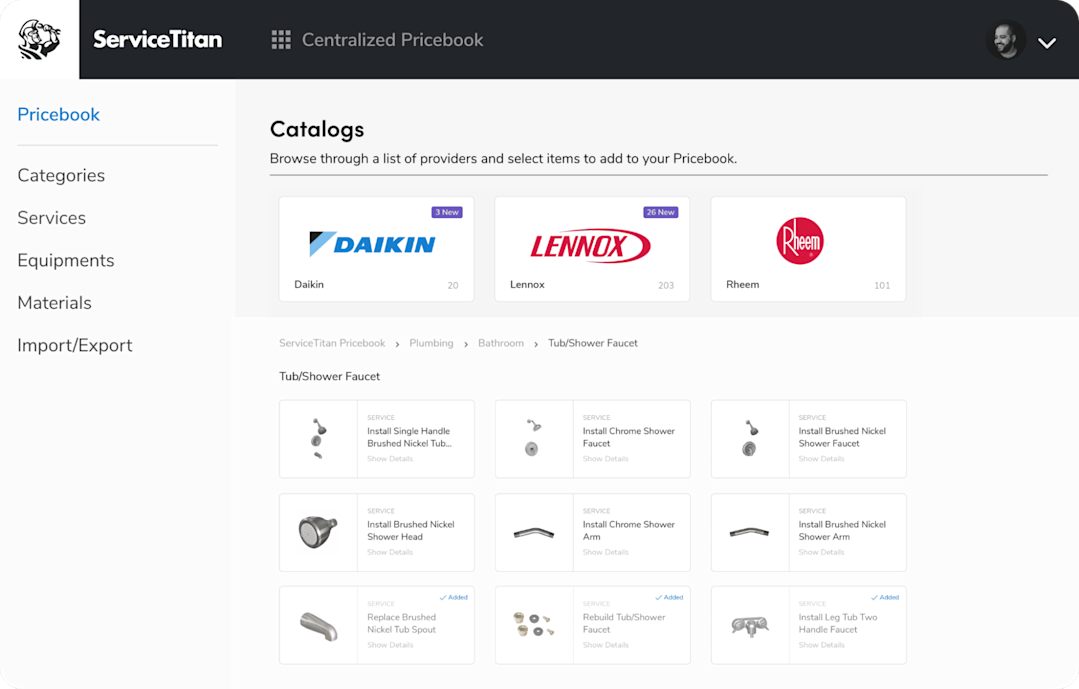
With the Pricebook feature, which comes with flat-rate pricing, line items and prices can be sourced automatically so every invoice is itemized consistently and priced the same regardless of which tech is on the job. This helps you avoid any vague descriptions and inconsistent pricing, which can reduce customer disputes.

And, best of all, before your technicians leave the driveway, they can use ServiceTitan’s payment features to collect on-site through credit card, check, online payment links, and tap-to-pay, among other payment options. So, no more chasing payments—the invoice is paid the moment the work is approved.

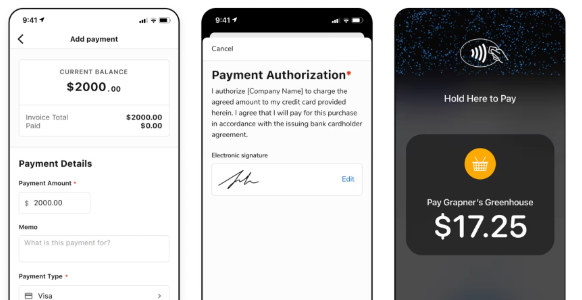
With all these features, your entire workflow can be done within one piece of software, and the invoicing process is completed in one site visit.
Regardless of the tools you use, these are practices that will get your invoices paid faster.
Over to You!
Invoicing is the last step of every plumbing job. At this point, your work becomes money, so delaying the process can lead to delays, lower margins, disputes, and forgotten charges. That’s why you need to train your techs and use the right invoicing processes to get paid fast and without friction.
Capture details on site, itemize clearly, state your terms, send immediately, and collect as early as you can. Whether you do that with a template or a platform, the principle is the same: the sooner and cleaner the invoice, the sooner you're paid.
ServiceTitan is an all-in-one software solution that helps home service businesses automate and streamline their business processes like invoicing, which translates into higher productivity, revenue, and cost savings.


Frequently Asked Questions (FAQs)
What should a professional plumbing invoice include?
A complete plumbing invoice includes:
Your business name, contact info, and license number
The customer's name and service address
A unique invoice number
The service and invoice dates
Itemized labor, materials, and fees
Subtotal, tax, and total
Clearly stated payment terms and accepted methods
How do you manage plumbing invoicing for tax and compliance?
The main thing you’ll need to do is to record every invoice and fully understand how your state taxes labor versus parts (it varies by state). Your invoices should always include your license number where required, and retain records for the period your state and the IRS require. Tax treatment is different in each state, so you’ll have to confirm what’s true for you rather than assuming.
Should you use plumbing invoice templates or software?
Templates work if you're a solo operator or invoice only a few jobs a week with simple pricing, as they're free and easy to use. Once you add more plumbers, take on more complex jobs, or start chasing payments and notice invoice errors, that's when you should go for plumbing software that generates invoices from job data, keeps pricing consistent, and collects payment on site.
Overall, if you’re running a small business, templates will be fine. For growing plumbing businesses, you’ll need a platform that handles the entire invoicing process end-to-end and makes your technicians more efficient.
ServiceTitan Plumbing Software
ServiceTitan is a comprehensive plumbing business software solution built specifically to help service companies streamline their operations, boost revenue, and achieve growth. Our award-winning, cloud-based platform is trusted by more than 100,000+ contractors across the country.